
Settings › Marketing

Email Marketing Settings

Keep MailerLite, Kit or ActiveCampaign in step with your newsletter list, customers, orders and abandoned carts. Every setting here needs PRO. 7 sections.

Quick links

Where to find it:WP Admin › EasyCart › Settings › Marketing › Email marketing

On default is enabledOff default is disabledValue factory defaultPRO needs PRO or PremiumAdvanced behind the fold

MailerLite

MailerLite

Subscribers and groups, then orders and abandoned checkouts.

MailerLite

Newsletter subscribers, kept in step both ways

4 settings

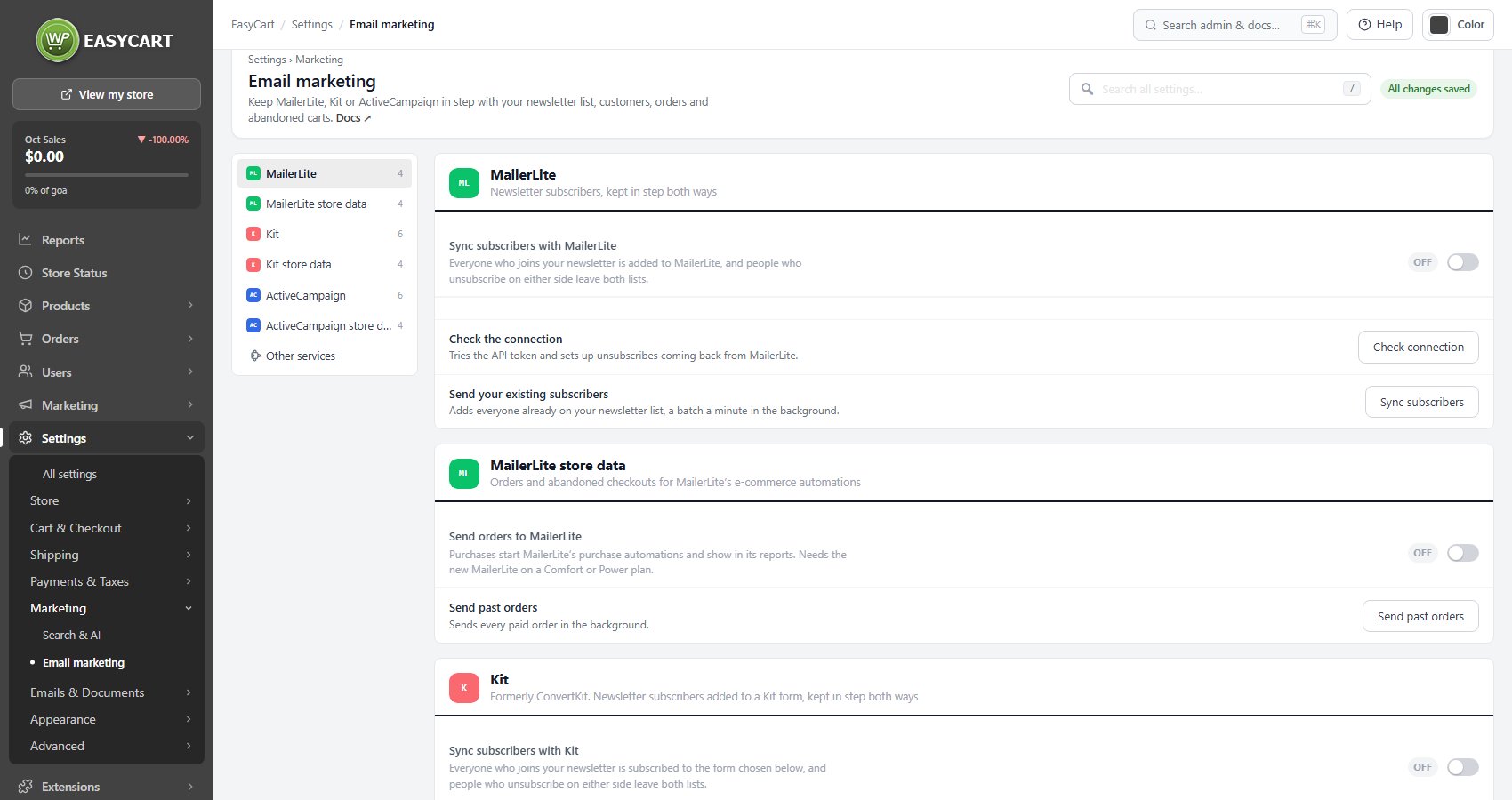
Sync subscribers with MailerLite

Everyone who joins your newsletter is added to MailerLite, and people who unsubscribe on either side leave both lists.

Off
PRO

API token

From MailerLite › Integrations › API. A key from MailerLite Classic still works for subscribers. A Check connection button under the section tries the credentials and sets up unsubscribes coming back from MailerLite.

Empty
PRO

Groups for newsletter subscribers

New subscribers join these groups, picked from your MailerLite account. Products and categories can add buyers to more groups in their editors.

None
PRO

Send phone and address

Fills the phone, company, city, state, ZIP and country fields from the subscriber’s latest order.
On
PRO
Settings › Marketing › Email marketing, opening on MailerLite.

💡 Note: Under the section, Sync subscribers sends everyone already on your newsletter list, in the background. With PRO the section also shows the connection status, anything waiting to retry and the last 50 results. More in MailerLite.

MailerLite store data

Orders and abandoned checkouts for MailerLite’s e-commerce automations

4 settings

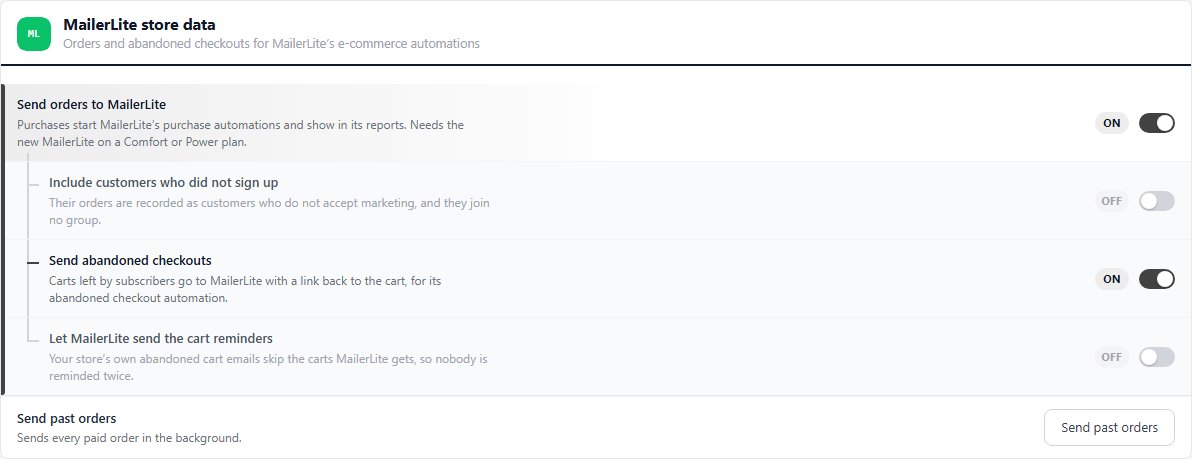
Send orders to MailerLite

Purchases start MailerLite’s purchase automations and show in its reports. Needs the new MailerLite on a Comfort or Power plan.

Off
PRO

Include customers who did not sign up

Also sends orders from customers who did not join your newsletter. They are recorded as customers who do not accept marketing and join no group.

Off
PRO

Send abandoned checkouts

Carts left by subscribers go to MailerLite with a link back to the cart, for its abandoned checkout automation.

Off
PRO

Let MailerLite send the cart reminders

Your store’s own abandoned cart emails skip the carts MailerLite gets, so nobody is reminded twice.
Off
PRO
MailerLite store data with orders and abandoned checkouts switched on.

💡 Note: Send past orders sends your earlier paid orders in the background.

Kit

Kit, formerly ConvertKit

A V4 API key for subscribers and tags, plus the V3 secret for purchases.

Kit

Formerly ConvertKit. Newsletter subscribers added to a Kit form, kept in step both ways

6 settings

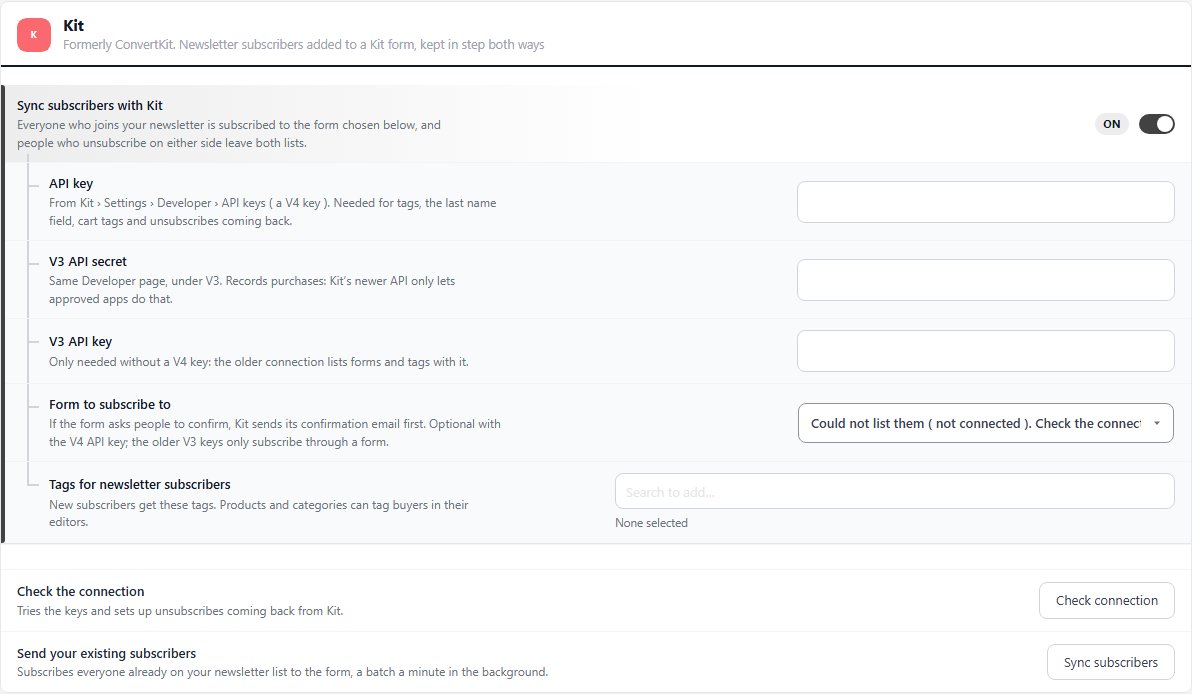
Sync subscribers with Kit

Everyone who joins your newsletter is subscribed in Kit ( formerly ConvertKit ), and people who unsubscribe on either side leave both lists.

Off
PRO

API key

A V4 key from Kit › Settings › Developer › API keys. It is needed for tags, the last name field, cart tags and unsubscribes coming back. A Check connection button under the section tries the credentials and sets up unsubscribes coming back from Kit.

Empty
PRO

V3 API secret

On the same Developer page, under V3. It records purchases, because Kit’s newer API only lets approved apps do that.

Empty
PRO

V3 API key

Only needed without a V4 key: the older connection lists forms and tags with it.

Empty
PROAdvanced

Form to subscribe to

The Kit form new subscribers join. If the form asks people to confirm, Kit sends its confirmation email first. Optional with the V4 API key; the older V3 keys only subscribe through a form.

Choose a form
PRO

Tags for newsletter subscribers

New subscribers get these tags. Products and categories can tag buyers in their editors.
None
PRO
The Kit section switched on, showing the V4 API key, the V3 secret and key, the form and tags.

💡 Note: Under the section, Sync subscribers sends everyone already on your newsletter list, in the background. With PRO the section also shows the connection status, anything waiting to retry and the last 50 results. More in Kit.

Kit store data

Purchases and abandoned carts for Kit automations

4 settings

Record purchases in Kit

Subscribers’ orders become Kit purchases, for purchase automations. Needs the V3 API secret.

On
PRO

Tag subscribers who leave a cart

Adds a tag when a subscriber leaves a cart and removes it when they buy. Start a Kit automation from it.

Off
PRO

Abandoned cart tag

The tag used for abandoned carts. Needs the V4 API key.

Choose a tag
PRO

Let Kit send the cart reminders

Your store’s own abandoned cart emails skip the carts Kit tags, so nobody is reminded twice.

Off
PRO

💡 Note: Send past orders sends your earlier paid orders in the background, recording subscribers’ orders as purchases and adding their product tags.

ActiveCampaign

ActiveCampaign and more

A list, tags and double opt-in, then e-commerce data. Mailchimp and others use an extension.

ActiveCampaign

Newsletter subscribers on an ActiveCampaign list, kept in step both ways

6 settings

Sync subscribers with ActiveCampaign

Everyone who joins your newsletter is added to the list chosen below, and people who unsubscribe on either side leave both lists.

Off
PRO

API URL

Your account’s API access URL, under Settings › Developer in ActiveCampaign, such as https://youraccount.api-us1.com.

Empty
PRO

API key

From the same Developer page. Only sent from your server. A Check connection button under the section tries the credentials and sets up unsubscribes coming back from ActiveCampaign.

Empty
PRO

List to add subscribers to

The list subscribers join. Create one in ActiveCampaign for store subscribers.

Choose a list
PRO

Ask new subscribers to confirm

Pick an ActiveCampaign form that uses double opt-in: new subscribers get its confirmation email and join the list once they confirm. Leave it on No, add them straight away to skip confirmation.

No, add them straight away
PRO

Tags for newsletter subscribers

New subscribers get these tags. Products and categories can tag buyers in their editors.

None
PRO

💡 Note: Under the section, Sync subscribers sends everyone already on your newsletter list, in the background. With PRO the section also shows the connection status, anything waiting to retry and the last 50 results. More in ActiveCampaign.

ActiveCampaign store data

Orders, refunds and abandoned carts through ActiveCampaign’s e-commerce data

4 settings

Send orders to ActiveCampaign

Orders show on the contact and start “Makes a purchase” automations; refunds update them.

Off
PRO

Include customers who did not sign up

Customers who did not sign up become contacts with their orders and product tags, but join no list. ActiveCampaign bills by contacts, so they count toward your plan.

Off
PRO

Send abandoned carts

Carts left by subscribers go to ActiveCampaign with a link back to the cart, and are marked recovered when they buy.

Off
PRO

Let ActiveCampaign send the cart reminders

Your store’s own abandoned cart emails skip the carts ActiveCampaign gets, so nobody is reminded twice.

Off
PRO

💡 Note: Send past orders sends your earlier paid orders in the background as historical data, which never starts automations.. For a step by step walkthrough, see How to Connect Email Marketing

Other services

Mailchimp and more

no stored settings

Mailchimp, Klaviyo and other services connect through the Email Marketing extension. Browse extensions opens EasyCart › Extensions. See Email Marketing.

Keep going

Related panels

Email Marketing

Mailchimp, Klaviyo and more through the Email Marketing extension.

MailerLite

MailerLite in detail.

Subscribers

The newsletter list these services sync.

Abandoned Carts

The store’s own abandoned cart reminders.

SEO & Marketing

Choosing groups and tags for a product.

Integrations

Analytics, ads and the other integrations.

Ready to run your store on WP EasyCart?

Everything in this guide works with the free plugin. PRO and Premium add subscriptions, memberships, wholesale pricing and more. Try every PRO feature free for 14 days.

The WP EasyCart admin: orders and offers
Updated on October 2, 2026