
Plans
Two kinds: a Change plan list, or a pricing table
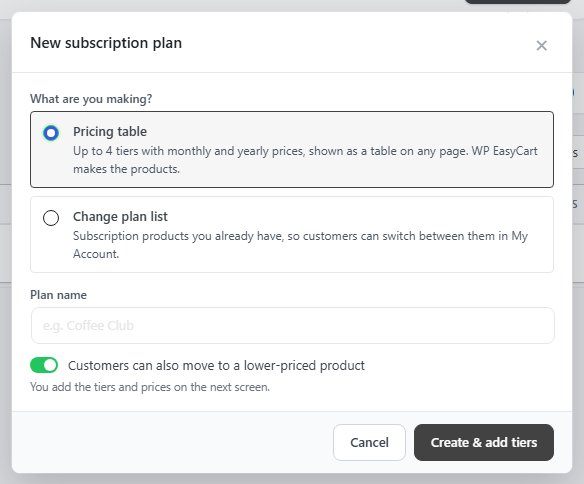
no stored settingsAdd plan opens New subscription plan, which asks What are you making?
Pricing table: up to 4 tiers with monthly and yearly prices, shown as a table on any page. WP EasyCart makes the products for you. Its editor is covered below.
Change plan list: subscription products you already have, so customers can switch between them in My Account.
The Plan name is internal: customers see the product or tier names, not the plan. The list shows each plan’s products, its subscribers, its monthly recurring revenue and its Downgrades column, reading Up or down or Upgrades only. A pricing table shows a Pricing table chip with its shortcode. Tiles count the Plans, the Products in plans, the Subscription products in no plan and the MRR in plans. Monthly recurring revenue counts paying subscriptions, the same way as Orders › Subscriptions and Reports: a free trial counts once it pays.
Deleting a plan never deletes products: move them to another plan or detach them, and their subscriptions keep running. Undo is available for 15 minutes.
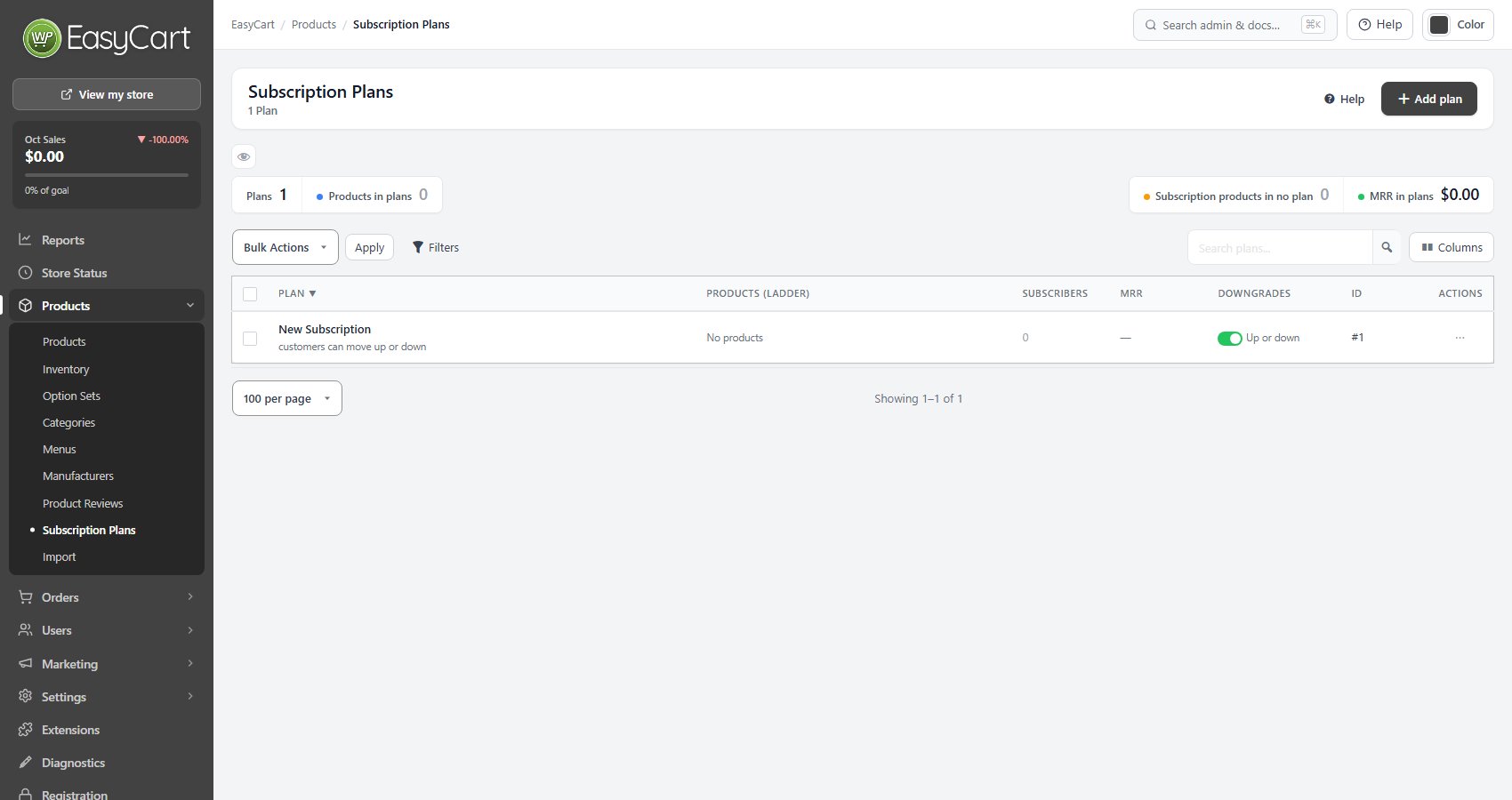
A Change plan list
Products in price order, and moving between them
no stored settingsProducts in this plan are listed in price order, which is the order customers see them. Search for a subscription product to add it. A product belongs to one plan, so adding it here moves it out of its current plan.
Under Changing plans, customers can always move up to a higher-priced product in the plan. Customers can also move to a lower-priced product lets them move down too. My Account › Change plan lists the products, and Stripe prorates by each product’s prorate setting. A customer who can downgrade is kept; one who has to cancel to change tier often does not come back.
Removing a product from a plan does not touch its existing subscribers. They simply stop seeing the other tiers as switch options. Sell these as a pricing table with Turn into a pricing table makes the list a pricing table, and its products can become the tiers’ products. A list that was a pricing table shows This plan was a pricing table with Turn back into a pricing table instead.
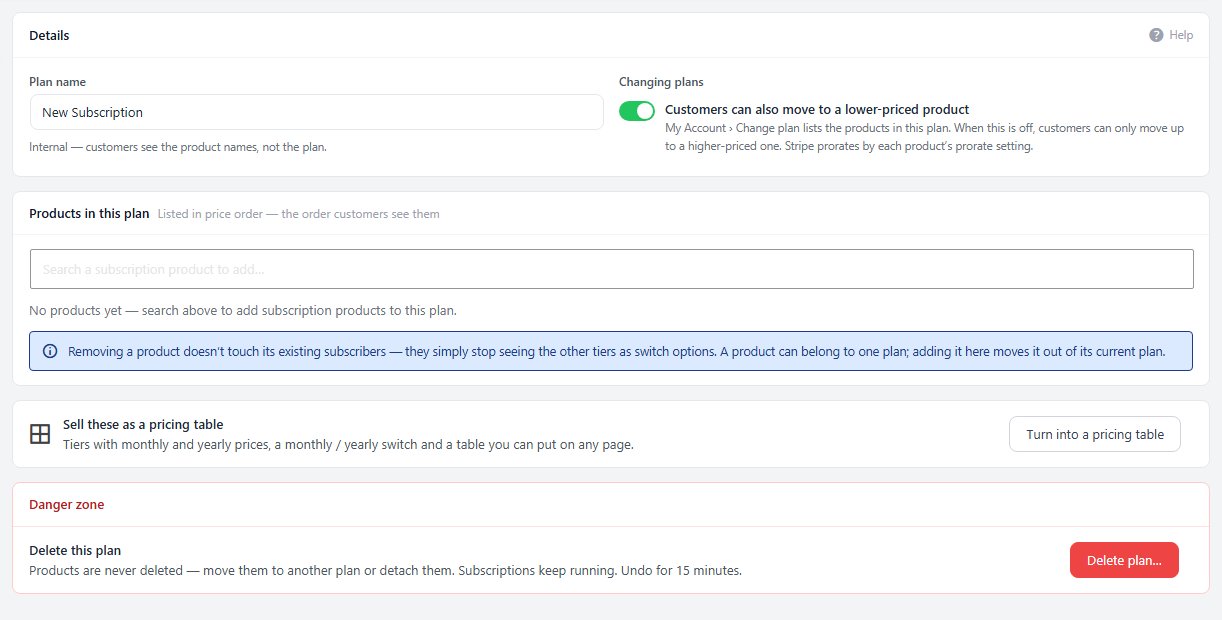
A pricing table
Tiers, billing, changes and price moves in one editor
no stored settingsA pricing table’s editor has its shortcode in the header and these cards:
Billing: which billing periods it sells ( monthly, yearly or both ), which the table opens on, a switch or two tabs for the choice, whether the yearly price shows per month or per year, the saving as a percent or as months free, Offer yearly billing to monthly subscribers and Customers can buy more than one, for licenses or seats.
Changing plans: when a move to a higher or lower tier, to yearly or to monthly happens, now or at renewal, what a change during a free trial does, and whether higher tiers open lower tiers’ members content.
Price changes: subscribers who pay an older price, and moving them to the current one with an email and the notice you choose.
Usage bar: price each tier by how much a customer needs, such as subscribers or seats, with a price for each level or a price per unit.
Tiers: up to 5 cards, 4 of them selling a subscription and the others linking to another page, such as Contact us. A selling tier has a name, button text, monthly and yearly price, free trial, sign-up fee, description and a highlight; every tier has a Card look with its own badge, button look, note under the price and second link.
What each tier includes, Look ( heading, cards or compare table, feature lists, whether the plans ship something ), Show it on a page and Products, one per selling tier and billing period, made when you save and hidden from store lists and search.
Change plan list: Turn into a Change plan list turns the table back into a list of its products. The table stops showing, the tiers and settings are kept, and the list offers Turn back into a pricing table.
Every card is explained step by step in How to Sell Plans from a Pricing Table, and the usage bar in Sell Usage-Based Plans with a Pricing Table.
Ready to run your store on WP EasyCart?
Everything in this guide works with the free plugin. PRO and Premium add subscriptions, memberships, wholesale pricing and more. Try every PRO feature free for 14 days.
