
Offers on this product
Every discount that can touch it, in one list
no stored settingsA product is rarely touched by only one offer. A storewide sale, a category promotion and a coupon code can all apply to the same item, and none of them are set up on the product itself. The Offers section ( PRO ), under Insights, gathers them, with Test a coupon code at the top.
Three tiles count the Live offers, the Orders with an offer and the Product revenue with offers. The filters narrow the list: All, Live ( running now and able to discount this product ), Targets ( offers aimed at this product, its variations or options, its categories or its manufacturer ) and Used ( at least one use, or an order that included this product ).
Offers are grouped by why they are listed: Applies storewide, Targets this product, or Used on this product before for offers that discounted it once and no longer apply. Each shows its code, status, uses, orders and revenue, and All offers opens the offers screen.
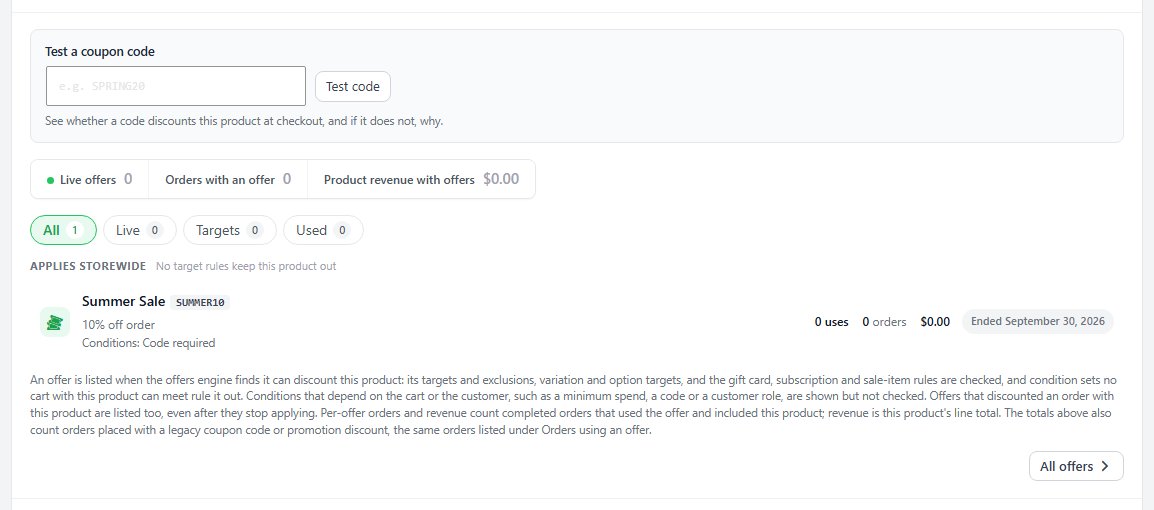
Test a coupon code
Whether a code discounts this product, and if not, why
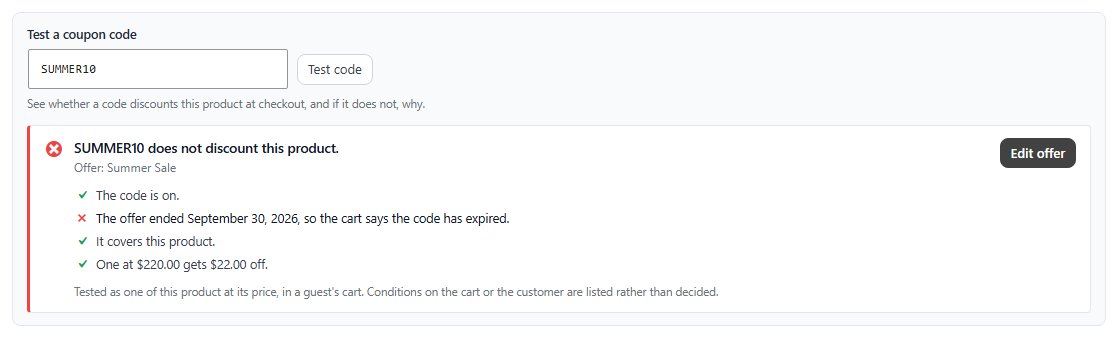
no stored settingsType a code into Test a coupon code and click Test code to see whether it would discount this product at checkout. The answer follows the cart’s own order, a live offer’s code first and then a classic coupon, and lists every check: the code, the offer’s status, schedule and limits, whether it covers this product, its conditions and how far a cart with this product is from them, and what it takes off.
When a code fails, the line that failed is the reason: the offer ended or is paused, the code is switched off or used up, the product is not covered. Edit offer or Edit coupon opens it in a new tab to fix. Gift card numbers are recognized too.
Testing is read only. Nothing is applied, counted or logged, so it is safe to try on a live store while a customer is on the phone.
Orders using an offer
The orders with this product where a discount applied
no stored settingsThe Orders using an offer card lists the orders with this product where an offer, coupon or promotion applied, with a search box, a filter for one offer and a date range.
This is the view that answers whether discounting the product was worth it. Volume alone never does: an offer can move a great deal of stock and still lose money, particularly where it stacks with another. Revenue counts this product’s line total only.
It also shows which offer is doing the work when several apply. Often one carries the sales and the others only reduce the margin on orders that would have happened anyway.

Ready to run your store on WP EasyCart?
Everything in this guide works with the free plugin. PRO and Premium add subscriptions, memberships, wholesale pricing and more. Try every PRO feature free for 14 days.
