
Settings › Shipping › Royal Mail
Royal Mail Shipping Rates
Offer Royal Mail at checkout for your UK shop: pick the services, set what shoppers pay, and let each order be priced by parcel size, weight and destination. 9 parts.
Quick links
Where to find it:WP Admin › EasyCart › Settings › Shipping › Shipping settings › Royal Mail
Before you start
How it works
What Royal Mail rates do, what they do not, and what you need.
How Royal Mail rates work
What they do, what they do not, and what you need
What you need. WP EasyCart PRO or Premium ( Royal Mail is a PRO feature ), a store that charges in pounds sterling, and your products’ weights and sizes. You do not need a Royal Mail account or any keys.
What it does. Royal Mail has no live quote service for online shops, so WP EasyCart prices each order from Royal Mail’s own published price lists. At checkout it works out the parcels the order needs, puts each one in the cheapest Royal Mail size it fits, and prices it by size, weight and destination. Shoppers in the UK, the Isle of Man and the Channel Islands see your UK services; everyone else sees your international services, priced by Royal Mail’s zone for their country.
The services. 1st Class and 2nd Class, both also as Signed For, Tracked 24 and Tracked 48, both also with Signature, Special Delivery Guaranteed by 1pm, and International Standard, Tracked and Economy.
What it does not do. It prices postage at checkout. It does not buy postage or print labels.
The steps are: turn Royal Mail on and choose your price list, pick the services and what shoppers pay, switch the store to live rates, and make sure your products have a weight and size.
Set it up
Six steps
Turn Royal Mail on, choose the prices and services, switch to live rates and get your products ready.
Step 1. Turn on Royal Mail
One switch on Shipping settings
Open EasyCart › Settings › Shipping › Shipping settings and find the Royal Mail section, just after Carrier accounts. Turn Offer Royal Mail at checkout on. The rest of the section opens below it.
There is nothing to connect: the prices come with WP EasyCart PRO, and your store checks for new ones once a day while Royal Mail is on.
On a UK store, the setup wizard’s shipping step also leads its live rates card with Royal Mail.
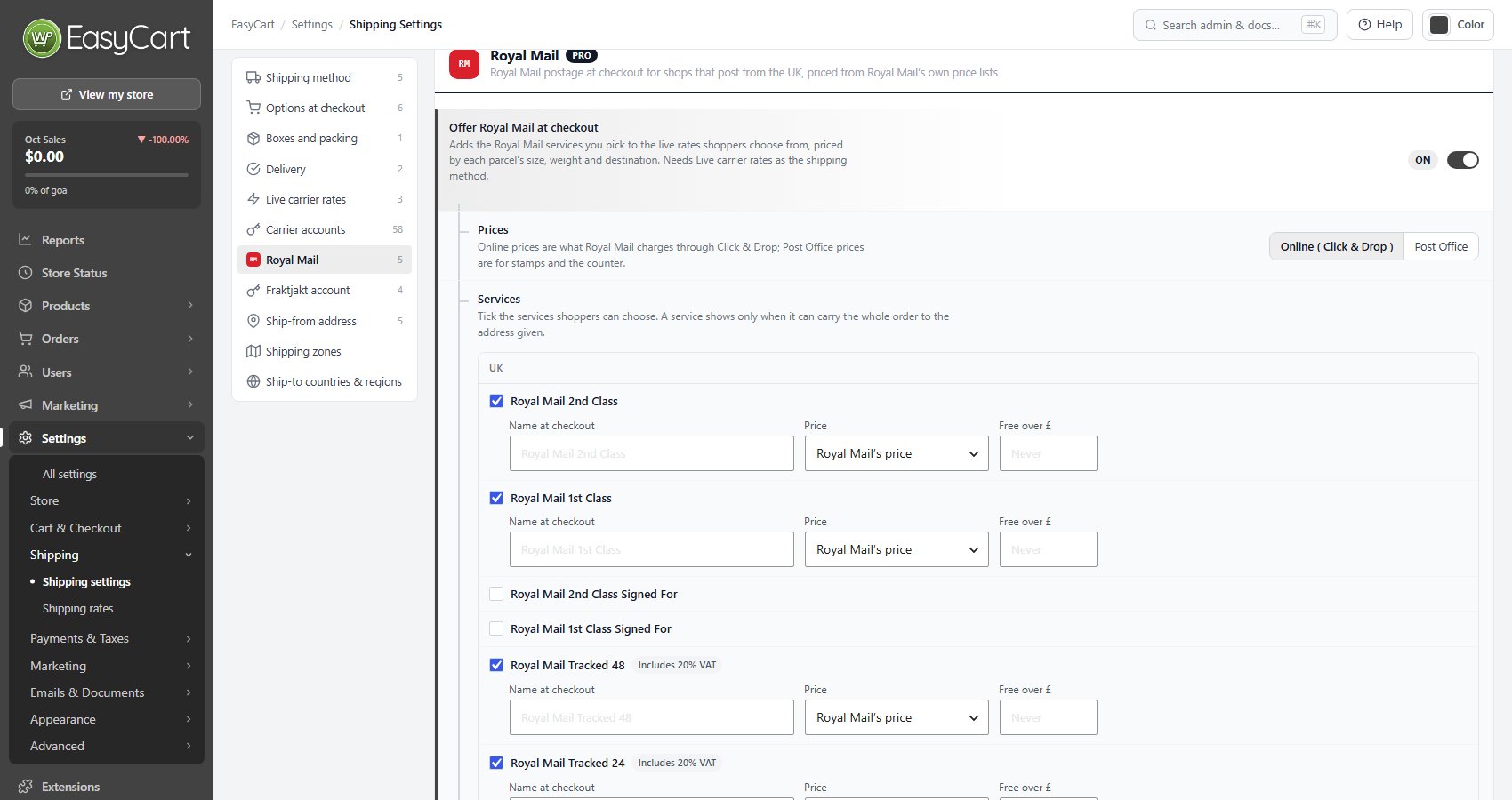
💡 Note: Royal Mail is priced from Royal Mail’s published prices, so there is no account to connect and nothing to sign up for.
Step 2. Choose Online or Post Office prices
And how the prices stay current
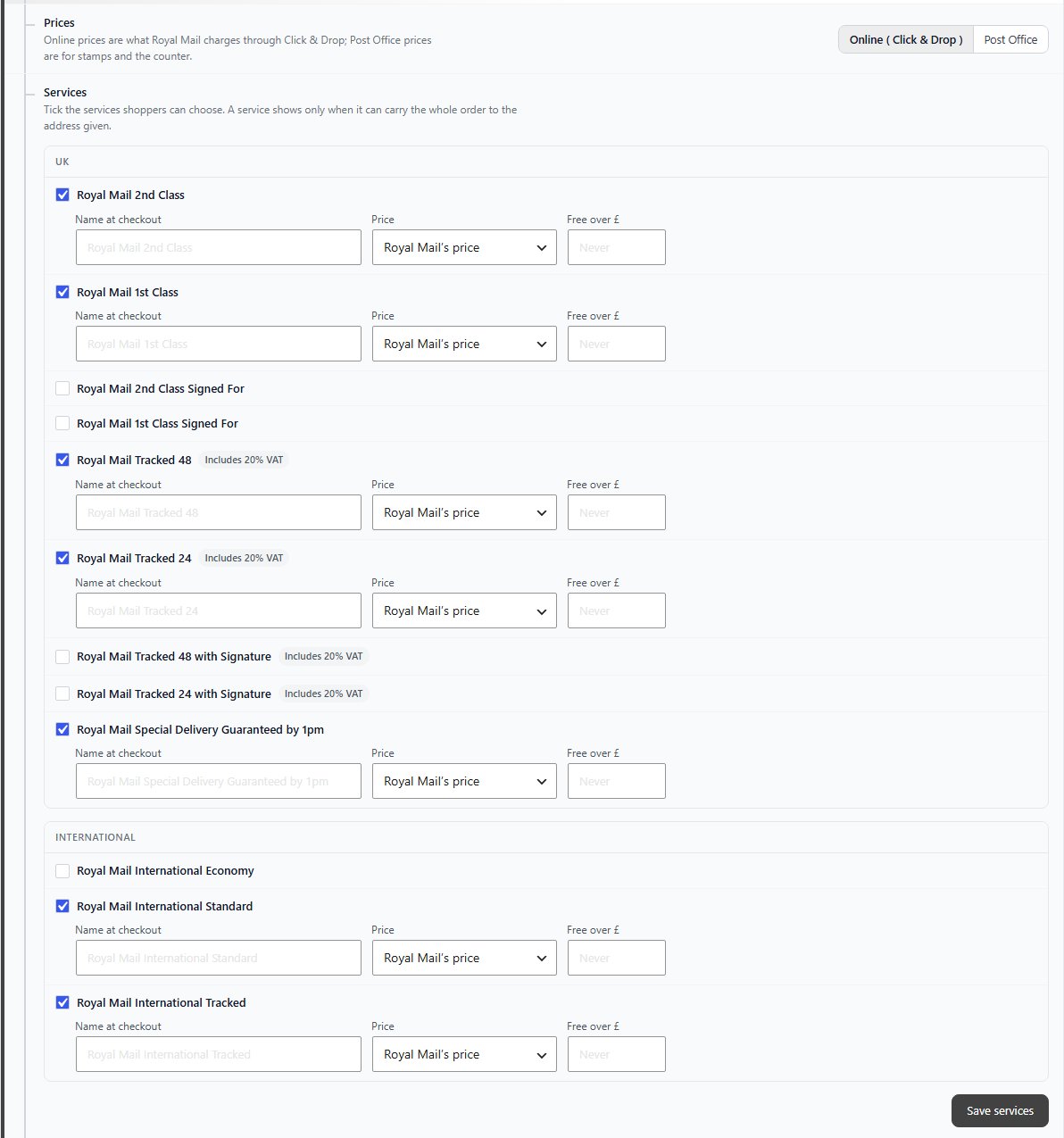
Prices picks which Royal Mail price list your shoppers are charged from:
Online ( Click & Drop ): what Royal Mail charges when you buy postage online through Click & Drop. The default.
Post Office: the prices for stamps and at the counter.
Royal Mail changes its prices in April and October. The new prices reach your store before their date and take over on the day, without an update to WP EasyCart. At the foot of the section a line says which prices are in use and since when, such as Using Royal Mail’s Online prices from …, and once new ones are waiting, Royal Mail’s new prices are ready and take over on …. If Post Office prices are not available for the dates yet, Online prices are used until they are, and the line says so.
Check for new Royal Mail prices with Check now checks straight away instead of waiting for the daily check.
Step 3. Pick the services and what shoppers pay
Tick the services, then name and price each one
Under Services, the UK services and the international services are listed apart. Tick the ones shoppers can choose. To start with, 2nd Class, 1st Class, Tracked 48, Tracked 24, Special Delivery Guaranteed by 1pm, International Standard and International Tracked are ticked. The Tracked services carry an Includes 20% VAT tag, because Royal Mail’s Tracked prices do.
For each ticked service:
Name at checkout: what shoppers see. Leave it empty to show the service’s own name.
Price: Royal Mail’s price, Royal Mail’s price, adjusted ( Change by % then Then add £, to add a margin or absorb some of the cost ), or A fixed price you set.
Free over £: the service is free once the order reaches this total. Leave it empty to never make it free.
Press Save services to keep your choices. The services save on their own button, apart from the rest of the page.
A service only shows at checkout when it can carry the whole order to the address given, so a heavy order may see fewer choices than a light one.
Step 4. Switch your store to live rates
Royal Mail is only quoted with Live carrier rates
Royal Mail joins your live carrier rates, so it only shows while Live carrier rates is the shipping method. Choose it under Shipping method at the top of Shipping settings, or as the Active method on Settings › Shipping › Shipping rates.
On Shipping rates, Royal Mail is listed under Also quoted, from your extensions with its services. That row is read only; its Settings link brings you back to this section. Live services from other carriers you have set up are offered beside it.
⚠️ Careful: Changing the active method changes what every shopper is charged. Rates you built under the old method are kept, but not used.
Step 5. Get your products ready
A weight and a size in each product’s Shipping section
Royal Mail prices by size as well as weight, so edit every product you ship. Open the product, go to its Shipping section, and set:
Ships to the customer: on, or the item is left out of the shipping calculation.
Weight, Width, Height and Length under Package: the item as it leaves you, packed. Weight decides the price band, the size decides whether it goes as a Letter, Large Letter, Small Parcel or Medium Parcel.
Packs in, when you have a box library: Ships in its own box ( one per item ) or always one of your boxes. With boxes set up, Royal Mail packs the order into them; without, each service fills parcels up to the largest size it carries to that destination.
Abroad, a Small Parcel is measured by length, width and depth together: up to 90 cm in total, with no side over 60 cm.
A product with no length, width and height is sent at least at the size set in Size for products without measurements ( next step ), so measured products price more accurately.
Step 6. Size, VAT and collection
Three settings below the services
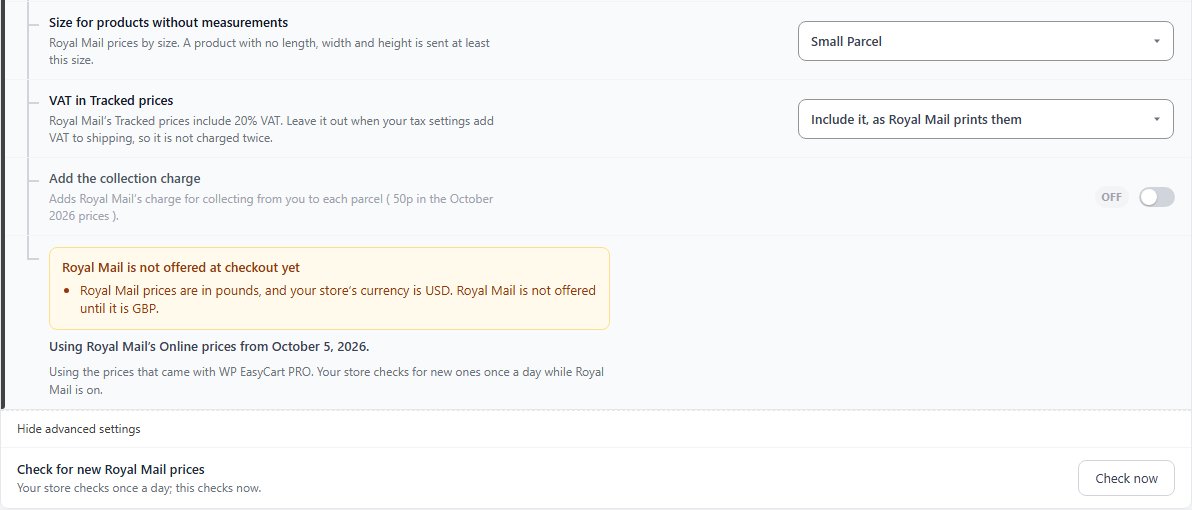
Size for products without measurements: Large Letter, Small Parcel ( the default ) or Medium Parcel. The smallest size an unmeasured product is sent at.
Press Show advanced settings for two more:
VAT in Tracked prices: Royal Mail’s Tracked prices include 20% VAT. Keep Include it, as Royal Mail prints them, or choose Leave it out when your tax settings add VAT to shipping, so it is not charged twice.
Add the collection charge: adds Royal Mail’s charge for collecting from you to each parcel.
Below them, the status line says which prices are in use. If anything stops Royal Mail showing at checkout, a box headed Royal Mail is not offered at checkout yet lists it.
Keep it working
Test and troubleshoot
Price a parcel before shoppers do, and what to look at when Royal Mail is missing.
Test it before you announce it
Try a parcel, then a real checkout
Try a parcel, in the Royal Mail section, prices one item without going near the checkout. Enter a Weight, the Length × width × height, where it goes ( To ) and an Order total £, then press Work it out. Each service that carries the parcel there shows Royal Mail’s price and what your shoppers pay, and services you have not ticked show as off. It uses your saved services, so save first.
Then add a shippable product to the cart and go through checkout to the shipping step with a UK address and, if you ship abroad, one from another country. With Show estimated delivery days on ( Live carrier rates card ), each service shows Royal Mail’s delivery estimate.
When you ship the order, Royal Mail is in the order screen’s carrier list, so the shipped email carries a tracking link.

💡 Note: Zones, per-product shipping and handling fees are explained in Settings › Shipping › Shipping settings and Shipping.
When Royal Mail does not show
The usual causes, in order
Start with the box at the foot of the Royal Mail section. It names the problem:
Your store’s currency is not pounds. Royal Mail prices are in pounds, and it is not offered until the store currency is GBP.
No service is switched on. Tick at least one service and press Save services.
Your shipping method is not Live carrier rates. See step 4.
A UK address gets only international services, or the other way round. UK services are for the UK, the Isle of Man and the Channel Islands; tick services from the list that matches the address.
A service is missing for one order. It cannot carry every parcel of that order: an item is too big or too heavy for it. Check the product’s weight and size, and use Try a parcel to see which services carry it.
Still stuck? Open a ticket at wpeasycart.com/my-account.
Keep going
Related panels
Every carrier account, zone and ship-to option.
The rate tables and the live carrier rates list.
Product weight and package size.
The cart shipping estimator shoppers see.
Ready to run your store on WP EasyCart?
Everything in this guide works with the free plugin. PRO and Premium add subscriptions, memberships, wholesale pricing and more. Try every PRO feature free for 14 days.



