
The offers overview
What is live now, what is coming, and what it is costing you
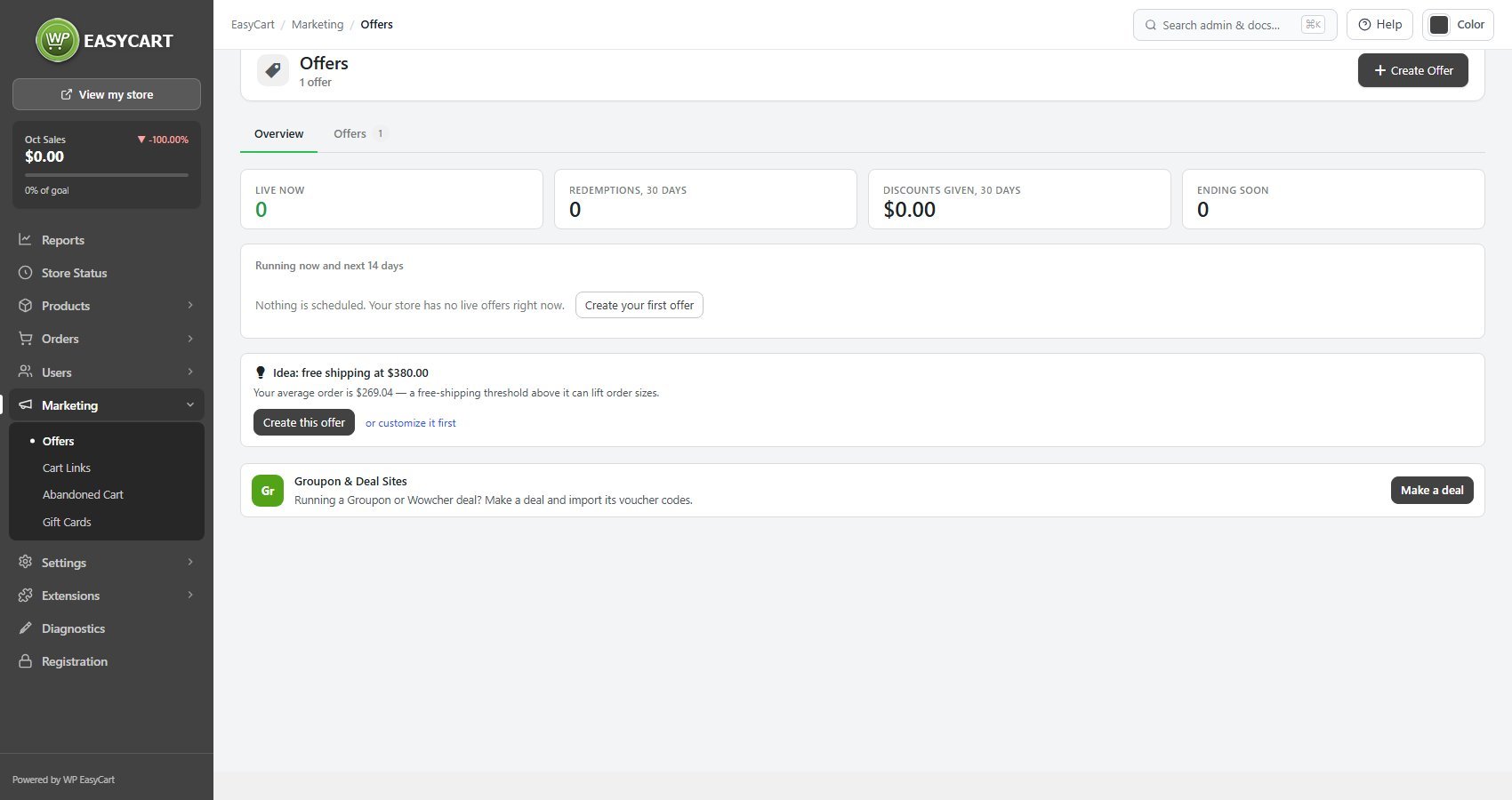
no stored settingsThe overview answers the questions you actually have about discounting: what is running right now, what is scheduled, what is ending soon, and what it has been worth. Redemptions and discounts given over the last thirty days sit alongside the schedule, so the cost of a promotion is visible next to the promotion itself.
Offers carry a state. Draft is being written and invisible to shoppers, Live is running, Paused is configured but stopped, Expired has run its course and Archived is kept for the record. Offers can be activated, paused, archived, deleted or duplicated in bulk from the list, and duplicating always produces a draft so you cannot accidentally run two of the same thing.
One flag worth watching is Live but never used. An offer that has been running for a fortnight with no redemptions is usually not being seen, and the overview points you at its display settings rather than leaving you to notice. It can also suggest an idea, such as free shipping at a threshold above your average order, with Create this offer to set it up in one click.
Under the overview sits Groupon & Deal Sites. Until that Premium extension is active it is a one-line tip, which you can hide with its ×. Once active, it is the way into your deals: it imports each deal’s voucher codes into an offer and lists the redeemed ones to report back.
1. The deal
Seven shapes of discount, and the maths behind each one
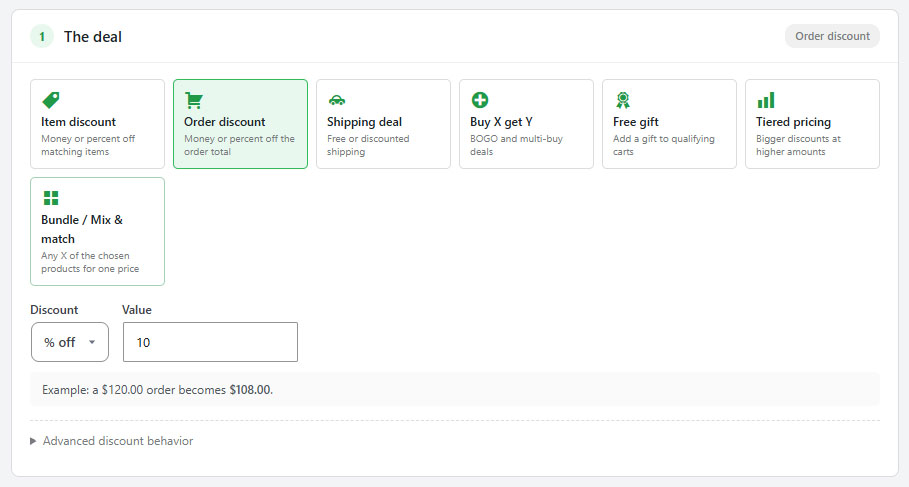
no stored settingsThe first section is the discount itself. Seven cards set the shape, and the fields beneath change to suit the one you pick; a worked example under them shows what a sample cart would pay, so you can see a mistake in the numbers before a customer does.
Item discount takes money or a percentage off each matching item. Order discount takes it off the order total instead. Shipping deal makes shipping free or cheaper, and can be limited to particular rates or shipping zones; a free-shipping deal can also waive the handling fee and per-product shipping fees, which are otherwise still charged. Buy X get Y covers BOGO and multi-buy: the customer buys a quantity or spends an amount, and gets a number of items free, at a percentage off, an amount off or a fixed price. The buy and get items can come from one pool, which is classic BOGO, or two, where one set of products qualifies the deal and another receives it. It can repeat for every multiple, and you choose whether the cheapest or the most expensive matching item is the one discounted. Free gift adds one or more products to a qualifying cart at no charge, either automatically or by letting the shopper claim one from a panel at the top of the cart. Tiered pricing gives bigger discounts as quantity or spend rises, tier by tier, and warns you if the thresholds are out of order. Bundle / Mix & match sells any set number of the chosen products for one price, a percentage off each, or an amount off the set, repeating for every full set.
Behind the Advanced discount behavior fold are the settings that decide whether a deal is profitable: whether the discount is worked out from the regular price or the current price after sales, whether it also applies to items already on sale, a cap on the total discount an order can receive, and for buy X get Y and bundles, how many times the deal may apply in one order.
2. What it applies to
Storewide, or narrowed to products, categories and brands
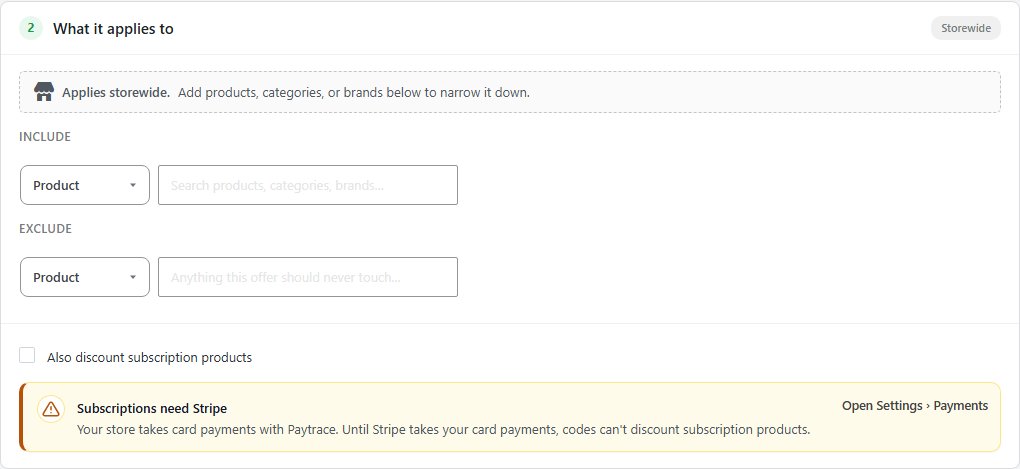
no stored settingsEvery offer starts storewide. To narrow it, search for products, categories or manufacturers and add them to the Include list; the offer then applies only to items matching at least one of them. The Exclude list is the opposite and always wins, so you can put a whole category on offer and keep one product out of it. Each chip links to the product, category or manufacturer screen it came from.
For the deals that need products to exist before they work, this is the section that makes them real: a bundle is any X of the products chosen here, a two-pool buy X get Y takes its buy and get products from here, and a free gift qualifies against what is included here.
At the foot of the section, Also discount subscription products lets a coupon code reach subscriptions too. It is covered under Codes at scale below.
3. Who gets it & when
Ten audience conditions, a schedule and a weekly pattern
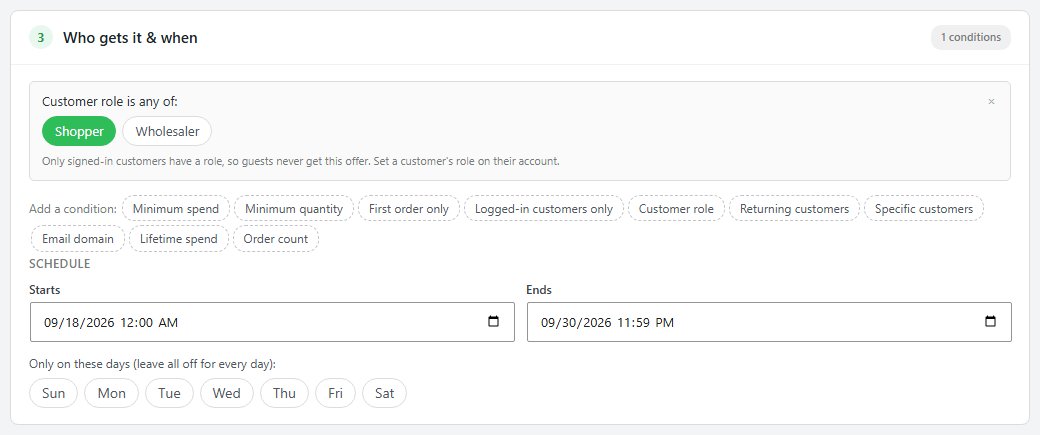
no stored settingsEveryone qualifies until you add a condition, and conditions combine, so a cart has to meet all of them. The ten are Minimum spend and Minimum quantity on the cart itself; First order only, Logged-in customers only, Customer role and Returning customers, which asks for a number of previous orders; Specific customers, chosen by searching your accounts; Email domain, for a company or a school; and Lifetime spend and Order count, for rewarding your best customers.
Customer role limits the offer to the roles you pick, such as Wholesale, so a coupon or a promotion can be just for your trade customers. Only signed-in customers have a role, so guests never get it; set a customer’s role on their account. Its badge and product page callout show only to customers with one of those roles, and product pages show each customer only the offers they get and the price they pay.
The schedule sets when the offer starts and ends, to the minute, in the site’s time zone. Leave both empty and it runs until you pause it. Beneath that, the day pills restrict it to particular days of the week, for a Tuesday special or a weekend sale; leave them all off for every day.
The first-order and returning-customer conditions look at the account’s order history, so they only work for shoppers who are signed in. A guest is treated as a new customer every time.
4. How customers get it
Automatically, or with a code they type at checkout
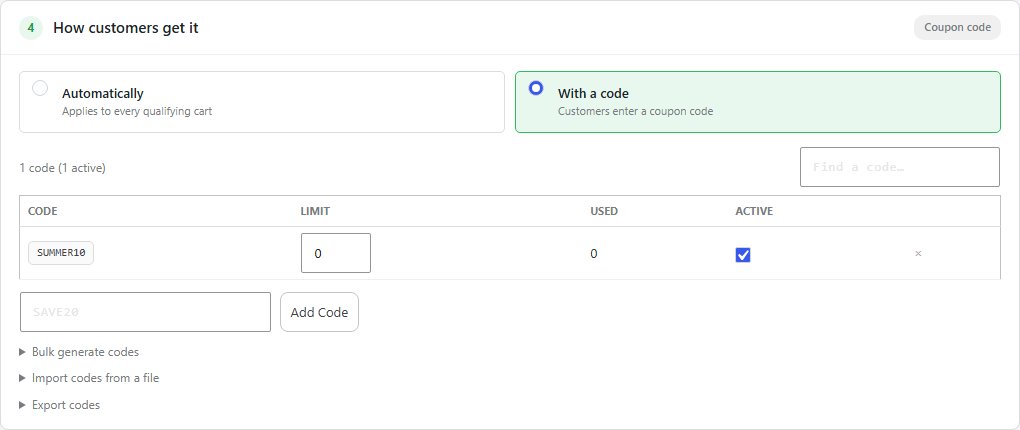
no stored settingsAn automatic offer applies to every qualifying cart with nothing to type, which is right for a sale, free shipping over a threshold, or anything you are advertising on the site itself. A coupon code offer only applies once the shopper enters a code, which is what you want for an email campaign, a partner deal or anything you do not want every visitor to get.
A coupon offer can hold one shared code, or thousands. Type a code and press Add Code, and each row in the table shows its own limit, how often it has been used and whether it is active; a code can be switched off without deleting it, and the table pages and searches once it grows. Beneath the table, Bulk generate codes, Import codes from a file and Export codes handle codes in bulk, covered under Codes at scale below.
Codes must be unique across every offer, and the editor refuses one already in use elsewhere rather than creating two offers that fight over it. Unique codes are the right choice for anything sent by email: a shared code ends up on a voucher site within days, and a single-use code cannot.
5. Limits & stacking
What happens when two offers apply to the same cart
no stored settingsThis is the part that decides whether your discounting is profitable, and it is worth slowing down for.
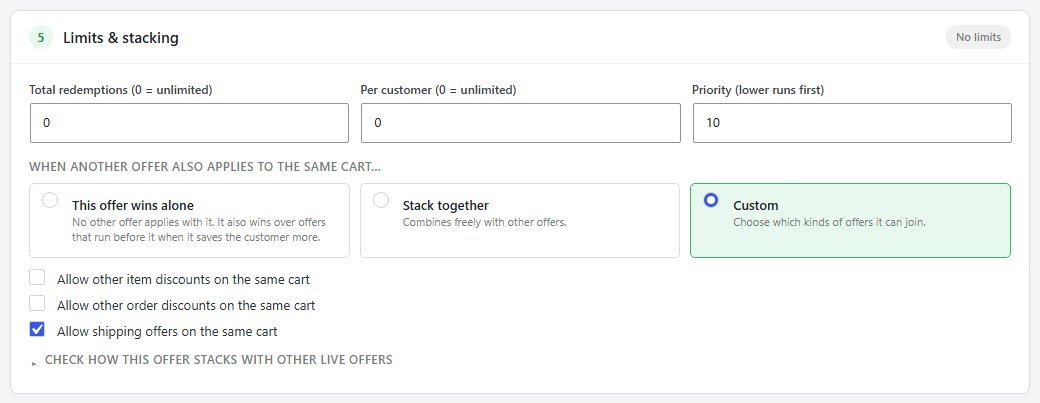
Three limits sit at the top: total redemptions across the whole offer, per customer, and a priority, where a lower number is evaluated first when several offers are live. Zero means unlimited for the two counts.
Then the stacking choice. This offer wins alone is exclusive: when it applies, nothing else can, and it also wins over offers that run before it when it saves the customer more, so a 20% wholesale offer beats an earlier 10% sale. An exclusive offer that saves less leaves the bigger discount in place. Stack together combines freely with every other live offer. Custom lets you say which kinds it will join, with separate switches for other item discounts, other order discounts and shipping offers, so a sale can allow free shipping on top of it without also allowing a second sale.
The fold at the bottom, Check how this offer stacks with other live offers, lists every live offer with a verdict on whether the two can land on the same cart. It reads the last saved settings, so save first and then open it.
For a step by step walkthrough, see How to Plan a Black Friday Promotion.
6. How it looks in the store
The label, the badge, the callout, the countdown and progress messages
no stored settingsAn offer nobody notices does not work, so the last section covers presentation.
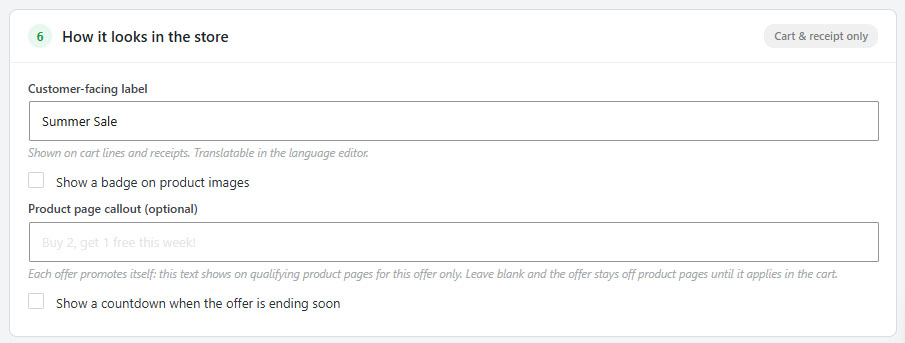
The customer-facing label is what shoppers see on cart lines and receipts, and it is translatable in the language editor, so it should be a name they recognise rather than an internal campaign code. A badge can be shown on the images of qualifying products, with your own text, colour and shape: rounded, pill, square or ribbon. A product page callout is a line of text on qualifying product pages, along the lines of “Buy 2, get 1 free this week!”.
Two switches add urgency honestly. The countdown appears only when the offer is genuinely ending soon, and progress messaging tells a shopper in the cart how close they are, as in “Spend $12 more…”. For a free-shipping threshold the progress message is the single most effective thing on this page.
Each offer promotes itself. A badge or callout set on one offer does nothing for another, and both render only for automatic offers: a coupon-code offer is promoted wherever you share the code and appears in the cart once it is applied.
Codes in bulk
Generate, import and export thousands of codes for one offer
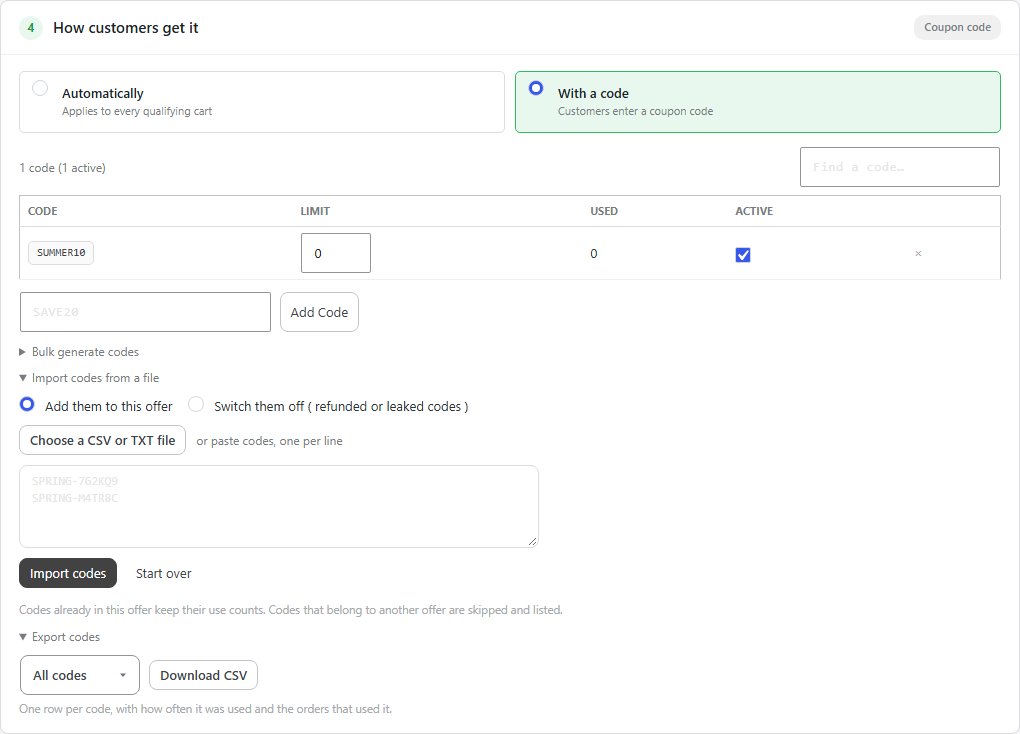
no stored settingsThree folds under the code table in section 4 handle codes by the hundred or the thousand, all inside one offer, so a whole campaign shares one set of rules and one performance report.
Bulk generate codes makes codes from a Prefix, How many ( up to 10,000 at a time ), a Random length and Uses per code, which defaults to one. The result looks like VIP-K7M2Q9, and lookalike characters such as O and 0 are left out.
Import codes from a file takes a CSV or TXT file, or codes pasted one per line, for codes made somewhere else: a partner, a printed run, a deal site. Pick the column the codes are in and whether the first row is a header, then set the uses per code. Before anything changes it checks the list and tells you what will happen, and the button says how many new codes it will add. Codes already in this offer keep their use counts, and codes that belong to another offer are skipped and listed. The file is read in your browser and never stored on the server.
The same fold can Switch them off instead: load a list of refunded or leaked codes and they stop working, without deleting their history.
Export codes downloads a CSV of All codes, or only those Never used, Used or Switched off, one row per code with how often it was used and the orders that used it. That is the file to send back to a partner who wants to know which of their codes were redeemed.
Selling through Groupon or Wowcher? The Groupon & Deal Sites extension does the import for each deal and lists the redeemed codes to report, and it is included with Premium.
The plain-English panel
The offer read back to you, a badge preview and a test cart
no stored settingsThe column on the right restates the offer as you build it. The top card, This offer, in plain English, turns the six sections into one sentence: what is given, on which products, under what conditions, automatically or with a code, and for how long. Each part of the sentence is highlighted while you edit the section it describes, and anything you have not filled in yet shows as a gap. If the sentence does not say what you meant, the offer will not do what you meant.
The storefront badge card previews the badge and callout on a sample product. Beneath it a note says when the offer will not be promoted on product pages at all: because it is a coupon-code offer, or because no badge or callout has been set.
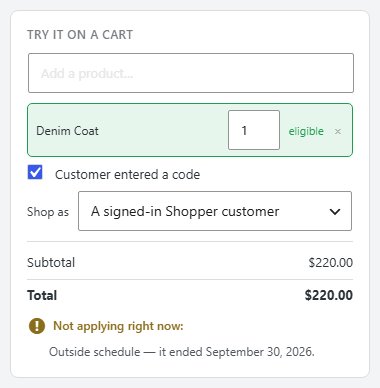
Try it on a cart is a simulator. Add products, tick whether the customer entered a code, set a shipping cost for a shipping deal, and choose Shop as: a guest, or a signed-in customer with one of your roles, each line at that customer’s own price. A store whose prices include VAT also gets a VAT choice, to try a customer who pays no VAT. It shows the cart line by line with every offer it gets, as checkout stacks them, this one in bold and the others linked to their own offer. When this offer qualifies but the cart gets another one instead, it says which and why. It runs against your unsaved changes, so you can try a setting before committing to it. The status card at the bottom says whether the offer is live, when it ends and how many redemptions remain.
Ready to run your store on WP EasyCart?
Everything in this guide works with the free plugin. PRO and Premium add subscriptions, memberships, wholesale pricing and more. Try every PRO feature free for 14 days.
