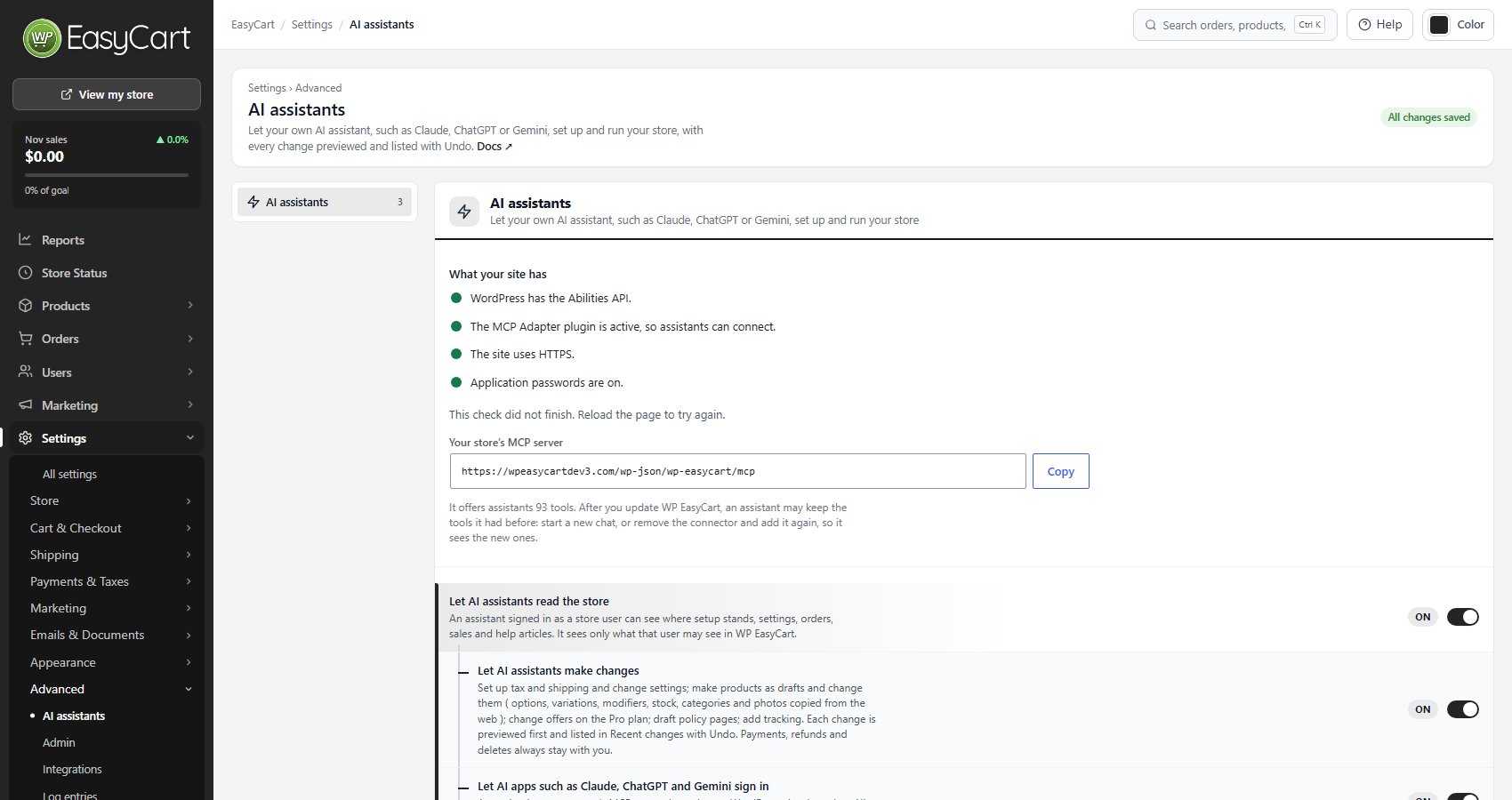
What your site has
The four things an assistant needs, and your store’s MCP server address
A checklist with a green dot for each thing that is in place: WordPress has the Abilities API ( WordPress 6.9 or newer ), The MCP Adapter plugin is active, so assistants can connect, The site uses HTTPS and Application passwords are on. When the MCP Adapter plugin is missing the line offers Install it from wordpress.org, and when it is installed but off, Activate it. A security plugin can switch application passwords off; the line says so.
Your store’s MCP server is the address every assistant asks for, with Copy. Under it, the number of tools your store offers assistants. After you update WP EasyCart an assistant may keep the tools it had: start a new chat, or remove the connector and add it again, so it sees the new ones.
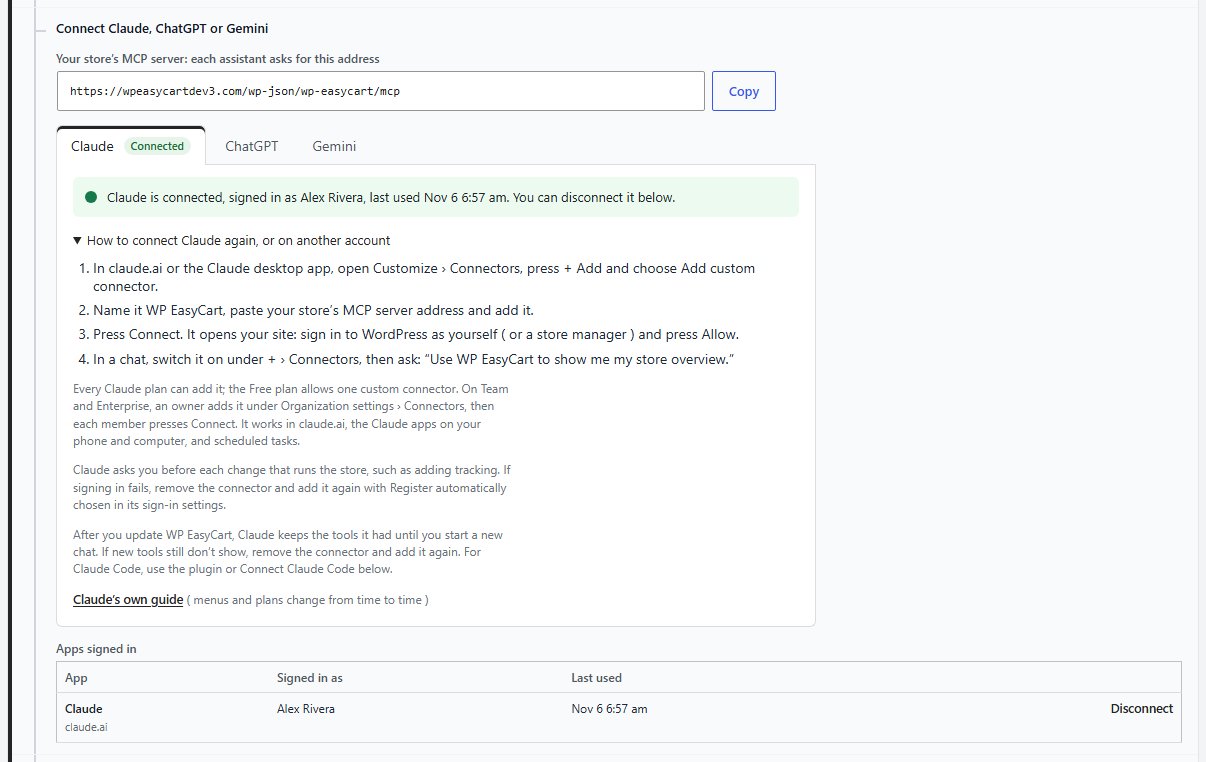
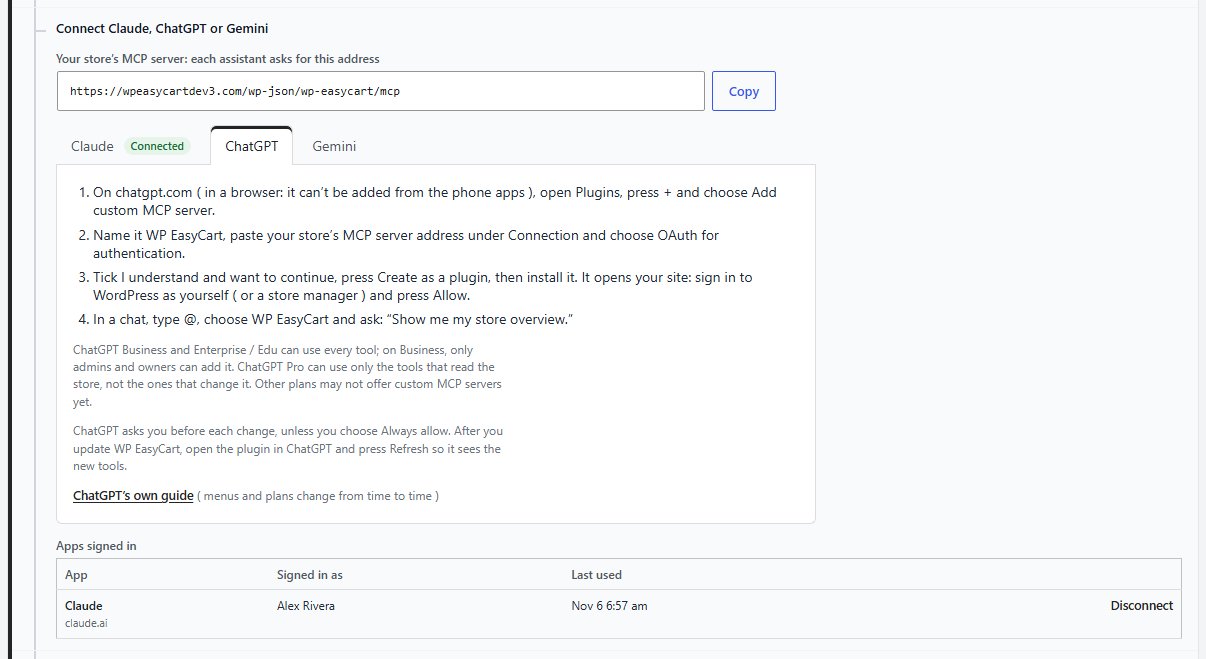
Connect Claude, ChatGPT or Gemini
Your server address, the steps for each assistant, and the apps signed in
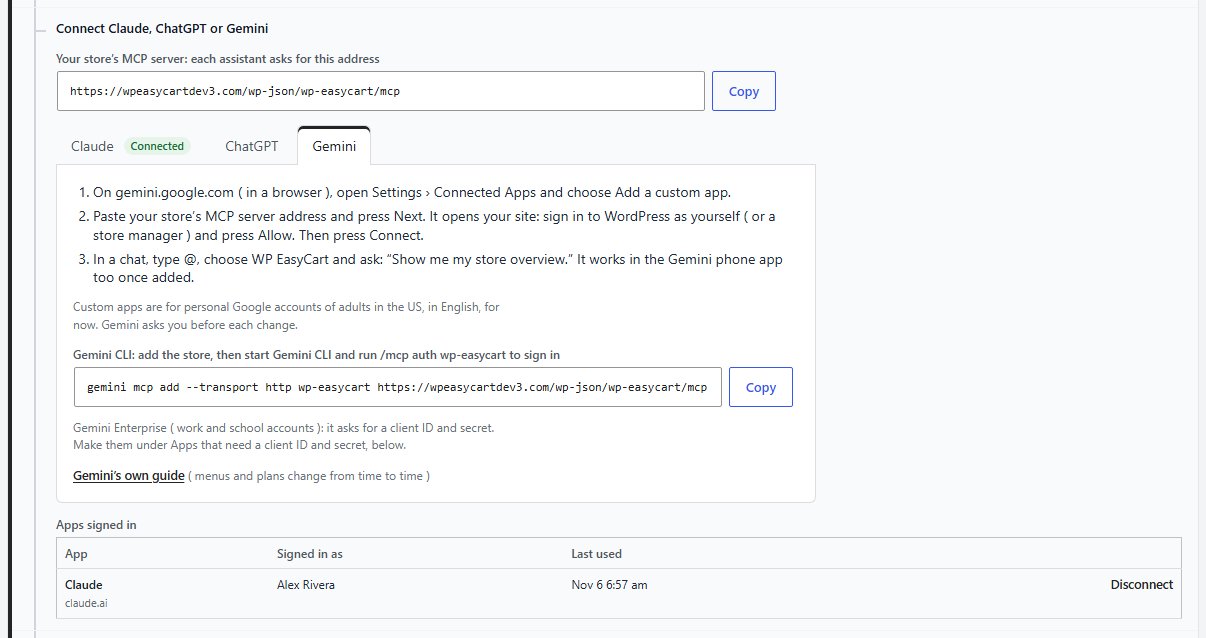
The MCP server address again, then a tab for each assistant with its steps. A connected assistant’s tab says so, with How to connect it again, or on another account. In each, the assistant opens your site: sign in to WordPress as yourself ( or a store manager ) and press Allow.
Claude: in claude.ai or the Claude desktop app open Customize › Connectors, press + Add and choose Add custom connector. Name it WP EasyCart, paste the address, add it and press Connect. In a chat switch it on under + › Connectors. On Team and Enterprise an owner adds it under Organization settings › Connectors, then each member presses Connect.
ChatGPT: on chatgpt.com in a browser open Plugins, press + and choose Add custom MCP server. Name it WP EasyCart, paste the address under Connection, choose OAuth, tick I understand and want to continue, press Create as a plugin and install it. Business and Enterprise / Edu can use every tool; Pro only the tools that read the store.
Gemini: on gemini.google.com in a browser open Settings › Connected Apps and choose Add a custom app. Paste the address, press Next, then Connect. Custom apps are for personal Google accounts of adults in the US, in English, for now. The tab also gives the Gemini CLI command.
Apps signed in lists each app, who it signed in as and when it was last used, with Disconnect. A disconnected app has to sign in again.
Claude Code
The WP EasyCart for Claude plugin, or an application password
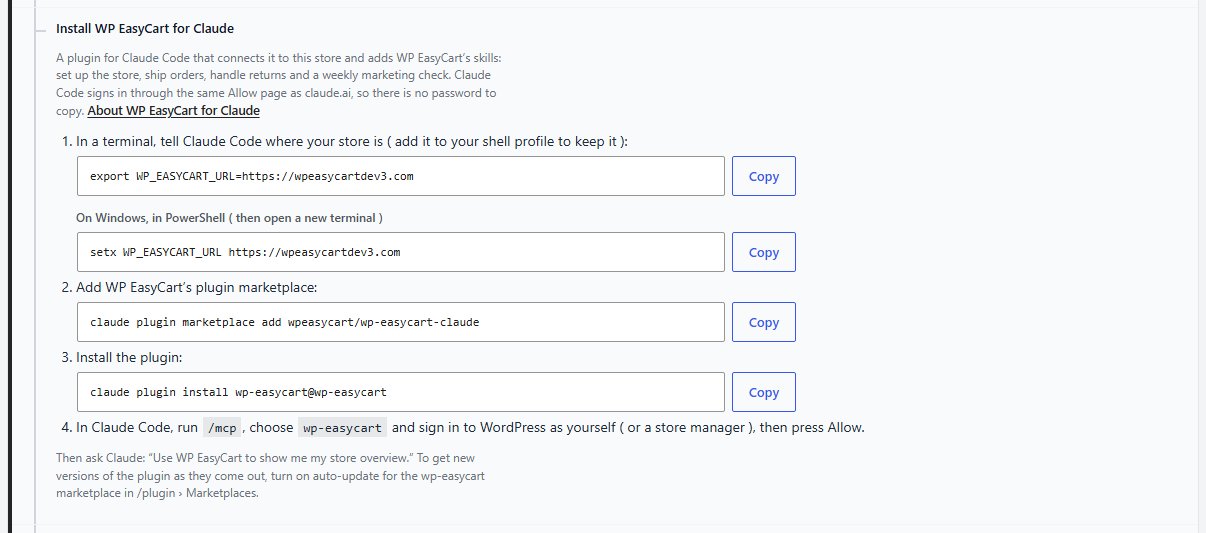
Install WP EasyCart for Claude is a plugin for Claude Code that connects it to your store and adds WP EasyCart’s skills: set up the store, ship orders, handle returns and a weekly marketing check. The row gives each command with Copy: set WP_EASYCART_URL to your store ( with a PowerShell line for Windows ), claude plugin marketplace add wpeasycart/wp-easycart-claude and claude plugin install wp-easycart@wp-easycart. Then run /mcp in Claude Code, choose wp-easycart and sign in through the same Allow page, so there is no password to copy.
Connect Claude Code is for setups without the plugin, or where apps cannot sign in. It makes an application password for you, named Claude ( WP EasyCart ), and shows the lines to paste into a terminal or into Claude Desktop’s config. The password is shown only once. The assistant can do what you can do in WP EasyCart; for less access, sign in as a user with a store manager role and make it there. Remove it any time under Users › Profile › Application Passwords.

Apps that need a client ID and secret
For apps such as Gemini Enterprise that do not register themselves
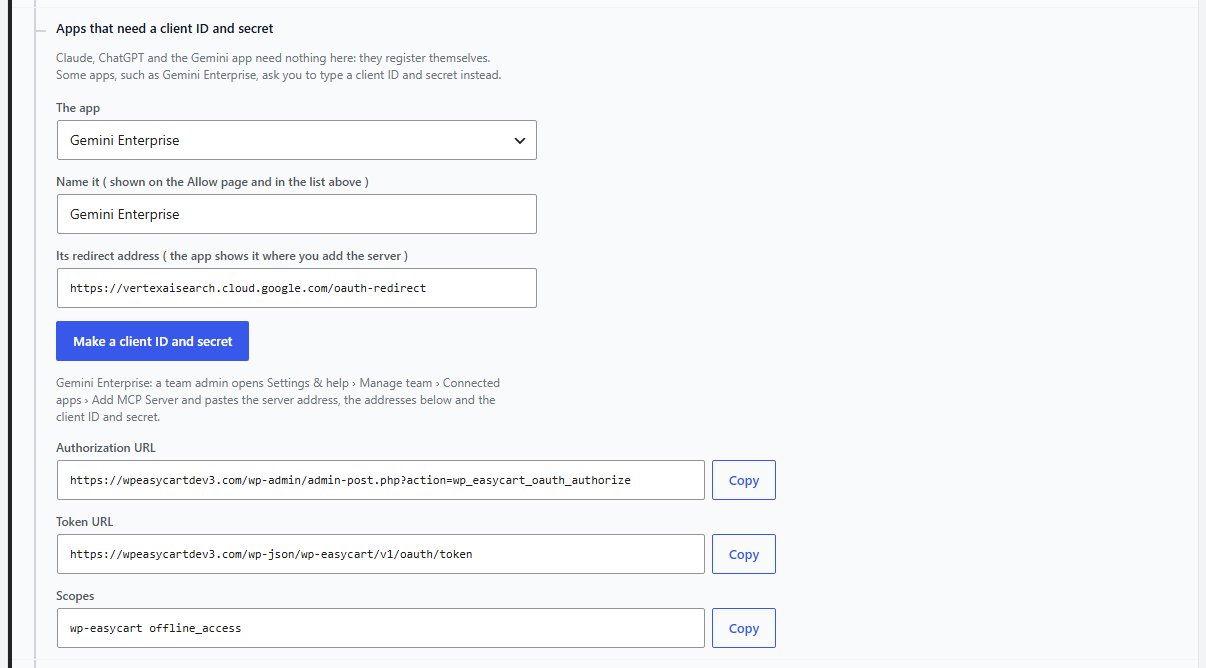
Claude, ChatGPT and the Gemini app need nothing here. Some apps, such as Gemini Enterprise, ask you to type a client ID and secret. Choose The app ( Gemini Enterprise or Another app ), name it, paste the redirect address the app gives you and press Make a client ID and secret. The row lists the Authorization URL, Token URL and Scopes to paste into the app. A site administrator makes them.
Assistant activity
Every call an assistant made, kept for 30 days
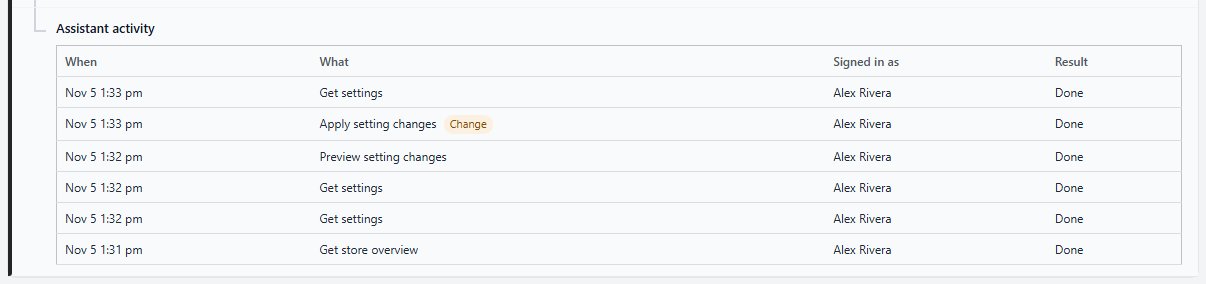
One line per call: when, what, who the assistant was signed in as, and the result. A call that changed something is marked Change. To put a change back, use Undo in Recent changes on Settings › All settings.
Ready to run your store on WP EasyCart?
Everything in this guide works with the free plugin. PRO and Premium add subscriptions, memberships, wholesale pricing and more. Try every PRO feature free for 14 days.