
Integration Guide
WP EasyCart × Google Ads
Connect Google Ads conversion tracking to WP EasyCart and every purchase flows back to your Ads account — ready for conversion reporting, smart bidding, and remarketing audiences.
Before You Begin
A Google Ads account with conversion tracking set up is required. If you haven’t set up conversions yet, visit your Google Ads dashboard and create a website conversion action first. You’ll need the Conversion ID and Conversion Label that Google generates.
Step 1 — Get Your Conversion ID from Google Ads
Create a conversion action in Google Ads so it can hand you the tracking ID EasyCart needs.
Set Up a Conversion Action
In Google Ads, go to Tools › Conversions and create a new conversion action of type Website. Google will give you a Conversion ID and a Conversion Label when you complete the setup wizard. Copy both — you’ll need them in the next step.
Step 2 — Enter Tracking Data in EasyCart
Paste your Google Ads tracking codes into EasyCart so purchase data flows back automatically.
Configure Google Ads Tracking
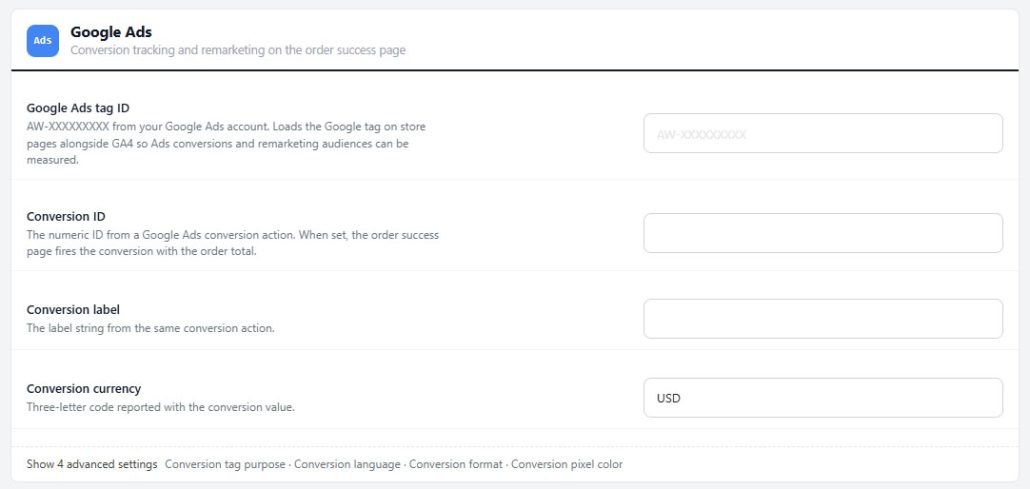
In WordPress, go to EasyCart › Settings › Advanced › Integrations › Google Ads. Enter your Conversion ID and Conversion Label, then save. From this point, every completed order on your store will fire a conversion event back to Google Ads — powering reporting, smart bidding, and conversion-optimized campaigns.
Going Further
Use Google Merchant for Product-Level Ads
To get the most from Google Ads, pair conversion tracking with rich product data via Google Merchant. Edit each product in EasyCart and fill out the Google Merchant options — these power Google’s shopping ads and product listing results.
- Set Conversion tag purpose to Remarketing only if you only want to track audiences for retargeting, not full conversion events
- Edit each product’s Search & marketing section: its Search & AI tab holds product condition, GTIN and MPN, the Google Merchant card on its Google Shopping tab holds Google product category, and the brand comes from the manufacturer
- Read the full Google Merchant guide for the complete field reference
Measure What’s Actually Working
Combine WP EasyCart with Google Ads conversion tracking to see which campaigns drive real revenue — then double down on what works.