
Financial Settings
Payments Setup
EasyCart lets you run up to three payment systems at the same time. Manual Payments, Third Party Payments, and Live Payments give your customers a choice on how they’d like to pay — and a selection of choices builds confidence at checkout.
Watch the Walkthrough
Prefer to watch? See payment gateways connected from start to finish in one short video.
Setting up Payment Gateways
Connect your EasyCart in one click with our Stripe, Square, and PayPal gateways. EasyCart allows you to accept direct deposit/Bill Later payments, third party PayPal, or any of our 30+ live gateways such as Stripe, Square, Authorize.net, FirstData, Eway, and others!
Configuring Your Payment Gateway
Three payment approaches, one checkout. Here’s what each one does.
- Manual Payments: Offers the ability to place an order without processing any payment. Orders go into a ‘Pending’ status and you can Bill Later, Invoice, COD, or handle these as you see fit.
- Third Party Payments: Offers customers the ability to pay on another website, such as PayPal or 2Checkout. This allows you to offer PayPal along with Stripe, Square, or another live payment gateway — giving customers the choice to pay with the popular PayPal method OR on your website with a credit card.
- Live Payments: Offers customers the ability to pay directly on your website using a standard credit card entry form. Offer any one of our live payment processors along with PayPal third party payments for best results and the most conversions with your customers.
- European SCA (Strong Customer Authentication): PayPal, Stripe, and Square are all SCA compatible payment providers.
💡 Run them together: You can run Manual Payments, Third Party Payments, and Live Payments all together on your website for best results and the most conversions!
Using Bill Later/Manual Payments
Setup EasyCart to bypass payment systems and collect orders with our Bill Later or Manual payment methods.
Gateways by Edition
Every edition can take payments. Here’s exactly which gateways come with the FREE Edition and which unlock with Professional & Premium.
Manual Payments — FREE + Professional & Premium
Bill Later / Invoice / Manual PaymentThird Party Payments — FREE Edition
PayPal ExpressThird Party Payments — Professional & Premium (No Application Fees)
PayPal ExpressPayPal Standard2CheckoutCashfreeDwollaNets NexaxeptPayFastPayfortPayment Express pxpay 2.0RealexRedsysSage Pay Now South AfricaSkrillLive Payments — FREE Edition (2% application fees apply*)
SquareStripeLive Payments — Professional & Premium (No Application Fees)
SquareStripeAmazon PayAuthorize.netBamboraBraintreeCardPointeChronopayVirtual MerchantEwayFirstDataGeoMerchantIntuitiDEAL (with Stripe & Euros)MIGSMoneris CanadaMoneris USNMIPaylinePayment ExpressPayPal ProPayPal Payments ProPayPointRealexSagepaySagepay USSecure PayWorldPayStripe Payment Methods Supported
Credit Card ProcessingApple PayGoogle PayMicrosoft PayAliPayGrabPayWeChat PayLink PaymentsAffirmAfterPayKlarnaBancontactBLIKEPSGiroPayiDealPrzelewy24PixPayNowPromptPayBECS💡 * About application fees: All free editions offer processing payments with a 2% application fee + payment gateway fees. Contact your payment provider for their payment gateway fee structure. All Professional & Premium licensed versions offer zero application fees at this time.
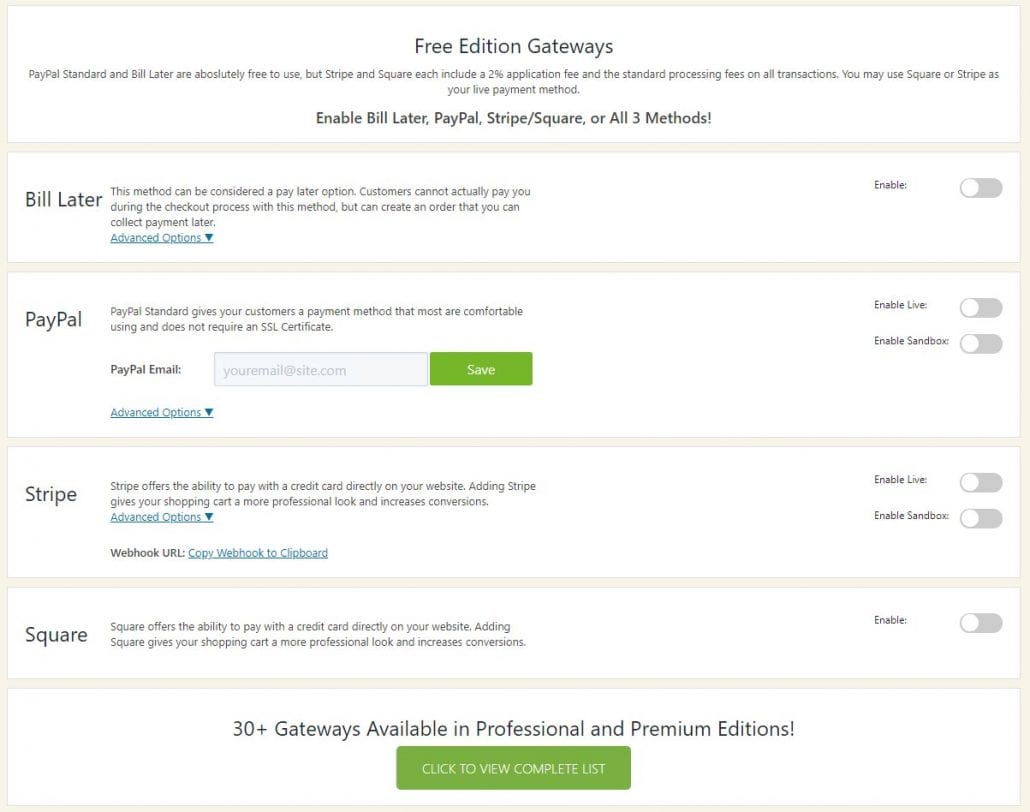
FREE Edition Gateways
Several gateways, easy activation — with 2% EasyCart fees per transaction. Bill Later allows users to enter an order and skip any payment processing, leaving you the ability to invoice or bill the customer for payment. PayPal offers an integration where customers can pay from within a standard PayPal frame securely using their payment system. Square & Stripe allow credit card processing directly on your website. You will be required to have an SSL on your website in order to process payments directly on your website with Stripe — but it gives customers that professional confidence in your website.
💡 Our recommendation: Run PayPal AND Stripe or PayPal AND Square together for best results and the most conversions. Consumers are very conscious about how they want to pay, and offering several methods will convert more users into purchasers! Amazon Pay is another great third party solution that allows quick checkouts for users.
WP EasyCart — FREE Edition Payment Options
Professional & Premium Edition Gateways
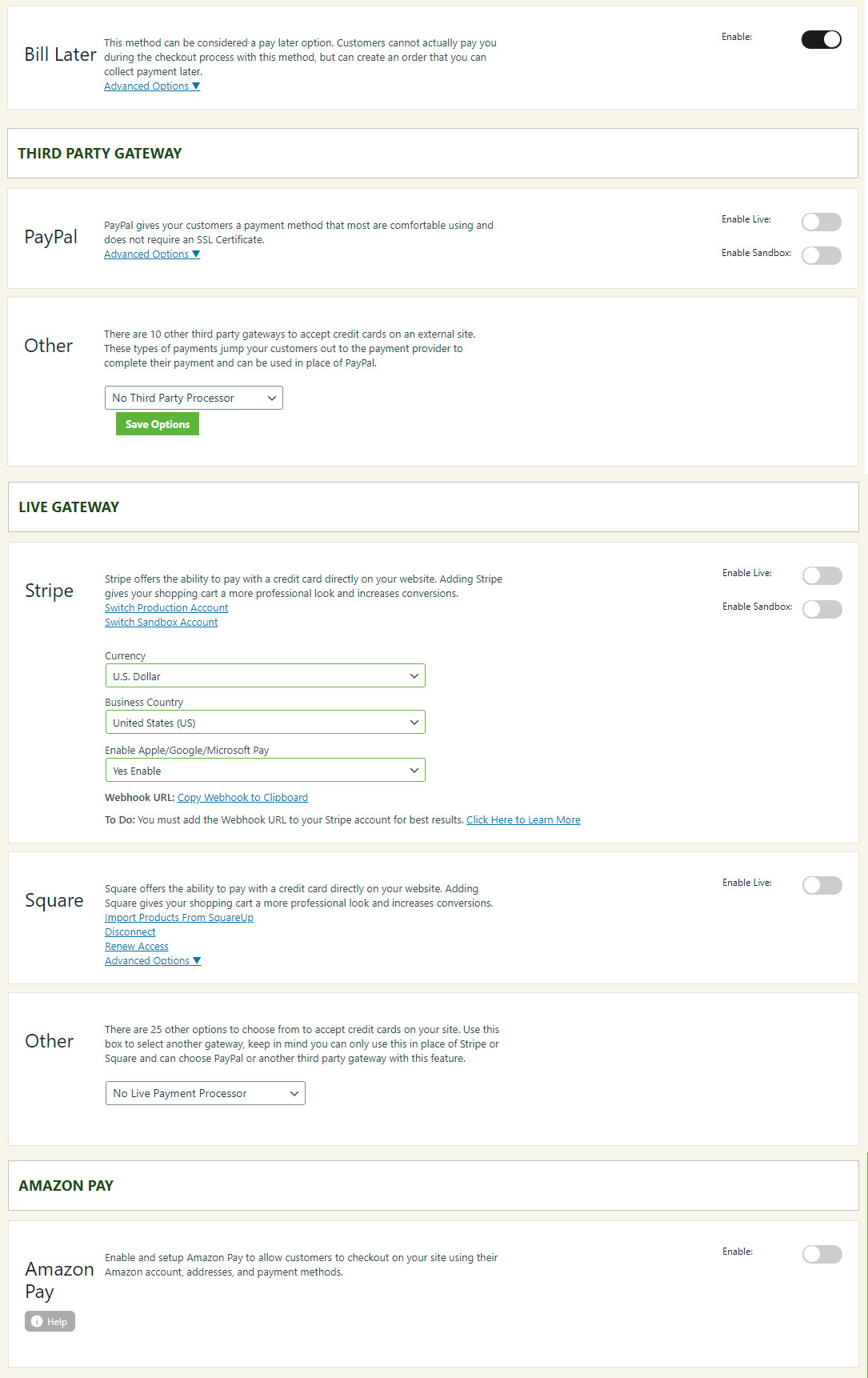
NO EasyCart fees per transaction. Payment gateways are broken down into the main categories below: Bill Later, Third Party, Live Payment, and Amazon Pay gateways.
WP EasyCart — Payment Settings Panel
Bill Later Payments
Invoicing, direct deposit, bank payments, bill later — take the order now, collect payment your way.
Also known as the Direct Deposit or Bill Later method, this system can be enabled/disabled along with a custom message. The way it works: it simply bypasses the payment processing step. Orders are all placed into an ‘Order Pending’ status so that no downloads or goods are shipped or given away until the site owner or administrator changes the order status to ‘Order Approved’. Once you collect payment — however that may be — is when the order status is changed.
This is useful for Purchase Orders, Direct Deposits, Checks, or other methods where the order is taken but payment is left to the site owner or administrator.
Third Party Payments
PayPal is the most common — customers hop to a trusted site, pay, and return.
EasyCart refers to payments in which the customer leaves your website to make a payment as ‘Third Party Payments’. PayPal is the most prevalent method, but we have close to a dozen different third party payment processors from around the globe. Simply enter your credentials and settings for the processor type you would like to enable.
💡 Selling downloadable goods? It’s easier for customers if you use a live processor — transactions are processed instantly and the results get the user to their downloads quicker and smoother than if they leave your site, pay, then come back.
Live Payment Setup
Stripe, Square, and Authorize.net are the most common — customers pay without ever leaving your website.
WP EasyCart refers to payments that are made without the customer ever leaving your website as ‘Live Payments’. Square, Authorize.net, Stripe, and FirstData are popular examples, but choose from over two dozen live payment integrations for international and domestic support. Simply enter your credentials and settings for the processor type you would like to enable — and remember, for downloadable goods a live processor gets customers to their downloads the quickest.
- Square: A popular payment gateway many small businesses already have — enable it as a payment provider here with a single click. Note that our integration does not do a 2-way syncing process with products and inventory on Square at this time.
- Other Payment Processors: WP EasyCart also offers two dozen other live payment processors. Simply select your payment gateway of choice from the box and enter the credentials for that gateway.
Power Feature
Stripe for Subscriptions
Subscriptions and memberships are much more complicated systems to work with, so a special consideration is made for them. WP EasyCart is integrated heavily with stripe.com as a live payment processor and subscription system. If you plan to use subscription based products, you should sign up for stripe.com.
💡 Note: Free Edition users cannot use subscriptions with Stripe and WP EasyCart — you must upgrade to access this feature.
Amazon Pay
A popular and unique payment choice that lets users quickly checkout with their Amazon Pay account. Simply engage the solution and users can process quick payments on your site with their Amazon account, address info, and payment methods of choice.
Transferring Funds — How Does It Work?
When an order is placed with WP EasyCart, the payment is collected through a payment gateway. Money passes directly from the customer’s credit card into your payment gateway merchant account. From there, you can set up the connection from your merchant account into your bank account — typically on a daily or similar schedule, with payments grouped into bank transfers.
Read more about this for the top 3 payment gateways below, or do a web search to find bank transfer information for your specific payment gateway.
Ready to Take Payments?
From Bill Later to 30+ live gateways, your checkout can fit any business. If a gateway setup has you stuck, our support team will get you processing.