Financial Settings
First Data Payment Settings
Connect your First Data account to WP EasyCart and start sending payment requests through your gateway. It all comes down to four values — two from your Terminal, two from API Access. Find them. Enter them. Done.
Terminal Values — Gateway ID & Password
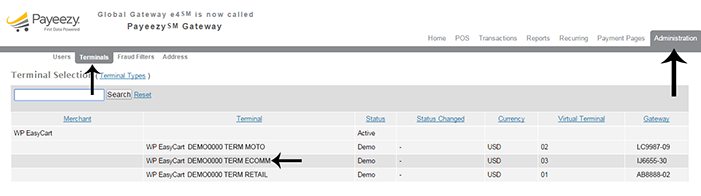
The first two values are related to the Terminal in your First Data account.
- Gateway ID: Clearly printed along with the terminal in your account.
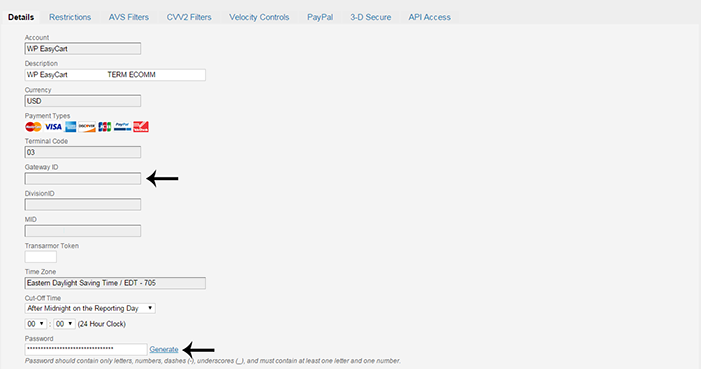
- Gateway Password: Must be set in the details for the gateway.
First Data — Terminal & Gateway ID
First Data — Gateway Password in Terminal Details
API Access Values — Key ID & HMAC Key
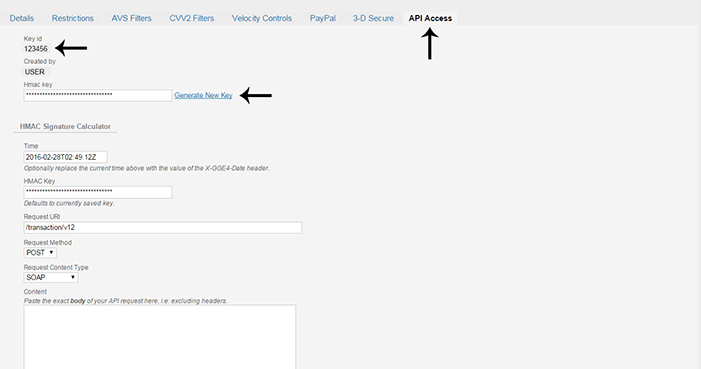
The other two values live in the API Access area for the gateway.
- Key ID: Clearly stated in the API Access section.
- HMAC Key: Generated on the API Access page.
First Data — API Access with Key ID & HMAC Key
Complete the Setup
Take the four values listed in this guide and enter them in the appropriate fields in the EasyCart Payment Setup for First Data. That’s the whole connection.
The Four Values You Need
Gateway IDGateway PasswordKey IDHMAC KeyMissing One of the Four Values?
Gateway panels change and keys go missing. If your First Data connection won’t authorize, our support team can help you sort it out.
