
Marketing
Gift Cards
Think of an EasyCart gift card as its own little prepaid credit card — loaded with a dollar value and redeemed with a code at checkout. Any balance left over stays on the card, ready for next time.
Watch the Walkthrough
Prefer to watch? See gift cards built, sold, and redeemed from start to finish.
Creating Gift Cards
Watch as we build gift cards that users can redeem at checkout on your WordPress ecommerce store. Even sell gift cards with our automated builder and collect customer messages along the way.
Create & Edit Gift Cards
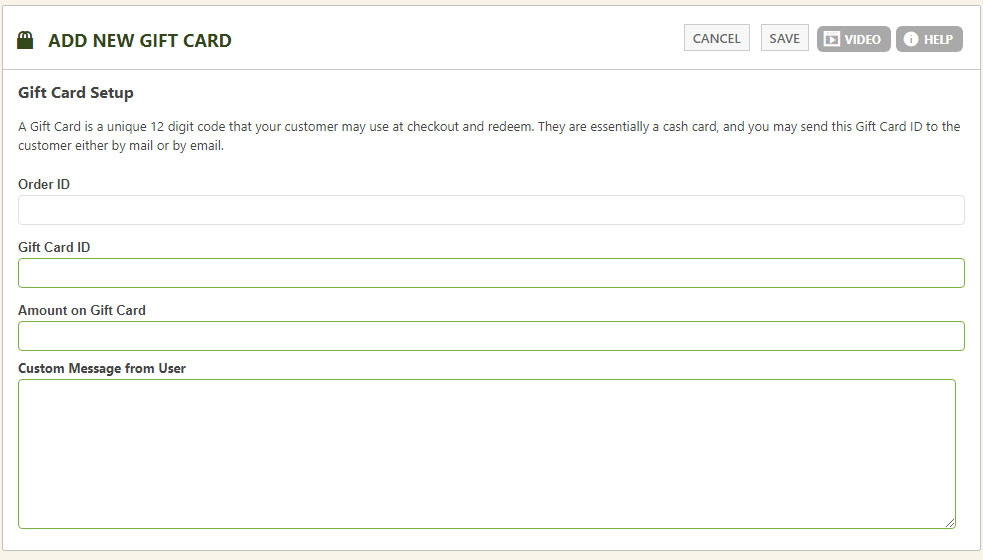
To create a gift card, enter a 12-digit unique code, the dollar amount loaded onto it, and a custom message the shopper sees once they redeem it.
WP EasyCart — Gift Card Setup
Two Ways to Create a Gift Card
Sell them, or build them by hand — both paths land in the same gift card system.
Sell Gift Cards as a Product
Create a new product, mark it as a gift card, and set the amount — say, a $25 gift card. Shoppers purchase it and instantly receive a unique 12-digit code, generated automatically with zero setup from you. Customers can even email the card straight to the recipient with the code included. This method logs the order ID on this screen too, so you can trace any card back to its sale.
Create Gift Cards Manually
Build the card yourself right in this section, then distribute the unique code to the recipient however you like.
How Redemption Works at Checkout
The shopper enters the gift card code during checkout, and EasyCart handles the math from there.
- Order total is more than the card: The discount applies, and the customer checks out and pays the remaining balance as usual.
- Order total is less than the card: The order amount is deducted from the card, and the remaining balance carries over for the customer to use on a future order.
💡 Mostly hands-off: Gift cards run fairly independently once created — you shouldn’t need to administrate them much. Check balances anytime in this section, and from the order screen you can see the code a customer used and resend the gift card email to the recipient if needed.
Start Selling Gift Cards Today
Give shoppers an easy way to gift your store — and give yourself a hands-off way to bring them back for a second visit.