Special Note: You must utilize the Stripe.com payment gateway for subscriptions/recurring payments. When a product is designated a ‘Subscription’ product, it must have more than one initial payment (thus the recurring payment charge). Also note that Subscriptions in EasyCart are a ‘Sign-Up’ one page process. They do not go into the shopping cart with other regular one-time purchase products. They require a special arrangement between the payment gateway and user so that the orders can be placed each billing cycle by Stripe.com.
Editing Subscription Options
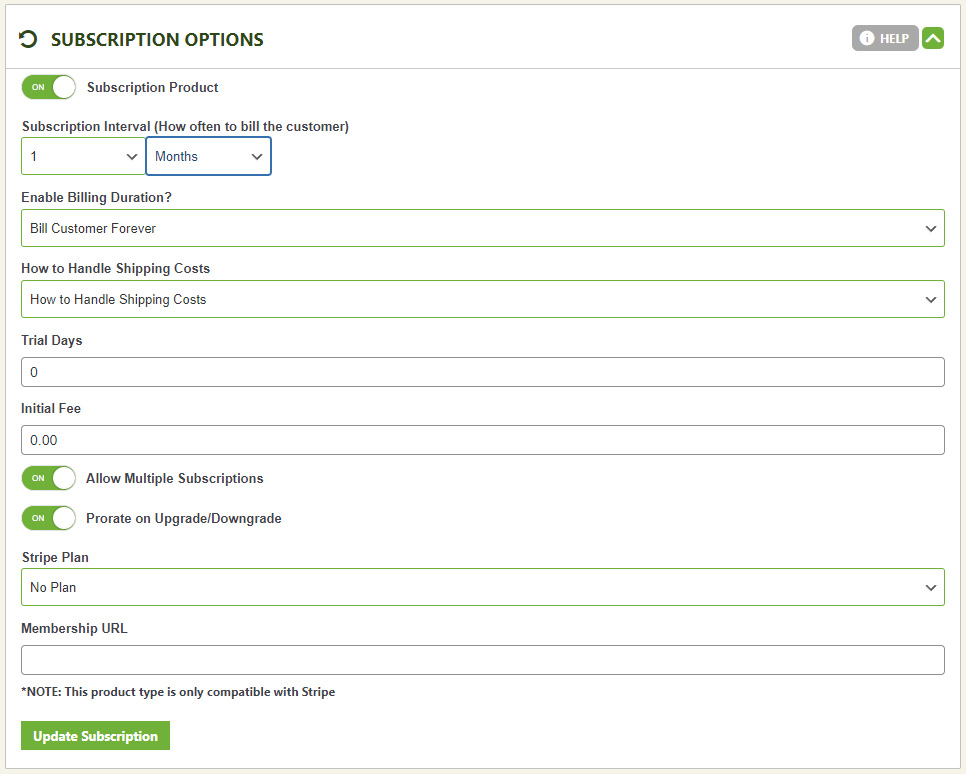
Select if you want to offer this product as a subscription. Subscriptions are treated as a single product sign-up, so subscriptions do not get put in the shopping cart like regular products. Instead, subscriptions take the user to a sign-up form and payment form all in one page for quick registration and payment.
- Subscription Interval – Set how often you want the recurring payment to occur. For example a monthly subscription would have an interval of 1 Month. If you wish for it to recurring bill every 2 weeks, then you would enter 2 weeks.
- Billing Duration – How many recurring occurrences do you wish for this subscription to have. For example a one year subscription that is billed with a subscription interval of 1 month would have a billing duration of 12. That is 12 recurring payments would occur at an interval of 1 month for a total of 1 year.
- How to Handle Shipping Costs – Stripe subscriptions can be ‘shippable’ or ‘not shippable’ within the shipping setup of this item. This cost may be applied to the initial payment or it can be applied to every payment that is recurring.
- Trial Days – Set how many trial days occur before the charge actual takes place. If you enter 14, then the user will be billed 14 days after they place the order.
- Initial Fee – This fee is added to the first payment as a way to have initial payment fee or a setup fee.
- Allow Multiple Subscriptions – This will allow the same account to order the same product again. for example, if you offer a membership subscription, you may want an account to only sign-up once. If you offer say web hosting, the user may want to have multiple hosting accounts so you must allow multiple subscriptions here.
- Prorate on Upgrade/Downgrade – This will prorate the payment during an upgrade/downgrade to a different plan.
- Stripe Plan – This is the grouping to which this subscription belongs to. Subscription plans are often used to sell similar products and allow upgrading/downgrading from within a plan. For example, a Bronze, Silver, Gold membership plan and allowing customers to upgrade via their account between those plans. Learn more about creating a plan by Clicking Here.
- Membership URL – If you want to offer a specific page with content on it that only members can access, enter the url here. Customers will receive this link upon subscribing. EasyCart offers a way to lock pages in WordPress down based on what products they purchase. This solution makes a great way to feed a custom WordPress page with downloads, videos, content and more to your paid members.