
Integration Guide
WP EasyCart × AffiliatePress
Launch a powerful affiliate marketing program directly within your WP EasyCart store — track commissions, control payouts, and grow your revenue through your affiliate partners.
Before You Begin
An active AffiliatePress account is required to use this integration. If you don’t have one yet, create your account at affiliatepressplugin.com. For full setup instructions, refer to the official partner documentation at affiliatepressplugin.com/documents/wp-easycart/.
Enabling the WP EasyCart Integration
Follow these steps inside your AffiliatePress dashboard to activate the integration and configure how commissions are calculated.
Open Integration Settings
From your WordPress admin, navigate to AffiliatePress › Settings › Integrations. This panel controls all third-party eCommerce platform connections.
Enable WP EasyCart
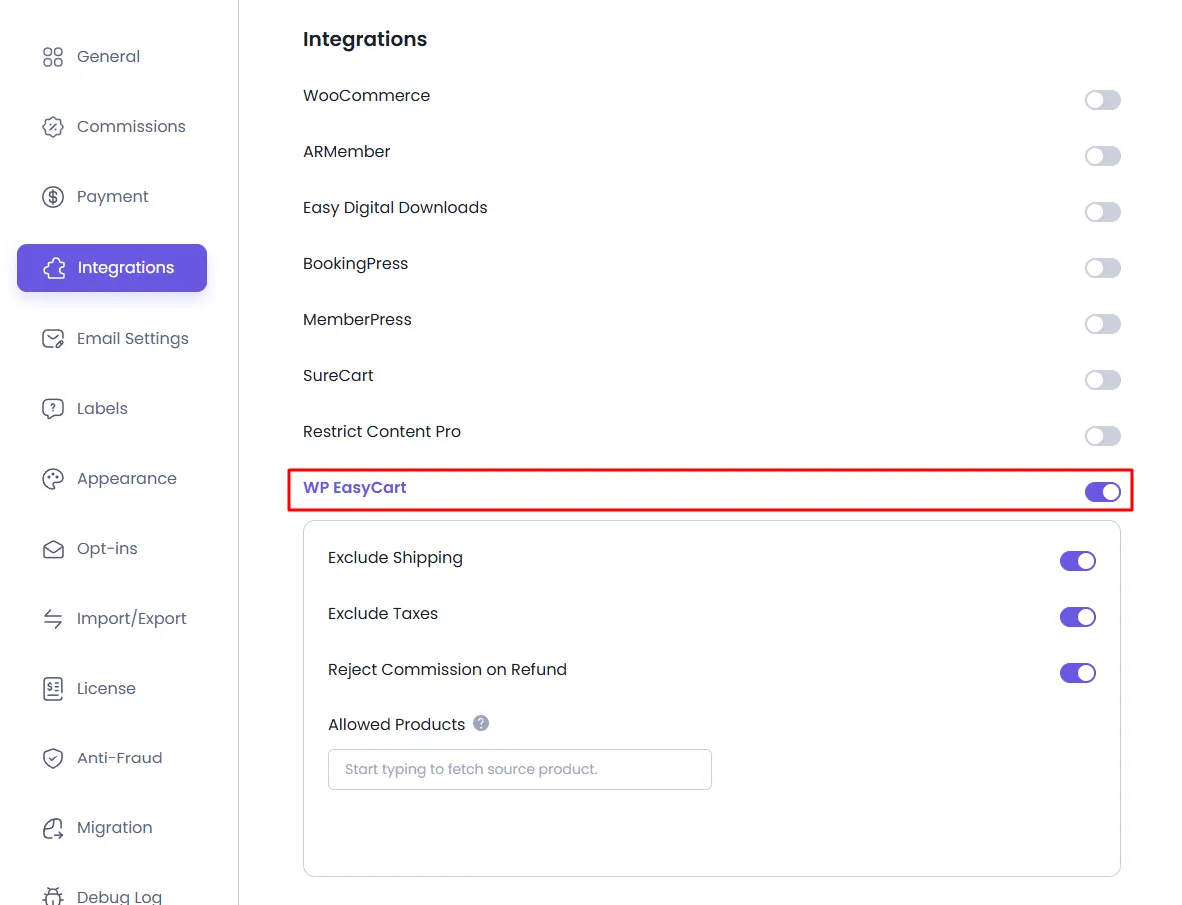
Locate the WP EasyCart entry in the integrations list and set it to “Yes”. This activates the live data connection between the two platforms.
Configure Commission Options
Once enabled, additional settings will appear. Adjust shipping and tax exclusions, and configure refund behavior to align with your affiliate payout strategy.
AffiliatePress — WP EasyCart Integration Settings Panel
Commission Configuration Options
After enabling the integration, the following options become available to control precisely how commissions are calculated across your store.
Exclude Shipping
When enabled, shipping charges are removed from the order total before commission is calculated. Affiliates earn only on actual product revenue.
Exclude Taxes
When enabled, applicable product taxes are excluded from the commission basis, ensuring affiliates are compensated fairly on net product value.
Reject Commission on Refund
When enabled, any unpaid commission tied to a refunded WP EasyCart order is automatically rejected — protecting your business from paying out on cancelled revenue.
Per-Product Control
Disabling Commissions for Specific Products
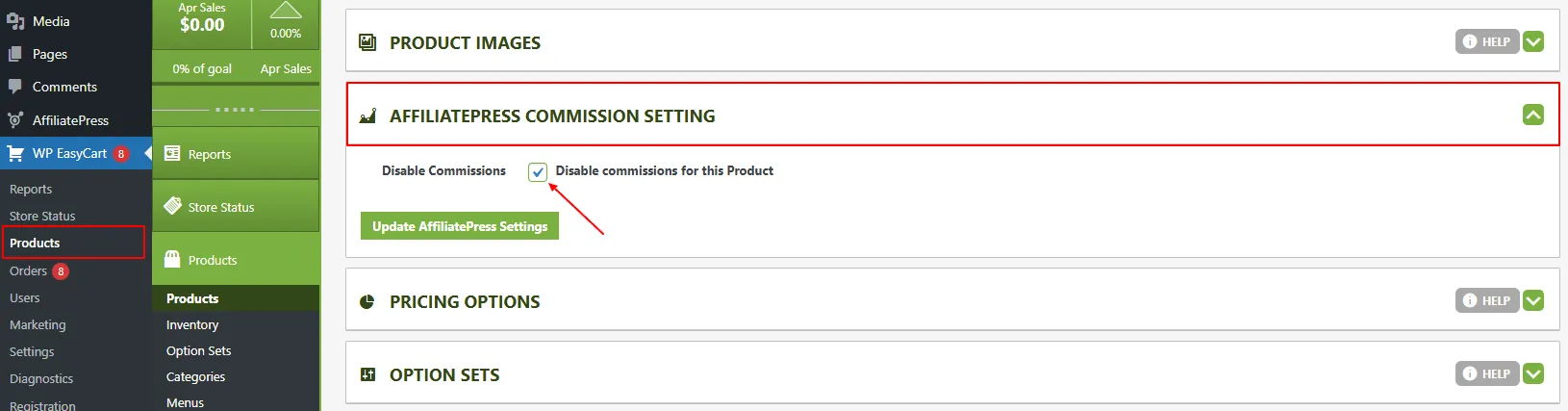
By default, commissions are generated for every product in your store. WP EasyCart gives you granular control — you can opt specific products out of affiliate commission calculations on a per-product basis.
- Go to WordPress Admin › WP EasyCart › Products
- Click the edit icon next to the product you want to update
- On the product edit screen, scroll down to the AffiliatePress Commission Settings section
- Toggle on “Disable Commissions”
- Click “Update AffiliatePress Setting” to save your changes
⚠ Important: The per-product disable option will not function if the Commission Basis is set to “Commission Per Order”. Ensure your commission basis is configured at the product level for this feature to work correctly.
WP EasyCart — Disable Commissions Product Setting
Ready to Launch Your Affiliate Program?
Combine WP EasyCart with AffiliatePress to drive more sales, reward your partners, and grow your store through performance-based marketing.