
Product Details
Download Options
Sell goods your customers download instantly — music, e-books, instructions, videos, whatever you’ve got. Package it all into one clean .zip file and let EasyCart handle hosting, limits, and expiration.
Watch the Walkthrough
Prefer to watch? See exactly how to set up a digital download product in this short video.
Creating a Digital Download Product
Digital downloads are a popular, easy way to sell online with EasyCart — see the streamlined setup in action.
Editing Download Options
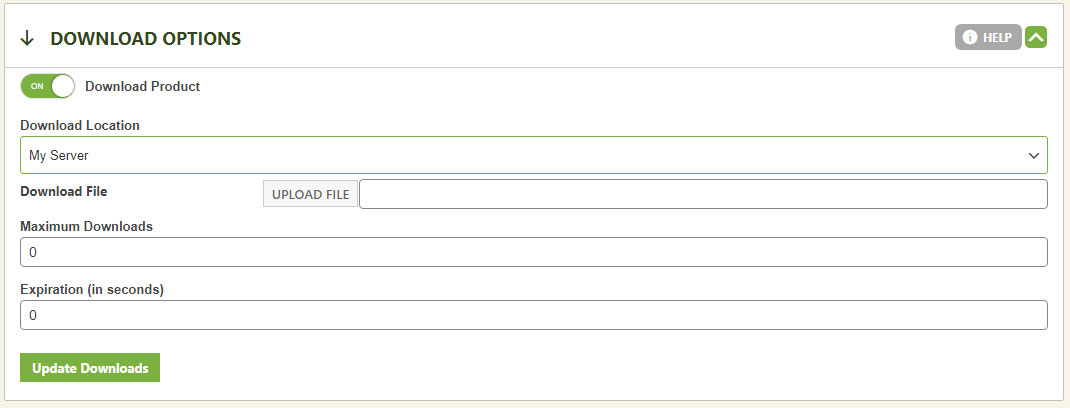
Turn any product into a download by selecting ‘Download Product’ — then dial in exactly how it’s delivered.
- Download Location: Host from your own server, or from Amazon S3 storage for high availability. Amazon S3 is a great choice for large files or if your host limits bandwidth; for small downloads, your own server keeps things simple. Learn more about Amazon S3 setup.
- File Choice: Choose your file from the list if using Amazon S3 — your S3 account must be set up and connected to EasyCart first (see third-party setup). Using your own server? Just upload the file directly.
- Maximum Downloads: Cap the total number of downloads per customer to prevent abuse. Default: 0 (unlimited).
- Download Expiration: Set a time limit on the download link, measured in seconds (86400 seconds = 24 hours), to further prevent abuse. Default: 0 (no expiration).
💡 Note: After a sale, use the download manager to reset a customer’s download count or restart their download window if needed.
WP EasyCart — Download Options Panel
Ready to Sell Your First Download?
Whether it’s an e-book, an album, or a full course, EasyCart delivers it securely and tracks every download.