
Orders
Subscriptions
Subscriptions are available when you use the Stripe payment method. Customers who buy a subscription product see a recurring charge, and you get a management area to view the subscription, see its past orders, and cancel it for a customer if needed. Customers can also view, manage, and cancel their own subscription — and update their card — from their account.
Watch the Subscriptions Walkthrough
See how to create and manage subscription and recurring-payment products in EasyCart.
Creating a Subscription or Recurring Payment Product
Sell subscriptions with recurring payments using EasyCart’s ecommerce system. Watch as we create and manage subscriptions in this tutorial.
Management
Editing subscriptions
For the most part the subscription manager is view-only. With Stripe, all subscription data — and customer payment information — lives on Stripe’s servers, keeping your site secure by not storing that critical data. You can see the subscription terms, payment periods, and payment dates, and cancel a Stripe subscription right here; it communicates back to Stripe to stop future payments. Cancel on Stripe’s side instead, and it syncs back to show as cancelled in EasyCart. Click View on Stripe at the top to review it on their system.
Customers manage their own subscription from their front-end account — cancelling or updating their credit card directly with Stripe. Only customers can update the card on file; it’s never accessible to store owners or staff.
WP EasyCart — Subscriptions
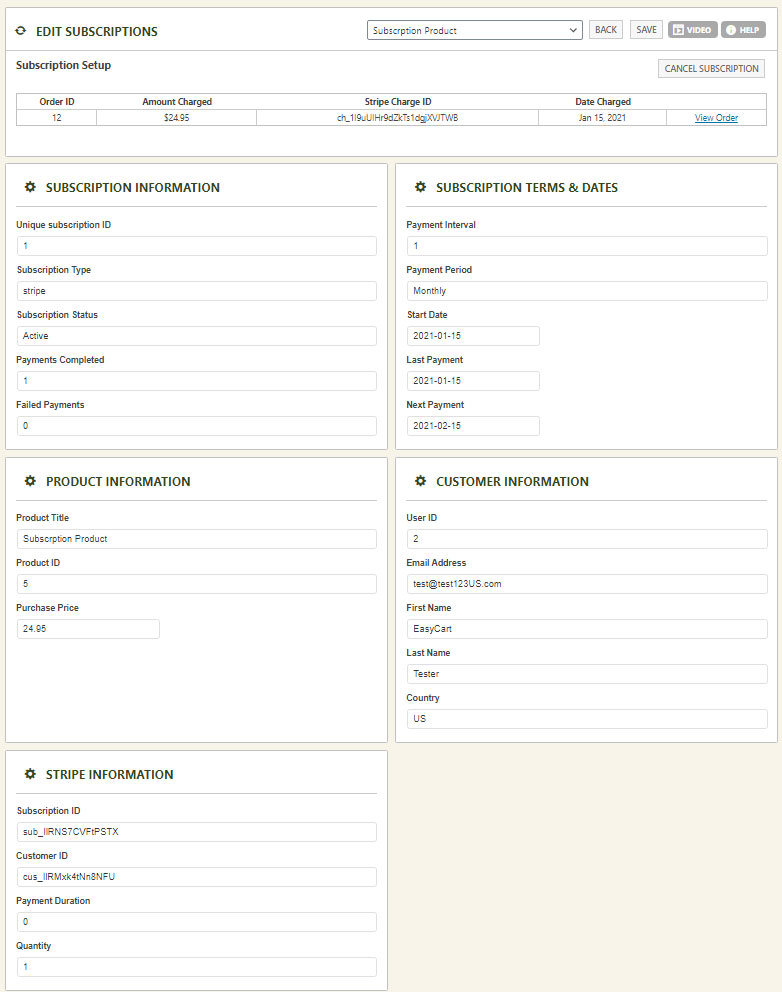
Subscriptions can’t be edited
You can’t change a subscription’s pricing, options, or data once it’s created — that would make it a different product the customer never agreed to. To adjust one, the customer usually cancels the existing subscription and signs up for the new one with the changes.
Sell subscriptions with confidence
Offer recurring-payment products backed by Stripe, with secure management for you and self-service for your customers.