
Integration Guide
WP EasyCart × ShareASale
ShareASale connects online retailers to 225,000+ affiliate partners worldwide. Connect ShareASale to WP EasyCart and every purchase driven by an affiliate is tracked automatically — ready for revenue share and commission payouts.
Before You Begin
A ShareASale Merchant account is required to use this integration. If you don’t have one yet, sign up to become a ShareASale Merchant. You’ll walk through their setup wizard and grab the Merchant ID that EasyCart needs.
Step 1 — Get Your Merchant ID from ShareASale
Find your Merchant ID inside the ShareASale signup wizard so EasyCart can attribute affiliate sales correctly.
Choose “Developer Install” in the Wizard
During ShareASale merchant signup, on Step 4, select “Developer Install”. ShareASale will display a tracking script that contains your Merchant ID. The number after merchantID= in that script is what you need — copy just that number, not the full script.
Step 2 — Paste Your Merchant ID into EasyCart
Drop the Merchant ID into the EasyCart ShareASale Setup panel and you’re tracking sales.
Enter the Merchant ID & Save
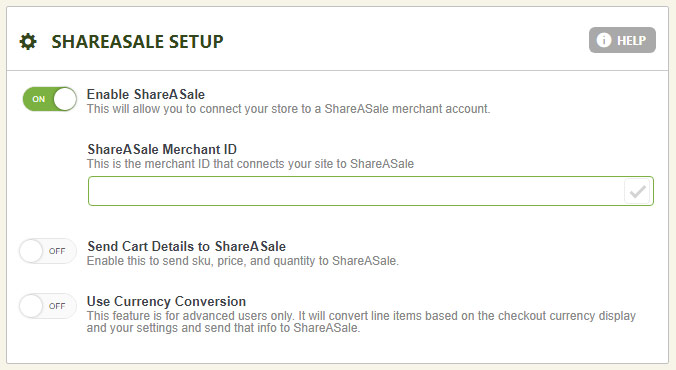
In WordPress, go to EasyCart › Settings › Third Party › ShareASale Setup. Paste your Merchant ID into the field and save. EasyCart already includes the full tracking integration — you only need to provide the Merchant ID. From this point on, every affiliate-driven purchase will be reported back to ShareASale automatically.
EasyCart — ShareASale Setup Panel
Additional Options
Send Detailed Cart Data & Currency Conversion
Two optional toggles in the ShareASale Setup panel let you send richer data to ShareASale for advanced reporting:
- Send Cart Details to ShareASale: sends individual SKU, price, and quantity for each line item — useful if you want product-level affiliate reports.
- Use Currency Conversion: if your store accepts multiple currencies, this converts each line item based on the checkout currency before sending to ShareASale.
💬 Note: WP EasyCart is working with ShareASale to be listed in the Step 4 wizard dropdown directly. Until then, use the Developer Install option to grab your Merchant ID.
Start Earning Through Affiliate Partners
Combine WP EasyCart with ShareASale to tap into a network of 225,000+ affiliates worldwide — tracked automatically, paid out reliably.