
WP EasyCart — Example Image Tag
WP EasyCart — Image Tag Setup Panel
< 1 min read
Product Details
Stamp a custom badge across any product — SALE flags, promo call-outs, or your own fancy mark-ups. Pick a shape, set the text, choose the colors. Done, right in the product editor.
See a badge in action before you build your own.
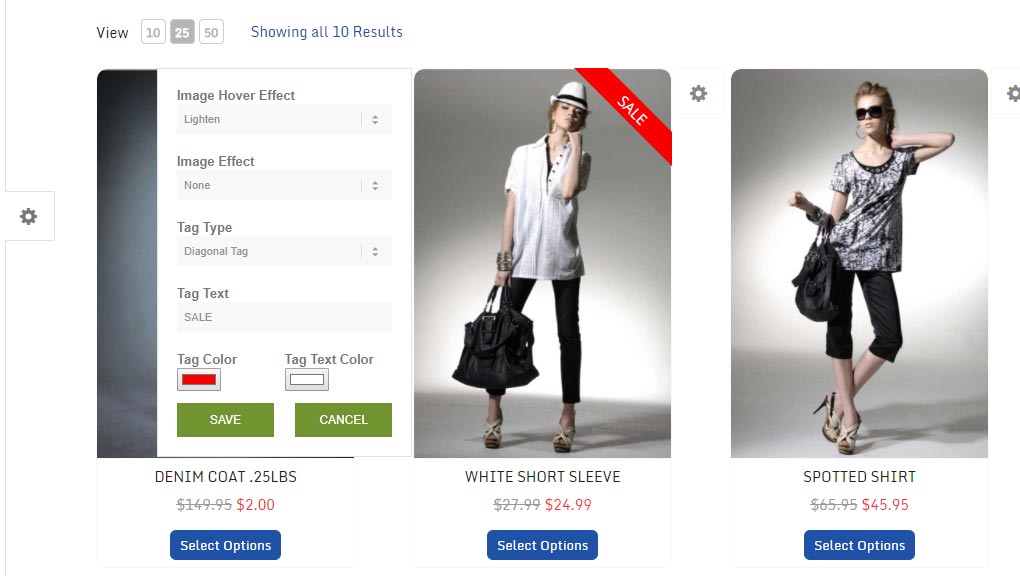
Here, a red ‘SALE’ badge stamps diagonally across a product to flag it as discounted. Choose from four styles — diagonal, square, round, or classy — and adjust the color and text to match your brand.
WP EasyCart — Example Image Tag
You can also set an image tag right from the front end of your store — just click the white/gray gear icon next to any product to open the customizer.
💡 Note: Front-end product customizers only appear when an administrator is logged into WordPress. Regular customers never see these controls.
Everything happens inside the product editor — no code required.
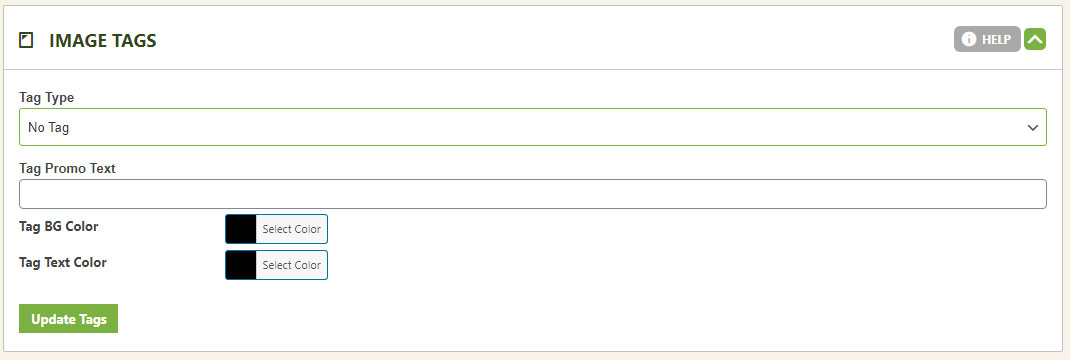
Open the product editor panel, choose which badge type you want layered over the product, set the text to display, then pick your background and text colors.
WP EasyCart — Image Tag Setup Panel
A well-placed SALE or NEW badge can be the nudge that turns a browser into a buyer. Set yours up in minutes.