
Integration Guide
WP EasyCart × Facebook Pixel
Facebook Pixel tracks custom events from your website to Facebook — page views, conversions, add-to-cart, checkout, purchases. WP EasyCart is already integrated. Drop in your Pixel ID and shopping events start flowing automatically.
Before You Begin
A Facebook Business account with a Pixel created is required. If you don’t have one yet, set it up in Meta Events Manager. EasyCart focuses on shopping events — for site-wide page tracking, pair it with a Facebook Pixel WordPress plugin or your theme’s built-in pixel option.
Step 1 — Get Your Pixel ID from Meta
Find the Pixel ID inside Meta Events Manager so EasyCart can send events to the right account.
Open Meta Events Manager
Log into your Meta Events Manager and select your Pixel from the Data Sources list. The Pixel ID is displayed at the top of the page — a 15- or 16-digit number. Copy it.
Step 2 — Paste the Pixel ID into EasyCart
Drop the ID into the Facebook Pixel setup panel and shopping events start flowing.
Enter the Pixel ID & Save
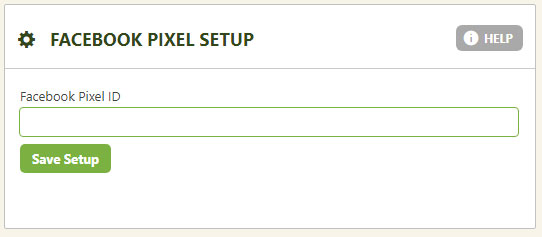
In WordPress, go to EasyCart › Settings › Third Party › Facebook Pixel. Paste your Pixel ID into the field and save. EasyCart will immediately start firing events for Page View, Add to Cart, Initiated Checkout, Add Payment Info, and Purchase.
EasyCart — Facebook Pixel Setup Panel
Good to Know
EasyCart Pixel Tracks Shopping Events Only
EasyCart’s Pixel integration is focused on commerce activity — the events that matter for conversion tracking, lookalike audiences, and ad optimization. It does not install Facebook Pixel site-wide for general page tracking.
- For site-wide page tracking, install a dedicated Facebook Pixel WordPress plugin or add the base pixel code through your theme settings
- Many WordPress themes include built-in Pixel support — check your theme options first before adding another plugin
- EasyCart’s shopping events work alongside any base pixel setup — there’s no conflict
Track Conversions & Optimize Your Ads
Combine WP EasyCart with Facebook Pixel to measure ad ROI, build buyer lookalike audiences, and retarget abandoned shoppers automatically.