Reference
Editing downloads
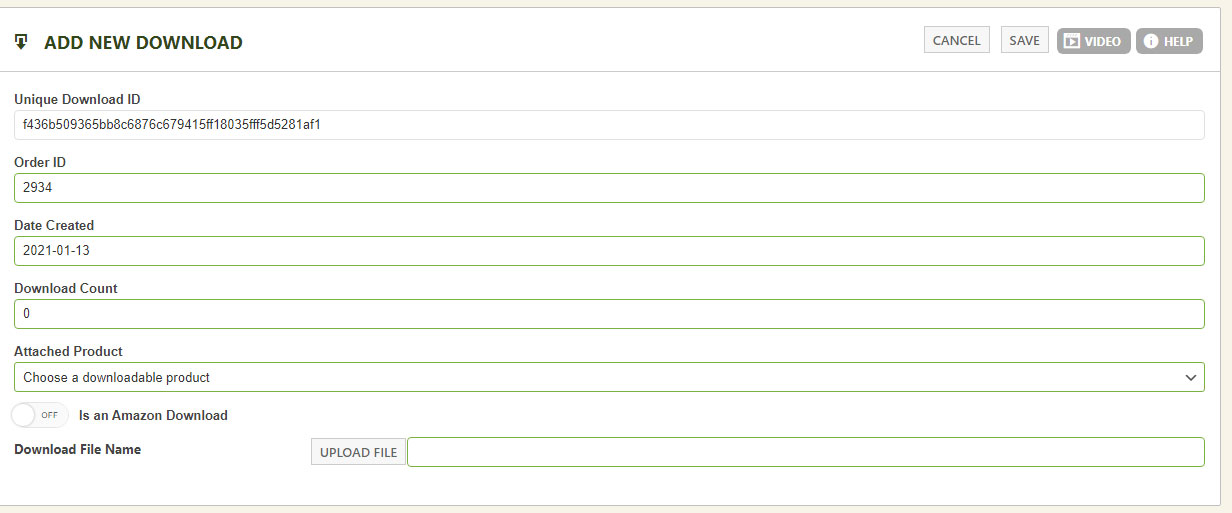
Each purchased download has its own record you can fine-tune:
- Unique Download ID — sticks to this download and order; not editable.
- Date Created — usually the order date; adjust it to extend a time-limited download for a customer (for example, unlocking more time on a 5-day window).
- Download Count — counts each download from the customer’s account; limit attempts (say, 3) for security, or reset to 0 to unlock more.
- Attached Product — change which product this download is tied to from the original purchase.
- Is Amazon Download — serve downloads from your own server or from Amazon S3; check this box if you’re using S3.
- Download File Name — pick the file from your chosen system. S3 requires setup in the Third Party settings with proper permissions, while server downloads are listed automatically.
WP EasyCart — Download Management