
Product Details
Subscription Options
Subscriptions and memberships are some of the hottest products online — and EasyCart handles them with real flexibility. Sign-ups, upgrades, downgrades, recurring billing: all built in.
Watch the Walkthrough
Prefer to watch? See how to create and manage a subscription product from start to finish.
Creating a Subscription or Recurring Payment Product
Sell subscriptions with recurring payments using EasyCart’s state-of-the-art ecommerce system.
How Subscriptions Work
One payment gateway, real flexibility for you and your customers.
Subscriptions require the stripe.com payment method — learn more about Stripe here. Not every gateway supports recurring billing, but EasyCart’s Stripe integration is comprehensive: customers can sign up, upgrade or downgrade plans, and keep their card current, all without leaving your site.
Subscriptions can include option variations and modifiers (option sets) so customers can customize their plan — and you can apply shipping costs and taxes to a subscription just like any other product.
Stripe.com Is Required
Subscriptions and recurring payments only work through the Stripe.com gateway. A product marked ‘Subscription’ must have more than one initial payment — that’s the recurring charge. Subscriptions are also a one-page ‘Sign-Up’ process: they don’t enter the shopping cart alongside regular one-time products. Behind the scenes, it takes a special arrangement between Stripe.com and the customer so orders can be placed automatically each billing cycle.
Editing Subscription Options
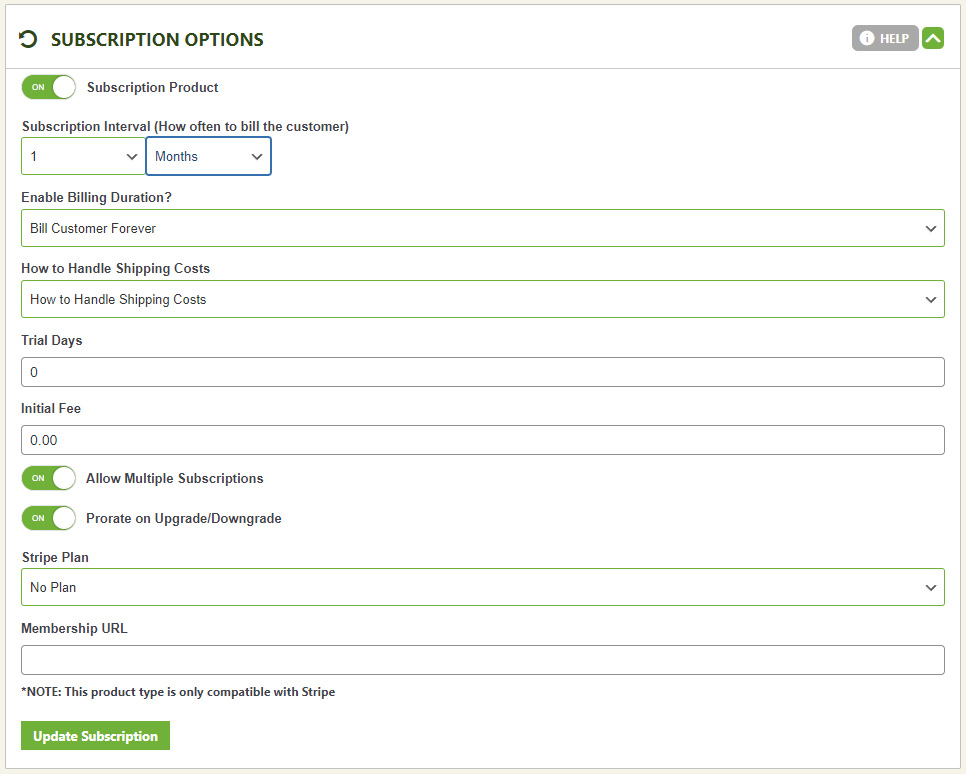
Turn on subscriptions and this product skips the cart entirely — sign-up and payment happen together, on one page.
- Subscription Interval: How often the recurring payment occurs — e.g. 1 Month for monthly billing, or 2 Weeks for a bi-weekly charge.
- Billing Duration: How many times the recurring charge repeats. A one-year subscription billed monthly would have a duration of 12.
- How to Handle Shipping Costs: Mark the subscription ‘shippable’ or ‘not shippable’ in its shipping setup, then choose whether that cost applies to just the initial payment or to every recurring charge.
- Trial Days: Days before the first charge hits. Enter 14 and the customer isn’t billed until 14 days after they order.
- Initial Fee: An extra charge added to the first payment only — useful as a setup fee.
- Allow Multiple Subscriptions: Lets one account sign up for the same product more than once. Keep this off for something like a single membership; turn it on for something like multiple hosting accounts.
- Prorate on Upgrade/Downgrade: Prorates the payment automatically when a customer switches plans.
- Stripe Plan: The group this subscription belongs to — handy for letting customers upgrade or downgrade between tiers, like Bronze, Silver, and Gold. Learn more about creating a plan.
- Membership URL: A page only members can access — customers get the link the moment they subscribe. EasyCart can lock down WordPress pages by purchase, making this a great home for downloads, videos, or exclusive content for paying members.
WP EasyCart — Subscription Options Panel
Ready to Launch Recurring Revenue?
Pair EasyCart with Stripe and turn one-time buyers into members who pay you every month.