
Product Details
Basic Settings
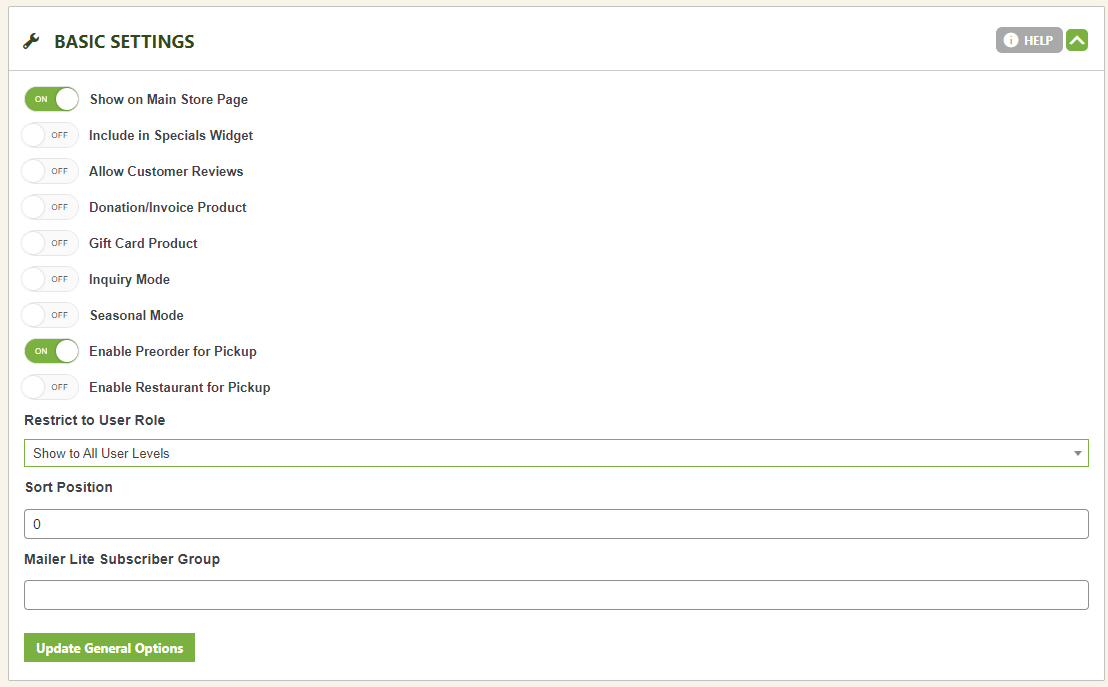
One product, a dozen different jobs. Basic Settings let you turn any product into a donation, an invoice, a gift card, an inquiry form, a seasonal preorder, or a role-restricted item — all without touching a line of code.
Watch the Walkthrough
Prefer to watch? See how invoice, gift card, inquiry, and seasonal product modes work in the video guides throughout this page — starting with invoice products below.
Creating an Invoice Product
Invoices and service-type products let you send users to a single product page to pay you and your business. Make collecting payments easy with this one product type.
General Display & Engagement Options
Three quick toggles that decide where and how a product shows up.
- Show on Main Store Page: Puts this product front and center on your main store page — think of it as marking the item ‘Featured.’
- Include in Specials Widget: Adds this product to the EasyCart specials sidebar widget, if you’re using one. See how to install and set up widgets here.
- Allow Customer Reviews: Adds a 5-star rating and a dedicated reviews tab next to the description. Shoppers can leave a comment and rating, and every submission lands in your reviews admin area for approval. Learn more about managing reviews here.
Donation, Invoice & Payment Products
Let the customer name the price.
Turn on Donation/Invoice Product and the price field becomes fully editable at checkout — perfect for straight donations, or a ‘Make-A-Payment’ product that lets customers pay off a bill for any amount they owe. Head into the language editor to rewrite the on-page wording so it reads like an invoice or payment page instead of a donation form.
Gift Card Products
Sell, deliver, and redeem gift cards without lifting a finger.
Turn this on and every purchase generates a unique 12-digit code the recipient can redeem at checkout. Customers fill in a To, From, and Message, plus an email address, and EasyCart sends the gift card automatically — no manual work on your end. Learn how to manage gift cards here.
Creating a Gift Card Product
Gift Cards let you create, sell, and redeem value-based gift cards on your EasyCart store. Watch as we show you how to build and manage these great marketing tools for your business.
Inquiry Mode
Some products deserve a conversation before a cart button.
Inquiry Mode swaps the Add to Cart button for an Inquiry button, so shoppers ask questions instead of checking out. EasyCart ships with its own inquiry form by default, or point the button at a custom inquiry URL — a Gravity Forms page or any other WordPress form works great here.
Creating an Inquiry or Quote Product
Wish your users would contact you before purchasing? Look no further than our Inquiry Mode for products, allowing users to submit a contact form and ask more questions before purchasing.
Seasonal & Catalog Mode
Not selling yet? Show it off anyway.
Seasonal Mode replaces Add to Cart with a ‘Coming Soon’ button. Add an expected date, or a custom message like ‘Available this Summer,’ and turn any product — or your whole store — into a catalog with zero selling pressure.
Creating Catalog or Seasonal Product
Want to turn your store into just an online catalog with no selling? Or maybe just one product you wish to hide ‘Add to Cart’ features for a while? Look no further than our seasonal Catalog Mode system in this video tutorial!
Preorder, Restaurant Pickup & Role Restrictions
Fine-tune exactly who can buy, and when.
- Enable Preorder for Pickup: Lets shoppers schedule a future pickup time right on the final checkout panel. Scheduling follows the store hours and checkout rules you’ve already set for your restaurant.
- Enable Restaurant for Pickup: Built for same-day orders — customers choose ‘ASAP’ or a specific time later in the day on the final payment page, again following your store’s schedule and checkout settings.
- Restrict to User Role: Lock a product to a single User Role you’ve created under User Accounts. Handy for private catalogs — just use it carefully, since anyone outside that role loses access entirely.
WP EasyCart — Product Basic Settings Panel
Make Every Product Work the Way You Do
Donations, invoices, gift cards, inquiries, seasonal drops — Basic Settings covers it. Still not sure which mode fits your product?