
Detailed Settings
Country List & Management
The country list controls which countries your shoppers see at checkout — it’s how you limit your store to only the regions and countries you want to sell to.
Watch the Walkthrough
Prefer to watch? Countries and states/provinces, covered together in one quick video.
Edit Countries & States/Provinces
Learn how to enable your country and states/provinces so you can sell to exactly the regions you choose with your WordPress shopping cart.
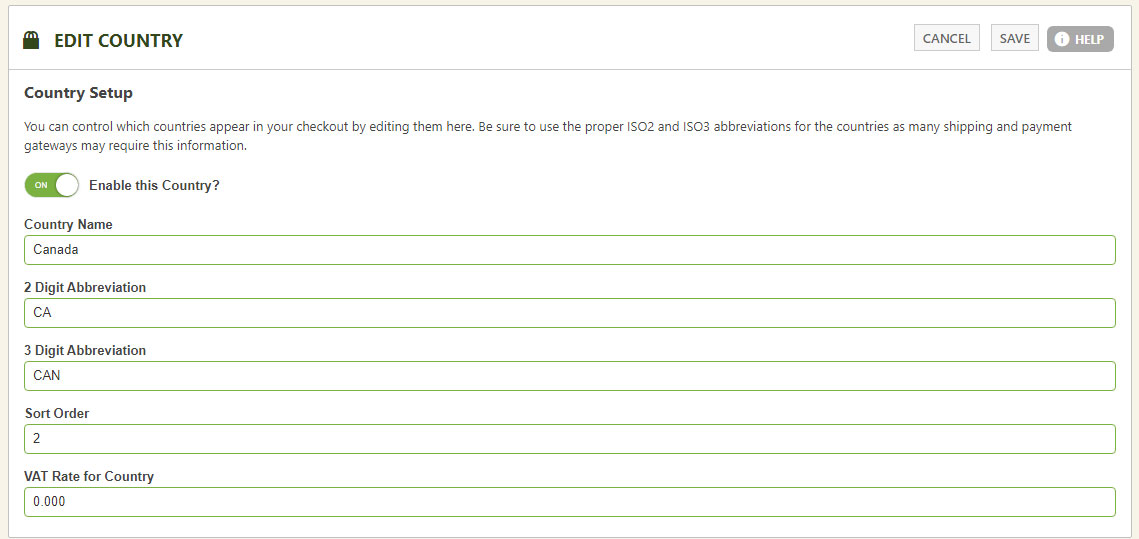
Editing Countries
Country setup is critical for some payment gateways and shipping API systems. Enter the country name plus the correct, world-recognized 2-digit and 3-digit ISO codes. Want a particular country listed first in the checkout selection boxes? Give it a sort order.
💡 VAT by country? This is the place to enter each country’s individual VAT rate as a percentage.
WP EasyCart — Country List Management
Sell Where You Want to Sell
Pair your country list with state and province management for clean checkout data everywhere you ship. Questions? We’re happy to help.