
User Management
User Roles
User Roles let you designate an account with a specific role in your store. Administrator and Shopper come built in — every new customer lands in the Shopper role automatically — and custom roles unlock powerful features like member-only pricing.
Why Create a Custom Role?
Create a new user role and you can build custom pricing on your store for users logged in with that role. A ‘wholesale’ role, for example, lets you set unique per-product pricing that only appears for customers who log in with a wholesale account. Retail shoppers see retail prices. Wholesale buyers see theirs. One store, every audience.
Editing User Roles
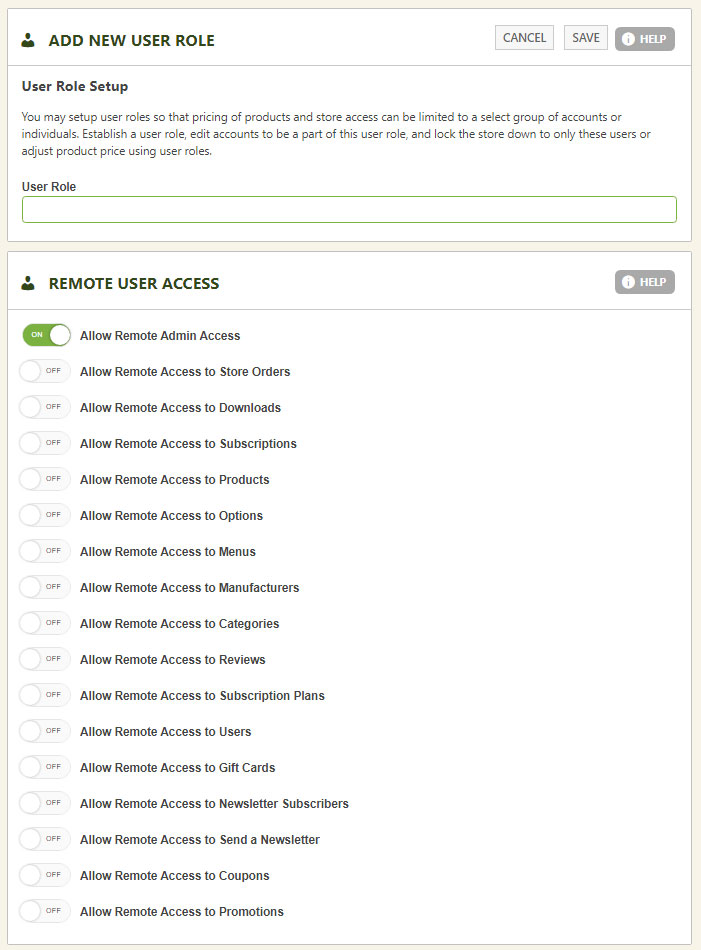
Simply edit a user role and give it a unique name to identify it. You can also choose whether the role has access to your EasyCart administrative area — useful when setting up our external apps for tablets, phones, and other devices.
💡 Note: Remote admin access works with our external desktop and tablet apps. In the Desktop app, you can create a user account here and grant access to only the orders, products, or marketing panels — perfect for limited-access staff.
WP EasyCart — Edit User Role
Ready to Build Wholesale Pricing?
Pair a custom role with per-product role pricing and open your store to wholesale buyers, members, and VIPs. Questions? Our support team has answers.