
Troubleshooting
Diagnostics
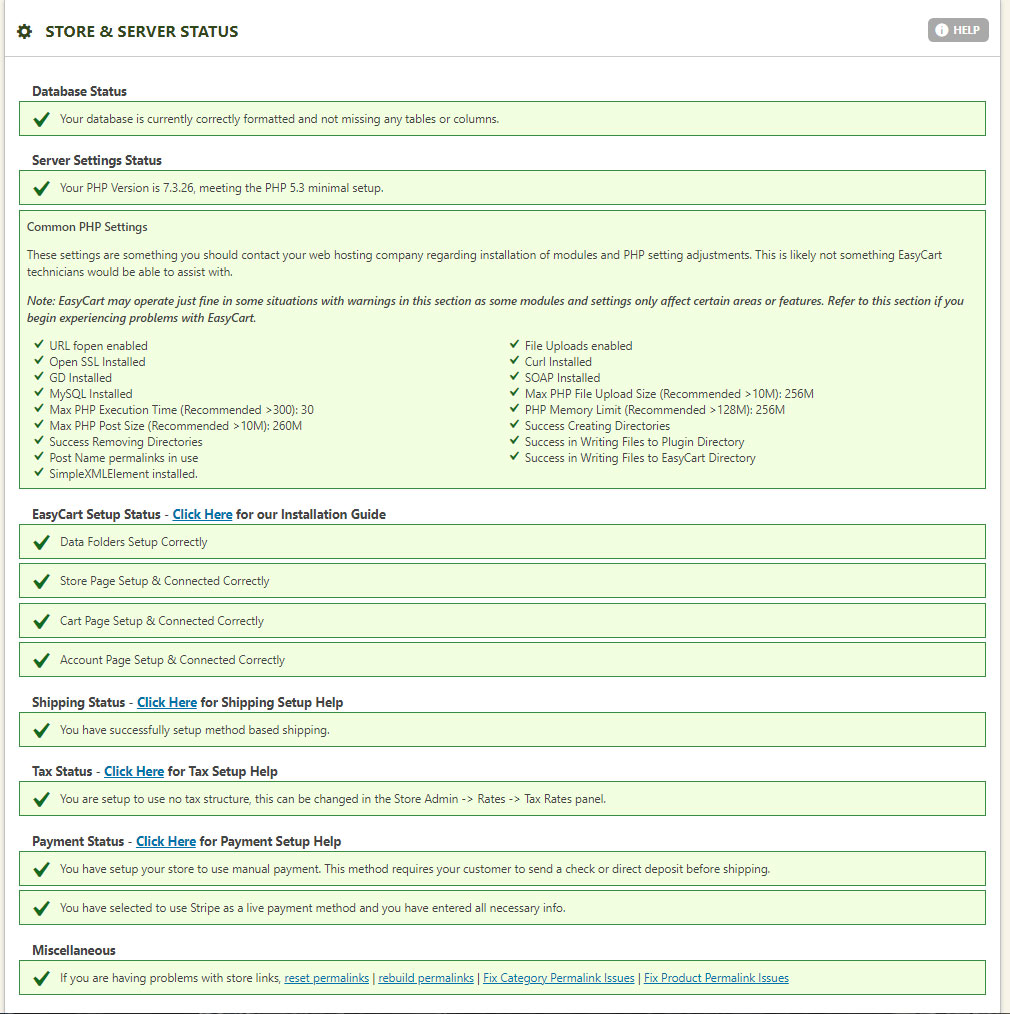
eCommerce takes far more server and PHP configuration than a standard website. The Diagnostics system checks the key pieces automatically, so you can spot and fix problems fast.
What Diagnostics Checks
Most EasyCart issues trace back to a misconfigured PHP or server setup — this is where you find out.
- PHP Configuration: Confirms your server meets what EasyCart needs to run properly.
- EasyCart Setup: Reviews your core cart configuration.
- Shipping: Verifies your shipping setup and connections.
- Taxes: Checks your tax configuration.
- Payment Setup: Confirms your gateway and payment settings.
The Store Status page also gives you a one-click way to reset permalinks — useful since linking often breaks during plugin, theme, or WordPress updates.
Fixing Broken Product Links
SEO plugins and WordPress updates can silently break the connection between a product and its storefront link.
Getting 404 Errors on Products?
When products stop linking correctly, or you start seeing 404 errors, it usually means a slug or permalink got adjusted or corrupted. This page includes buttons to rebuild, reset, and fix product permalinks and post tags — run them whenever storefront links stop matching product detail pages.
WP EasyCart — Store Status Page
Diagnostics Turning Up Errors?
If Diagnostics flags something you’re not sure how to fix, our support team can walk through the results with you.