
How-to › Fix common problems
How to Fix Order Emails Going to Spam or Missing
Get receipts, shipping notices and password resets into the inbox. You read the health card, set your sender, use a mail plugin, add SPF, DKIM and DMARC records and test. 8 parts.
Quick links
Where to find it:WP Admin › EasyCart › Settings › Email
Before you start
Why mail goes missing
What you need, and how your store sends email today.
How your store sends email
What you need and why mail goes missing
no stored settingsWhat you need. Any edition of WP EasyCart, a from address on a domain you own, and the ability to add records to that domain’s DNS. Your domain registrar or DNS host has that screen.
What happens today. By default WP EasyCart hands every receipt, shipping notice and password reset to WordPress, which sends it from your web server. Inboxes are wary of mail from a web server, because nothing vouches that your server is allowed to send for your domain. So it lands in spam, or is dropped without a word.
The cure. Four things. Send from an address on your own domain. Send through a mail plugin or a mail service instead of your web server. Publish three DNS records, SPF, DKIM and DMARC, that prove the mail is yours. Then test, and watch the email log. WP EasyCart checks all of it for you on the Settings › Email screen.
💡 Note: Sent is not the same as delivered. The log shows your mail server accepted the email. Whether an inbox trusts it is what SPF, DKIM and DMARC decide.
Fix it
Five steps
Read the health card, set your sender, use a mail plugin, add the DNS records and test.
Step 1. Read the Email health card
Settings › Email › Deliverability
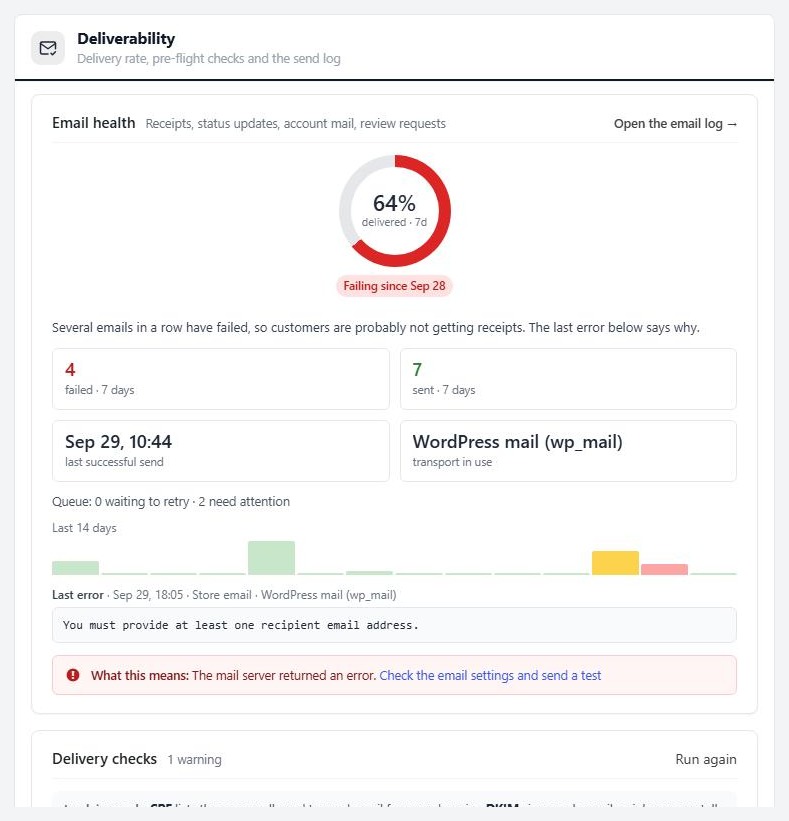
no stored settingsOpen EasyCart › Settings › Email. The Deliverability section is at the top. It starts with the Email health card, which reads your last seven days:
The ring is the share of emails your mail server accepted. 98 per cent or more is green and Healthy. Between 85 and 98 it turns amber and reads Some failures. Below 85 it turns red. It reads Failing since a date after three failures in a row, or No emails sent yet.
Four figures: failed and sent in seven days, the time of the last successful send, and the transport in use, meaning how mail leaves the site.
Last error: the words your mail server sent back, with a plain explanation and a suggested fix, such as a wrong SMTP password, a blocked port or a refused from address.
Test emails and the simulated failure are not counted, so testing cannot spoil your score. Accepted means the mail server took the email. It does not promise the inbox. The checks below deal with that part.
After three failed sends in a row a red banner appears on every WP EasyCart screen, saying store emails are failing, with buttons to fix email and see the affected orders. You can snooze it for 24 hours.
Step 2. Set your sender and your copy address
Three addresses ship with placeholders
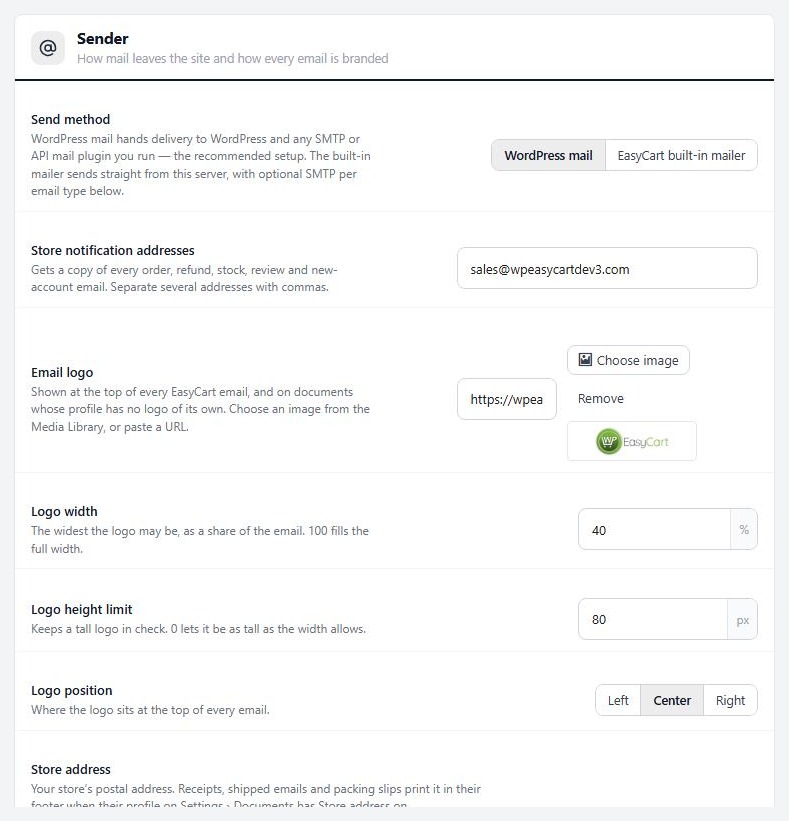
no stored settingsStill on Settings › Email, set these three, all of which start as youremail@url.com:
Store notification addresses ( Sender section ): where you get a copy of every order, refund and new-account email. Use an inbox someone reads.
Order emails come from ( Order emails section ): the sender on receipts, invoices and refunds. Write it as Your Store <orders@yourdomain.com>.
Account emails come from ( Account emails section ): the sender on password resets and activation emails. Point it at an inbox you watch, because people reply.
Use an address on your own domain, not Gmail, Yahoo, Outlook or another free mailbox. Gmail, Yahoo and Microsoft refuse mail that claims to be from them but did not come from them. The Delivery checks card shows this as a red problem.
Set Send method to WordPress mail. It is the default and the recommended setup, because a mail plugin then takes over delivery. The EasyCart built-in mailer sends straight from your server, with its own SMTP fields per email type. Choose it only if you have no mail plugin and need those fields.
⚠️ Careful: Until you change them, your store copies go nowhere useful and receipts leave from an address you do not own, which is the quickest route to a spam folder.
Step 3. Send through a mail plugin or service
A free plugin and a real sending account
no stored settingsInstall one mail plugin. The Delivery checks card suggests WP Mail SMTP or FluentSMTP, both free, and shows an Improve delivery in 3 steps guide while your mail still leaves through the basic server route. Follow the plugin’s setup wizard and connect it to a sending account.
Good sending accounts include Google Workspace, Microsoft 365, Zoho Mail, Amazon SES, SendGrid, Mailgun, Brevo, Postmark, SparkPost, Mailjet and MailerSend. WP EasyCart recognises these and gives DNS help for them. Any provider that supports SMTP or an API works.
Keep Send method on WordPress mail. An SMTP plugin only affects WordPress mail, so if the built-in mailer is selected the plugin is bypassed. The Delivery checks card flags this as a problem and offers to switch. It also warns when two mail plugins are active, because only one of them sends, and when a custom send method covers only some emails.
Free Gmail accounts and other capped mailboxes are a poor fit. The card warns when Gmail sending nears its daily limit, and mail past the limit fails.
Step 4. Prove the mail is yours with SPF, DKIM and DMARC
Three DNS records, explained plainly
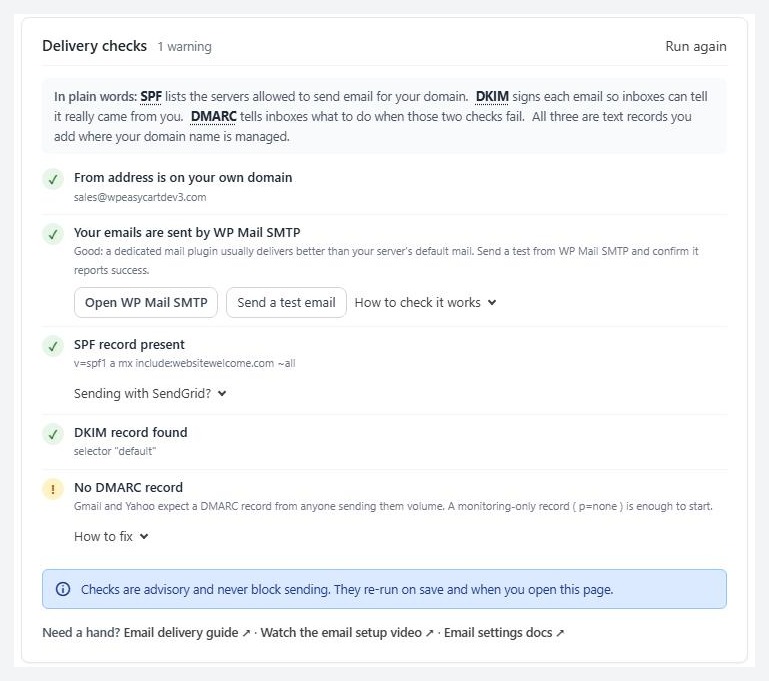
no stored settingsThese are three short records you add at your domain’s DNS. Your sending account or mail plugin tells you the exact values. The Delivery checks card looks them up for the domain in your order from address.
SPF is a list of the servers allowed to send mail for your domain. It is one TXT record that starts v=spf1. A domain may have only one, so add your sending service to the record you have. Do not create a second one. The card says No SPF record when it finds none.
DKIM is a digital signature added to every email. The receiver checks it against a public key in your DNS, so it knows the mail was not changed or forged. Your sending service gives you one or two records, usually CNAMEs. The card looks for the common selector names. If your provider uses an unusual one it can say No DKIM signature found even though DKIM works, so confirm in your provider’s dashboard before you worry.
DMARC tells receivers what to do when SPF and DKIM fail. It is one TXT record on _dmarc.yourdomain.com. Gmail and Yahoo expect one from anyone who sends them volume. Start with monitoring only. Something like v=DMARC1; p=none; rua=mailto:you@yourdomain.com asks receivers to report and reject nothing.
DNS changes can take an hour or more to spread. The card keeps DNS answers for an hour, so press Run again on the Delivery checks card after you add a record. If your server does not allow DNS lookups from PHP the card says DNS checks unavailable. Check the records at your DNS host or with your mail provider instead.
Step 5. Send a test
Test the route, then a real order
no stored settingsPress Send a test email. It shows on the Email health card when nothing has gone out in seven days, and in the help under the mail plugin check. It goes to the signed-in admin the same way order emails go, so a success means receipts take the same route. It appears in the log as Test. Check the inbox and the spam folder.
The Order emails section also has Send a test order email, and the Subscription emails section has a Send test for each subscription message. They all use Send test emails to. Leave it empty to use your own WordPress address.
Then place a test order with your card gateway in test mode. Use a Gmail address and an Outlook address if you can. Open the receipt and check the sender name, the address and the folder it lands in.
To watch a retry happen without touching customers, open the Retry queue and press Simulate a failed send. It queues a message that always fails. No mail goes out.
Keep it running
Watch and repair
The email log, the retry queue, and what to check when something still fails.
Watch the email log and the retry queue
What was sent, what failed, and what tries again
no stored settingsThe Email log lists the last 30 days: when, type, recipient, transport and result. Filter by Failed, Retrying, Sent or All. Search by order number, address or subject. It records who, what and the result. It never stores the message body. Entries stay 30 days.
When a send fails, WP EasyCart does not lose it. With Retry failed emails automatically on, which is the default, the email goes into the retry queue, kept in the ec_email_queue table. It is tried again after 1 minute, then 10 minutes, then 1 hour, then every 6 hours, up to 5 attempts. The queue runs on WordPress cron every 5 minutes while anything is waiting.
The Retry queue card shows how many are waiting and how many gave up, when it runs next, and a table of each with its attempts, next attempt and last error. Press Send queue now to run it at once, or Send now or Retry on one row. Once you fix the cause, press Retry all failed in the log.
On the Orders list, an order whose receipt failed shows a Receipt not sent chip, or Email retrying while it waits, with a Resend link. Open Orders with the failed email filter, or press See affected orders in the banner, to list them.
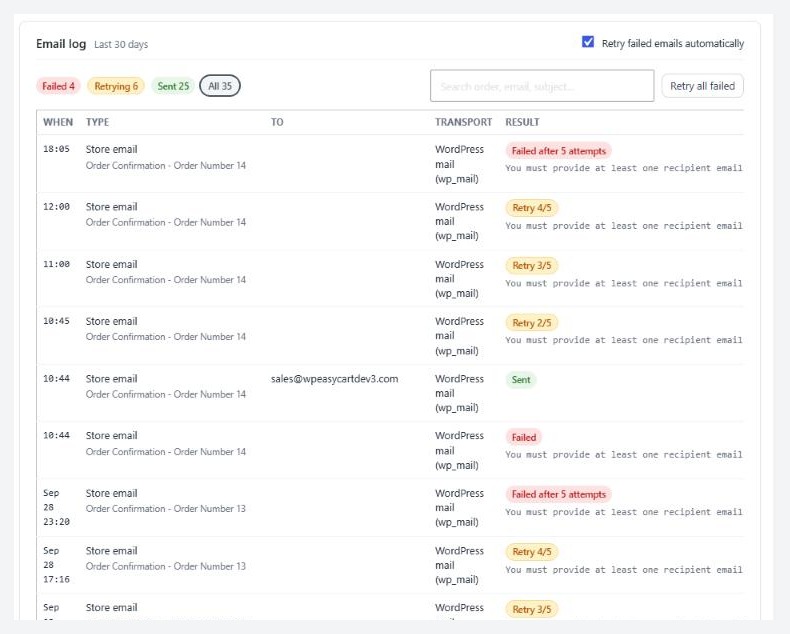
💡 Note: Retries are automatic, but an email that used up all 5 attempts stays in the queue as gave up. It will not send again until you press Retry.
If it does not work
Symptoms and fixes
no stored settingsReceipts go to spam, but the log says Sent. The mail server accepted them, so the problem is trust. Check that the from address is on your domain and that SPF, DKIM and DMARC show green. Then send from your mail plugin and check its own log.
The log says Failed. Read the Last error. A refused login means the SMTP or app password changed. Could not connect means the host blocks the port. A TLS or SSL error means the encryption does not match the port, usually TLS with 587 or SSL with 465. A refused sender means the from address is not on a domain your account has verified.
Nothing is in the log. Nothing was sent. If a message says the database update for email logging has not run, load any WP EasyCart admin page. If the store still logs nothing, a plugin may be sending mail around WP EasyCart, so test with only your mail plugin active.
You never get your own copy. Store notification addresses is still the placeholder, or the copy is landing in spam.
A custom send method only sends some emails. Another plugin, such as an older Mandrill add-on, took over the send method but handles only some emails. WP EasyCart sends the rest with WordPress mail, so they can arrive from a different server. Update that plugin, or switch it off and use WordPress mail with a mail plugin.
Still stuck? Open a request in your account and paste the Last error from the Email health card.
Keep going
Related panels
Every option on Settings › Email.
What receipts, shipped emails and the PDF invoice show.
Resend a receipt from the order, and filter orders whose email failed.
The subscription emails you can test.
Ready to run your store on WP EasyCart?
Everything in this guide works with the free plugin. PRO and Premium add subscriptions, memberships, wholesale pricing and more. Try every PRO feature free for 14 days.



