
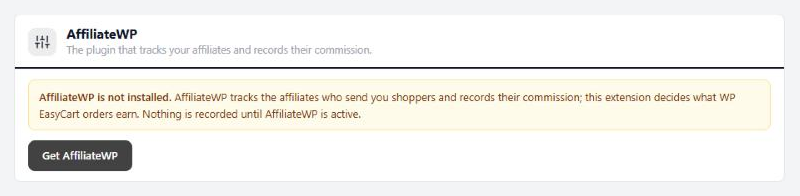
AffiliateWP
The plugin that tracks your affiliates and records their commission.
no stored settingsA quick check that everything is joined up. It reads:
AffiliateWP: active, with its version.
WP EasyCart orders: Tracked, or Not tracked while the integration is off.
AffiliateWP’s own rate: the rate that applies where no rule does.
Refunds in AffiliateWP: whether unpaid referrals are rejected on a refund.
Referrals from WP EasyCart: how many so far, and how many are pending.
Buttons open AffiliateWP’s Affiliates, Referrals and settings. When AffiliateWP is missing, inactive or too old, the section says so and offers the fix instead. It stays open whatever your license.
Commission rules
Your own rate for chosen products, for chosen affiliates or every affiliate.
no stored settingsA rule sets the commission on its products instead of AffiliateWP’s rate, including rates you set on an affiliate or a group. Add rule opens a drawer:
Name: only you see it.
Commission: a Percentage, up to 100, or an Amount per item. Set 0 to pay nothing, for example on gift cards.
Items that count: at most this many of each product per order. Empty counts every item; 1 pays once per product ordered, whatever the quantity.
Affiliates: Every affiliate, or only the ones you pick by name, username, email or ID.
Products: found by name, SKU or ID.
Rule is on: switch a rule off without deleting it.
Which rule wins. A rule naming the affiliate beats one for every affiliate. Between two rules of the same kind for the same product, the newer one wins, and the list flags the overlap. A percentage is taken from what AffiliateWP counts for the product: its line total plus an even share of shipping and tax, unless AffiliateWP leaves them out. Affiliates paid a flat amount per order in AffiliateWP keep it. Changing or deleting a rule changes new referrals only.

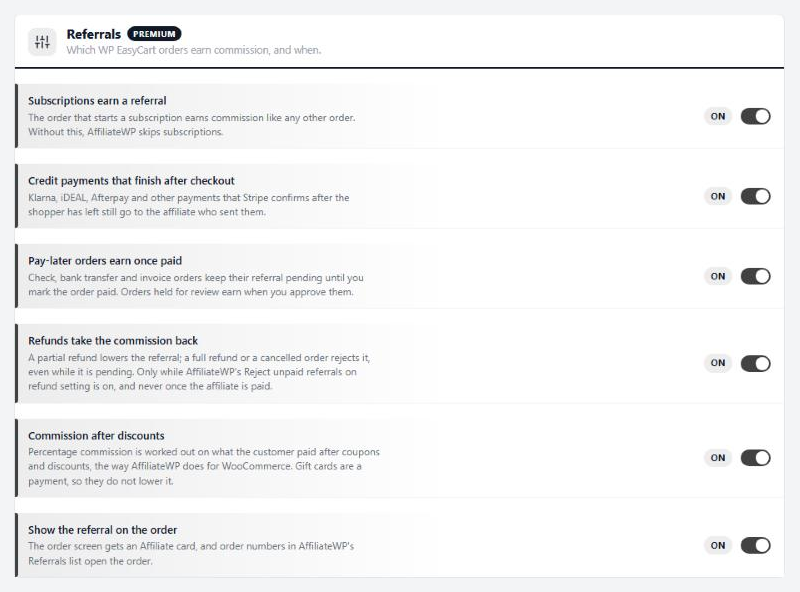
Referrals
Which WP EasyCart orders earn commission, and when.
6 settingsSubscriptions earn a referral
The order that starts a subscription earns commission like any other order. AffiliateWP skips subscriptions on its own, so without this they earn nothing.
Credit payments that finish after checkout
Klarna, iDEAL, Afterpay and other payments that Stripe confirms after the shopper has left still go to the affiliate who sent them. The store remembers the shopper’s affiliate while they shop, and hands it to AffiliateWP when Stripe finishes the order.
Pay-later orders earn once paid
Check, bank transfer and invoice orders keep their referral pending until you mark the order paid. Orders held for review earn when you approve them. Off, those orders earn as soon as they are placed.
Refunds take the commission back
A partial refund lowers the referral by the same share. A full refund or a cancelled order rejects it, even while it is still pending. This only happens while AffiliateWP’s Reject unpaid referrals on refund setting is on, and never once you have paid the affiliate.
Commission after discounts
Percentage commission is worked out on what the customer paid after coupons and discounts, the way AffiliateWP does for WooCommerce. It applies to your rules and to AffiliateWP’s own rates. Gift cards are a payment, not a discount, so they do not lower it.
Show the referral on the order
Adds an Affiliate card to the order screen, and turns order numbers in AffiliateWP’s Referrals list into links to the order.
Ready to run your store on WP EasyCart?
Everything in this guide works with the free plugin. PRO and Premium add subscriptions, memberships, wholesale pricing and more. Try every PRO feature free for 14 days.
