
Elementor Page Builder
WP EasyCart Store Element
Custom tools you can’t find anywhere else in EasyCart. The Store element lets you highly configure the grid, the design, and the filtering system of your store — all from inside Elementor.
Store Element vs. Products Element
The Store element is similar in many ways to the Products element — here are the key differences.
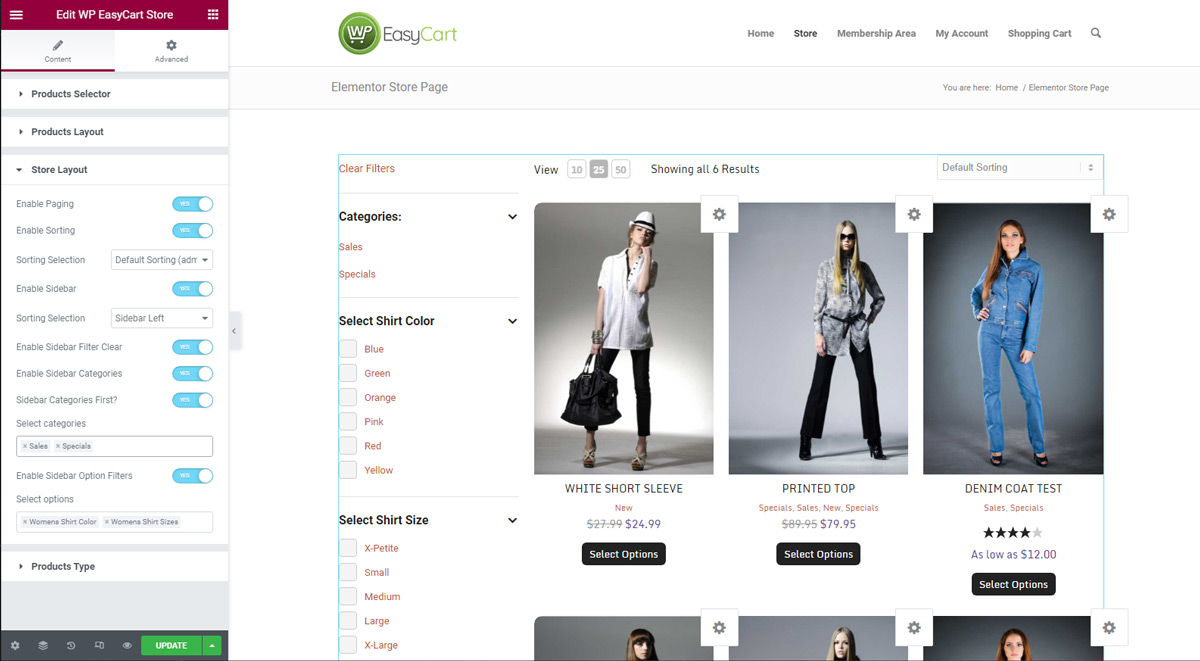
- WP EasyCart Store Element: Displays a grid of store products, provides a product filtering sidebar, and lets you enable or disable pagination and sorting.
- WP EasyCart Products Element: Displays a grid of products OR a slider system for banners or other designs.
This Element Lets You
Everything you can build and adjust with the Store element.
- Add a product grid to a page.
- Add a title & description to the display.
- Select specific products, categories, or brands for the page.
- Full sidebar filtering system for product options — either a slide-out overlay sidebar or a dedicated sidebar.
- Display the sidebar left, right, or as an optional overlay.
- Product option filtering scoped to the products on the page — a true filtering system.
- Customize column counts, product image corners, borders, and more.
- Customize product display items such as price, rating, title, add to cart buttons, quickview, and more.
💡 Tip: The Search Bar element works great above the store — it lets customers search across your EasyCart products and store.
Elementor — WP EasyCart Store Element
Build a Store Page Shoppers Can Filter
Grid, design, and filtering — all configurable from one element. If you get stuck dialing it in, our support team can help.