
Step 1. Check your store pages
Settings › Store details › Store pages
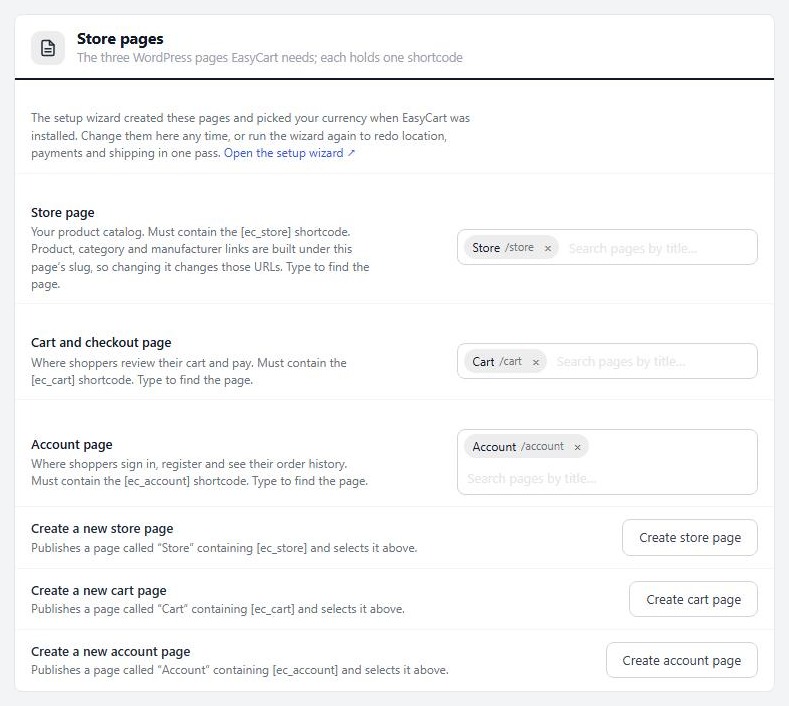
no stored settingsWP EasyCart makes a Store, a Cart and an Account page when you install it, each holding one shortcode. Open EasyCart › Settings › Store details to see them. The Store page must hold [ec_store], the cart page [ec_cart] and the account page [ec_account].
If you rebuild one of these pages in Divi, keep the shortcode on it and keep the page chosen in that setting. The Create store page, Create cart page and Create account page buttons make a fresh page with the right shortcode if you lose one.
Ready to run your store on WP EasyCart?
Everything in this guide works with the free plugin. PRO and Premium add subscriptions, memberships, wholesale pricing and more. Try every PRO feature free for 14 days.
