
Extensions
Installing Extensions
Every extension is installed, activated and updated from EasyCart › Extensions, one click each. 6 parts.
Quick links
Where to find it:WP Admin › EasyCart › Extensions
Getting started
Where extensions live
The catalog every store has, and the plugin that installs from it.
The Extensions catalog
Every extension in one place, under EasyCart › Extensions
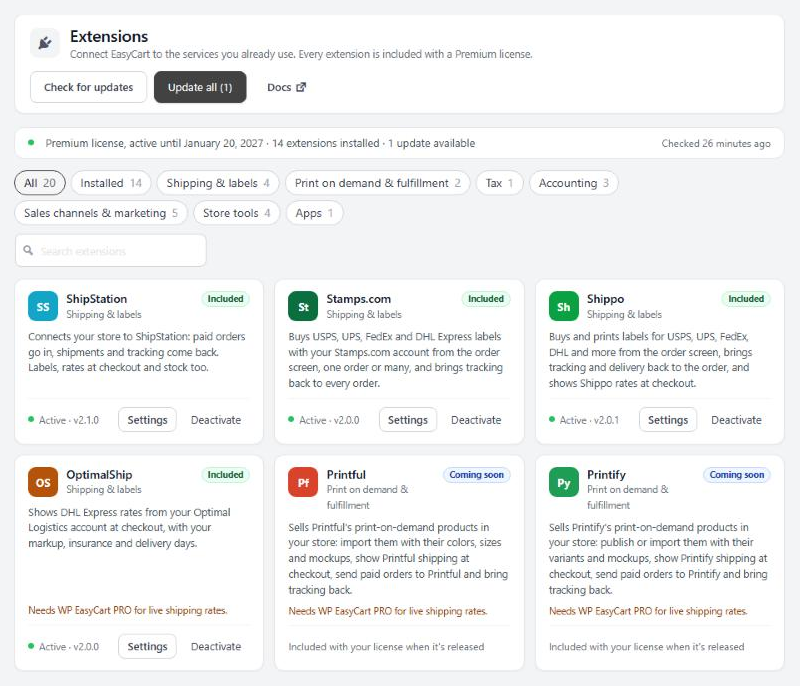
no stored settingsEvery store has the catalog at EasyCart › Extensions. Each extension has a card with what it does and where it stands on your site. Every extension is included with a Premium license.
Filter the cards with the pills along the top: All, Installed, and one per category: Shipping & labels, Print on demand & fulfillment, Tax, Accounting, Sales channels & marketing, Store tools and Apps. The search box finds an extension by name or by what it does.
A few cards work differently:
Coming soon: announced but not released yet. There is nothing to install. With a Premium license the card reads Included with your license when it’s released.
Store manager apps: links to the App Store, Google Play and the desktop app for managing orders and products. The apps check your license when you sign in.
Retired: no longer offered. The card says why and how to remove it.
Without a Premium license, each card shows what the extension adds and Learn more. A Pro license can upgrade to Premium from the banner at the top.
WP EasyCart Premium
The plugin that installs and updates your extensions
no stored settingsWP EasyCart Premium is a small plugin included with a Premium license. It installs, activates and updates your extensions from the catalog, lists each one’s settings under EasyCart › Extensions, and keeps their API keys encrypted. It needs WP EasyCart and WP EasyCart PRO 6.0.2 or newer.
One click. With an active Premium license, the catalog’s banner reads Your Premium license includes every extension. Press Install WP EasyCart Premium. WP EasyCart PRO downloads it from wpeasycart.com, checks the file, installs and activates it, and brings you back to the catalog. Other EasyCart screens show the same offer until it is installed; Remind me later hides it for 7 days.
If your host asks for FTP or SSH details before WordPress can install a plugin, a page asks for them first. WordPress uses them on this site only.
Once Premium is active, the banner shows your license’s end date, how many updates are waiting and when wpeasycart.com was last checked. If Premium is installed but not active, the banner offers Activate WP EasyCart Premium.
💡 Note: One-click install is offered to a current Premium license. A trial, a Pro license or a lapsed license sees the offer to upgrade or renew instead.
Everyday
Install and update
One click to install, and updates that come to you.
Installing an extension
One click from its card
no stored settingsPress Install on the card. The extension is downloaded, installed and activated, and its settings appear under EasyCart › Extensions in the left menu. If WP EasyCart Premium is not installed yet, Install on a card sets up Premium first and then that extension.
After that, the card shows where the extension stands:
Active, with its version: Settings opens its page and Deactivate switches it off. Its settings are kept.
Installed · not active: Activate switches it on.
Needs a newer WP EasyCart, PRO or Premium: update that plugin first, then install or activate the extension.
Each extension’s guide covers its own setup: the account it connects to and the settings to check first.
Keeping extensions up to date
Update, Update all and Check for updates
no stored settingsWP EasyCart Premium checks wpeasycart.com for new versions about every 12 hours. A card with an update shows the new version and Update to that version.
Update all, at the top of the catalog, updates every active extension that has one. Check for updates asks wpeasycart.com right now, instead of waiting for the next check.
Extension updates also show on the Plugins and Updates screens like any other plugin, and WordPress auto-updates work for them.
When an installed extension is too old for your WP EasyCart, its card says Update to the version it needs, and EasyCart screens show a notice with Update and Remind me in a week. The extension keeps running until you update.
Other cases
Manual installs and lapsed licenses
When one click is not available, and what happens if your license ends.
Installing from your account
The fallback when one-click install is not available
no stored settingsOne-click install needs an active Premium license, a site user who can install plugins, and a site that allows plugins to be installed from the dashboard. When it is not available, the card says Download and the banner says Open my account.
Step 1. Sign in at https://www.wpeasycart.com/my-account/ and download the extension, or WP EasyCart Premium itself, as a .zip file.
Step 2. In WordPress open Plugins › Add New Plugin › Upload Plugin, choose the .zip file and press Install Now.
Step 3. Activate it, then find its settings under EasyCart › Extensions.
Once WP EasyCart Premium is active, extensions you installed this way update from the catalog like the rest.
⚠️ Careful: Upload the .zip file as it is. Some Mac browsers unzip downloads on their own; if yours does, download the file again with that switched off.
If your license lapses
What keeps running and what waits
no stored settingsYour extensions keep running with their current settings. Installing, updating and changing settings wait until the license is active again, and a card with an update says it waits for renewal.
EasyCart screens ask you to choose: renew, or Deactivate WP EasyCart Premium. Deactivating it removes the extensions’ settings pages from the admin and stops their updates and the reminder. Tick Also deactivate my extensions to switch them off too; their settings are kept. Renew any time and activate Premium again to pick up where you left off.
Keep going
Related panels
Where your license key is activated.
An extension guide, from connecting to the first label.
Your license state, and how long support and updates last.
Try the PRO features free for 14 days
Anything marked PRO comes with WP EasyCart PRO or Premium. Take the whole thing for a run on your own store before you decide.
