
What’s newCard-testing protection now guards every store, Free included. See checkout

Extensions › Groupon & Deal Sites

Groupon & Deal Sites Extension

Sell a Groupon, LivingSocial or Wowcher deal through your store: import the voucher codes, honor what buyers paid, and report redeemed codes so you get paid. 10 parts.

Quick links

Where to find it:WP Admin › EasyCart › Extensions › Groupon & Deal Sites

On default is enabledValue factory default

Getting started

Set up a deal

What you need, your deals, and making one with its voucher codes.

Before you start

What the extension needs, and how a deal works

no stored settings

What you need. A Premium license, with Groupon & Deal Sites installed from EasyCart › Extensions, which also installs WP EasyCart Premium. It needs WP EasyCart 6.0.2 or newer and WP EasyCart PRO 6.0.2 or newer with a current license, because voucher codes live in PRO’s Offers. Anything missing is listed at the top of the Deals section.

How a deal works. You sell vouchers on Groupon, LivingSocial, Wowcher or another deal site, and the site sends you a file of voucher codes. Make one deal here for each campaign and import its codes. Each code works once at checkout, like a coupon. When the promotional value ends, unused codes switch to what the buyer paid. You report redeemed codes back to the deal site, which is how you get paid.

A deal is built on ordinary offers, named after the site and the deal, so you can also open them in Marketing › Offers.

💡 Note: Changing deals needs a current Premium license. If it lapses, the page turns read-only and your deals keep working: codes still redeem and still switch to the amount paid.

Deals

One deal for each deal you run on a deal site. Open a deal to import its codes, report redeemed ones, switch off refunded vouchers, or see what it brought in.

no stored settings

Every deal is listed with its site, how many codes it has and how many were redeemed, what a voucher is worth and its status: Active, Amount paid once the promotional value has ended, or Archived. A banner at the top counts redeemed codes not yet reported, with a Report them button.

New deal makes one. Open shows a deal in six tabs: Codes, Report, Import, Void, Settings and History.

Settings in a deal changes its name, deal link, the price paid, the date the promotional value ends ( until it has ended ) and uses per customer, and can archive it. An archived deal’s codes keep working. What a voucher is worth, its products and stacking are changed in the Offers editor, through Open the offer. History lists every import, void and move with who made it.
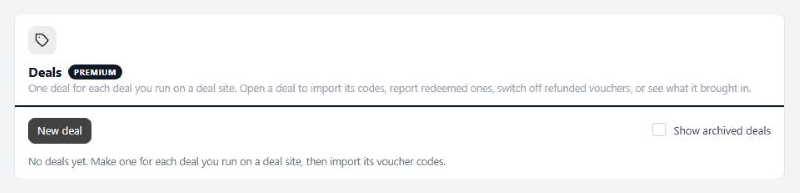
Deals, before the first deal is made.

Making a deal

The five steps of New deal

no stored settings

1. Deal. The deal site, a name only you see, and optionally the deal’s link or ID for your records.

2. What a voucher gets. An amount to spend, such as $50 off the order. A percent off everything, or off one product. A product: one product covered in full or in part, with the shopper paying shipping. Then the uses per customer ( 0 for no limit; match the deal’s fine print ), whether it can be combined with other codes and offers, and whether it also comes off subscription products: on the first payment only, for a number of months, or on every payment.

3. Value and dates. What the buyer paid the deal site, and the date the promotional value ends. For Groupon and LivingSocial both are required: their merchant terms say an unused voucher stays worth what was paid. For Wowcher and other sites it is a choice; without it, codes stop working when the promotional value ends.

4. Codes. Import the code file now, or later from the deal’s Import tab.

5. Review, then Create deal.

Importing voucher codes

The deal site’s code file, read in your browser

no stored settings

Choose the CSV or TXT file from the deal site, or paste codes one per line. The file is read in your browser and never stored on the server. Files over 20 MB need splitting.

The importer spots a header row and picks the columns: Codes are in for the redemption code, and Voucher numbers are in for the voucher or security number, which is kept for reporting. Change either if it guessed wrong. Codes are stored in capitals, with anything but letters, numbers, dashes and underscores removed.

Before anything is added it checks the codes and tells you how many are new, how many the deal already has, how many repeat or are too short, and how many belong to another offer and will be skipped. Then Import adds them in batches.

Importing the same file twice is safe. A code already in the deal is left as it is, so a used voucher stays used. Once the deal has switched to the amount paid, new codes go straight in at that value.

💡 Note: Each code can be used once. Check a deal’s uses per customer against its fine print, such as 2 for limit 1 per person, may buy 1 more as a gift.

Running a deal

Honor, report and void

What happens when the promotional value ends, getting paid, and refunded vouchers.

⚠️ Careful: The switch runs only while this extension is active and WP EasyCart PRO’s license is current. Until then, codes keep their full promotional value past the end date.

Reporting redeemed codes

Deal sites pay only for the vouchers you report

no stored settings

Open a deal’s Report tab. It lists the redeemed codes not yet reported, oldest first, with the voucher number, order, date and discount.

Copy codes copies them separated by commas, ready for the redeem box in Groupon Merchant Center, which takes several at once. LivingSocial deals are reported there too. Download CSV gives a file instead: for Wowcher it uses Voucher Code, Security Code, Redemption Date and Order Number columns for its bulk upload, so check it against Wowcher’s own template the first time.

Once the deal site has them, press Mark reported so they drop off the list and out of the Tuesday reminder.

A code counts as redeemed while its order stands. If the order is cancelled, the use is given back and the code leaves the list.

💡 Note: Report every week. Deal sites pay only for vouchers reported as redeemed, and Groupon pays each Wednesday for what was reported by its processing date.

Refunded vouchers

Switch off codes the deal site refunded

no stored settings

When the deal site refunds a buyer, open the deal’s Void tab, paste or upload those vouchers and pick why: refunded by the deal site, or another reason. Switch off turns off the unused ones so they no longer work at checkout.

The result says how many were switched off, how many were already off, and how many are not in this deal. Any that were already redeemed are listed with their orders, so you can follow up.

Orders and results

What each deal brought in, and where its vouchers show

no stored settings

The top of an open deal shows its numbers: codes imported, redeemed, not reported yet and unused, what the orders came to, new customers, and customers who ordered again afterwards. The Codes tab lists every code with its status, order and dates; filter by redeemed, unused, void or not reported, or search by code or voucher number.

On the order screen, an order that used a voucher shows a chip naming the site and the code. The Orders list gains a Deal filter: any deal voucher, or one of your newest deals.

The Offers screen also carries a Groupon & Deal Sites row, counting your deals and any redeemed codes waiting to be reported.

Housekeeping

Old coupons and reminders

Codes from the old version, and the weekly email about unreported codes.

Earlier imports

Version 1 of this extension saved each import as ordinary coupons. Move each import into a deal: every code keeps its use count, and the old coupons stop slowing the store down.

no stored settings

Coupons made by the old version are found by what an import’s coupons share: the same discount, expiry and message, ten or more of them. Coupons you made one at a time are left alone. Each group shows how many coupons it has, how many were used and an example code.

Move into a deal asks for the deal site, a name, what the buyer paid and when the promotional value ends, then moves the codes into a new deal with their use counts. The old coupons are removed. A code another offer already owns stays where it is and is counted.

For 90 days after a move, Put back in the deal’s History tab turns the codes back into ordinary coupons.
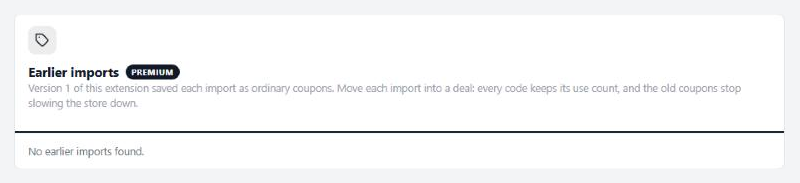
Earlier imports, on a store with nothing to move.

Reminders

Deal sites pay only for vouchers you report as redeemed.

2 settings

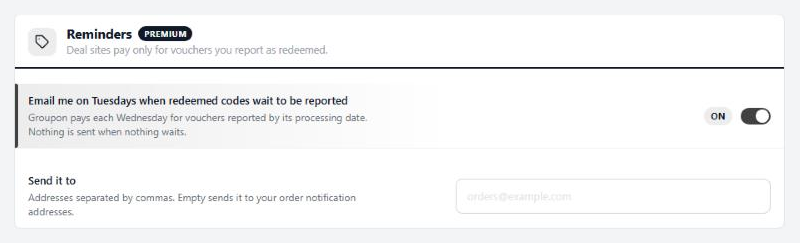
Email me on Tuesdays when redeemed codes wait to be reported

Each Tuesday from 8am, site time, you get one email listing each deal with redeemed codes not yet reported, and a link to report them. Groupon pays each Wednesday for vouchers reported by its processing date. Nothing is sent when nothing waits, and archived deals are left out.

On

Send it to

Addresses separated by commas. Leave it empty to use your order notification addresses from Settings › Email, or the WordPress admin email when those are empty too.
Empty
Reminders, the Tuesday email about unreported codes.

Keep going

Related panels

Offers

The offers each deal’s codes live in.

Order Management

Orders that used a voucher, and the Deal filter.

Email

The order notification addresses the reminder falls back to.

Products

The products a voucher can cover.

Try the PRO features free for 14 days

Anything marked PRO comes with WP EasyCart PRO or Premium. Take the whole thing for a run on your own store before you decide.

Updated on September 29, 2026