
Installation Guide › Steps to Install
System Requirements
What your WordPress site and hosting account need before you install WP EasyCart, and how to check a server in one screen. 4 parts.
Quick links
Where to find it:WP Admin › WP EasyCart › Diagnostics
Before you install
What your site needs
WordPress, PHP and the server settings WP EasyCart relies on.
WordPress
A WordPress site where you can install plugins
WordPress 6.5 or newer. WP EasyCart is a WordPress plugin, so you need a WordPress site where you are an administrator and can install plugins. A self-hosted install from wordpress.org on your own hosting account is the usual setup.
One store per WordPress install. WP EasyCart keeps its products, orders and customers in its own database tables, and those tables are shared by the whole install. On a WordPress Multisite network every site would see the same store, so run each store on its own WordPress install.
Post name permalinks. Product links such as /store/my-widget/ need WordPress permalinks set to anything other than Plain. Post name is what Diagnostics checks for. You set it under Settings › Permalinks, as shown in Installing WordPress.
PHP and server settings
PHP 7.3 or newer, plus the limits and extensions Diagnostics checks
PHP 7.3 or newer. Use the newest PHP version your host offers. WordPress and WP EasyCart both run faster and safer on it.
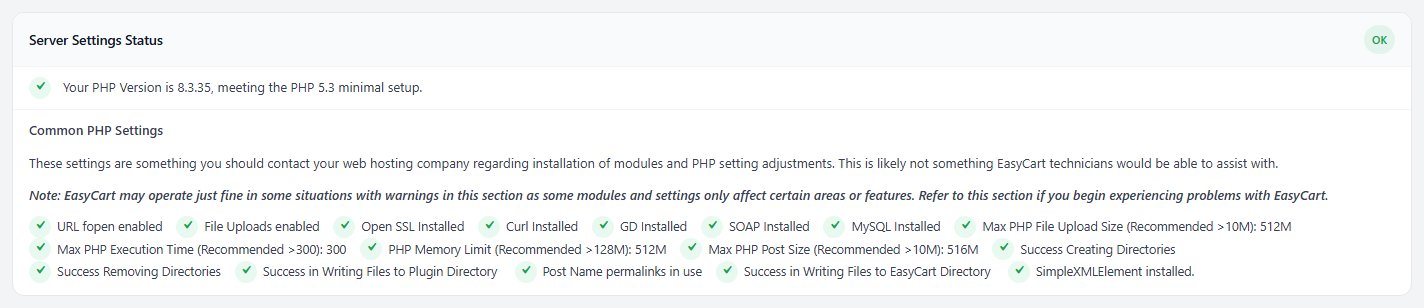
Recommended limits. These are the values Diagnostics looks for:
Max PHP File Upload Size: more than 10M.
Max PHP Post Size: more than 10M.
PHP Memory Limit: more than 128M.
Max PHP Execution Time: more than 300 seconds.
PHP extensions. OpenSSL, cURL, GD and MySQLi, with URL fopen and file uploads turned on. SOAP and SimpleXML are only needed by some live shipping carriers, so a warning about them can wait until you use one.
Writable folders. WP EasyCart creates its own data folder next to the plugin and writes files there, such as customer uploads and download files. Diagnostics tests that it can create, write and remove files in both places.
Your host sets all of these, not WP EasyCart. If one is too low, ask your hosting company to raise it.
💡 Note: These settings belong to your hosting account. Your host can change them in minutes, and most hosts let you pick the PHP version in their control panel.
Your hosting
Hosting and a quick check
Web server, SSL and caching, then how to test a server in one screen.
Hosting, SSL and caching
Linux hosting, a certificate for checkout, and the pages to keep out of the cache
Web server. Linux hosting with Apache, LiteSpeed or nginx is the common setup. On Apache and LiteSpeed, WP EasyCart protects customer uploads and paid downloads with .htaccess files. nginx never reads those, so Diagnostics prints the exact rule to add to your server block instead.
An SSL certificate. Stripe and Square take cards on your own checkout page, so your site must run on https before you can connect them. PayPal works without one. Once https works, WP EasyCart turns on secure checkout by itself.
Page caching. The store, cart and account pages are different for every shopper. WP EasyCart’s Cache compatibility setting is on from the start, and your host or caching plugin should still exclude the store, cart and account pages. Managed hosts such as WP Engine cache at the server, so ask them to add the exclusions. The full list is in Caching and WP EasyCart: What to Exclude and Why.
Not sure where to host? See the hosts we recommend in Installing WordPress.
Check your server with Diagnostics
Install the free plugin and let it test the server for you
The quickest way to check a server is to install the free plugin and open WP EasyCart › Diagnostics. The Server Settings Status card lists your PHP version, every extension and limit above, the folder write tests and the permalink check. Press Show passed checks to see the full list, not just the problems.
A warning there is not always a fault. Some extensions only matter for one feature, and the card says so. Anything marked as a problem is worth sending to your host.
Ready? Go on to Installing the EasyCart Plugin. Questions about a server result? Open a ticket at wpeasycart.com/my-account.
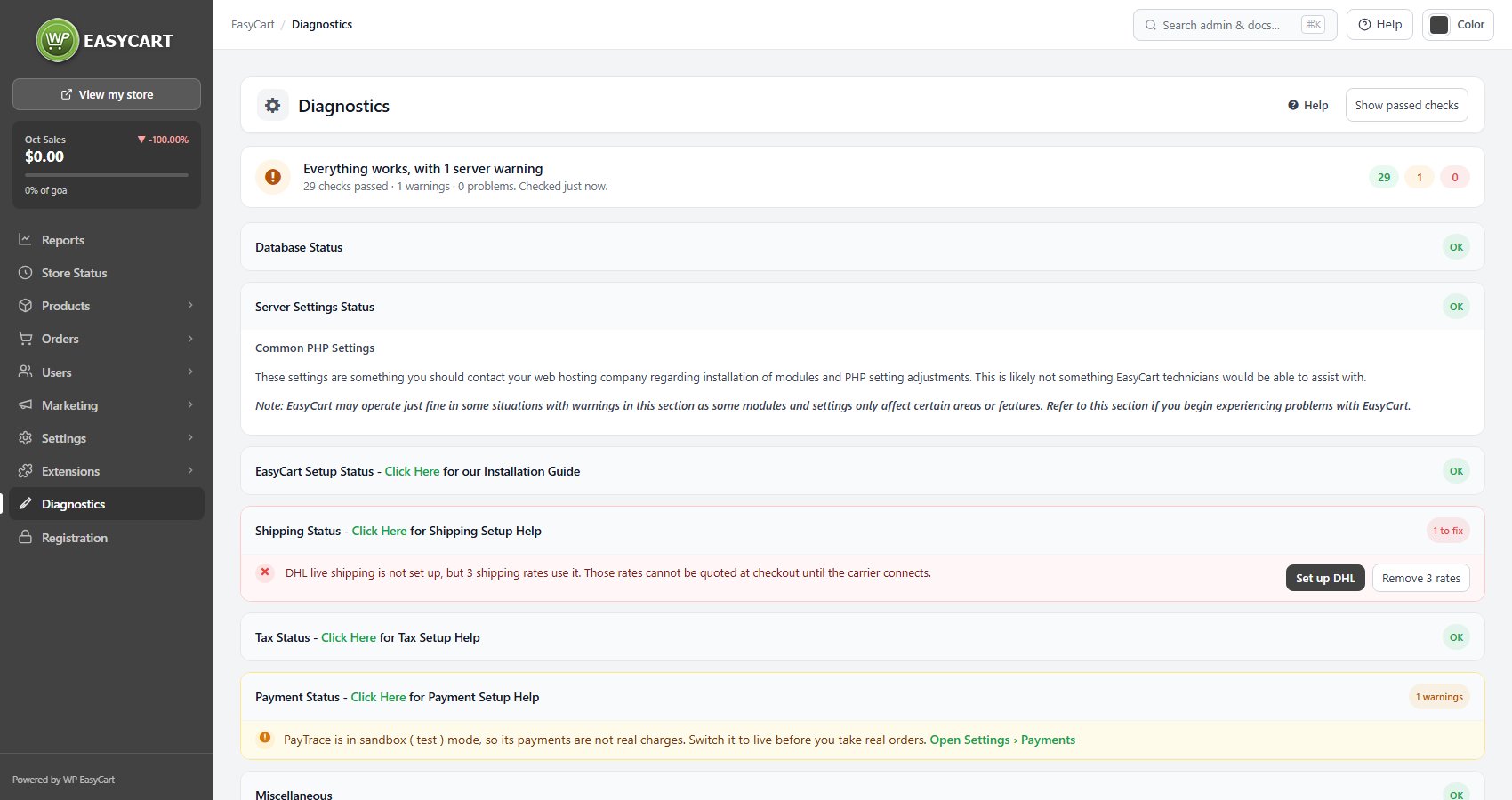
💡 Note: Every check on that screen is explained in Diagnostics.
Keep going
Related panels
Every store and server health check, explained.
The Store, Cart and Account pages and currency.
Stripe, Square and PayPal, and which need https.
Your licence and the four readiness checks.
Ready to run your store on WP EasyCart?
Everything in this guide works with the free plugin. PRO and Premium add subscriptions, memberships, wholesale pricing and more. Try every PRO feature free for 14 days.


