
Method 1. Enter the key on the new site
The quickest way, and the only way when the old site is gone
On the new site, install WP EasyCart and WP EasyCart PRO (see Installing EasyCart PRO), then open EasyCart › Registration.
Under Already have a license key? enter your Full name, Email address and License key, and press Activate license. The card says it plainly: if the key is in use on another site, it moves here automatically.
The license card then shows the new address under Registered URL. The old site loses its paid panels the next time it checks its license, so nothing is needed there.
The full walkthrough is in Registering Your License.

Method 2. Deactivate on the old site first
The tidy way when you are retiring a site
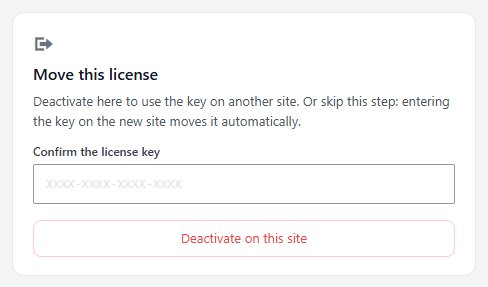
On the old site, open EasyCart › Registration and find Move this license.
Type your key into Confirm the license key and press Deactivate on this site. You are asked to confirm, because the Pro or Premium panels on that site lock until a key is entered again. When it is done, the page says License deactivated. You can use the key on another site now.
Then enter the key on the new site, as in Method 1.
The confirm field must match the key registered to this site. If it does not, the page says No license was found for that key.
Staging and test copies
Up to three development copies run beside your live store
Your license also runs on up to three development copies of your store, and entering the key on one does not move the license. The copy joins the key’s development sites and the page says This copy is now one of your license’s development sites. Your live store keeps its license.
A copy counts as a development site when its address is local ( localhost, a loopback or private network address, or a name ending in .local, .test, .localhost, .ddev.site or .lndo.site ), a hosting company’s staging address ( WP Engine, Kinsta, Pantheon, Flywheel, InstaWP or Cloudways ), or a staging., dev. or test. address of your live store.
Any other address counts as a live site, so entering the key there moves the license. If that happens by mistake, enter the key on the live site again; it moves back the same way.
The Development sites card on Registration lists the live store and its copies. Remove frees a place, from the live store or from any copy, and a copy that has not checked in for 90 days gives up its place by itself. On the copy itself, Remove this development site takes its place in the Move this license spot.
Your live store keeps taking orders either way. Only the Pro or Premium panels and updates depend on the license.

Ready to run your store on WP EasyCart?
Everything in this guide works with the free plugin. PRO and Premium add subscriptions, memberships, wholesale pricing and more. Try every PRO feature free for 14 days.
