
Integration Guide
WP EasyCart × DecoNetwork
DecoNetwork brings powerful product personalization to your WP EasyCart store. T-shirts, mugs, sweatshirts, hats — any product becomes customizable through the DecoNetwork configurator. Set up the connection once, mark products as customizable, and shoppers design as they buy.
Before You Begin
A DecoNetwork account is required to use this integration. If you don’t have one yet, visit deconetwork.com to sign up. You’ll configure settings on both sides — EasyCart and DecoNetwork — to establish the connection.
Step 1 — Configure the EasyCart Side
Set up the DecoNetwork connection in your EasyCart third-party settings panel.
Open the DecoNetwork Settings Panel
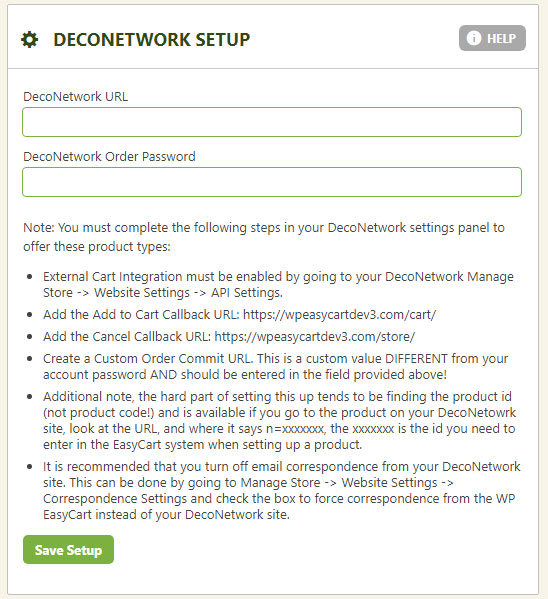
In WordPress, go to EasyCart › Settings › Third Party › DecoNetwork. Enter your DecoNetwork connection details (store URL, API credentials, and any required settings shown in the panel). EasyCart needs these to communicate with the DecoNetwork configurator when shoppers customize products.
EasyCart — DecoNetwork Settings Panel
Step 2 — Mark Products as DecoNetwork Customizable
Flag individual products as DecoNetwork products so the configurator launches at checkout.
Enable DecoNetwork on a Product
Edit any product in EasyCart › Products, then open the DecoNetwork Options tab. Mark the product as a DecoNetwork product and link it to its DecoNetwork configurator entry. Now when a shopper clicks “Customize” on that product, EasyCart sends them to the DecoNetwork configurator — and brings the finalized design back through checkout.
Start Selling Customizable Products
Combine WP EasyCart with DecoNetwork to offer print-on-demand customization at scale — perfect for apparel, gifts, promotional products, and anything else worth personalizing.