
Integration Guide
WP EasyCart × ConvertKit
ConvertKit is an email campaign and automation platform built for creators. Connect it to WP EasyCart and every checkout opt-in flows straight into your ConvertKit forms — ready for broadcasts, sequences, and purchase-based automations.
Watch the Setup Walkthrough
Prefer to watch? This short video walks you through the entire ConvertKit integration setup in just a few minutes.
ConvertKit Setup
We walk you through the quick setup of getting your EasyCart and ConvertKit accounts connected with this simple video.
Before You Begin
An active ConvertKit account is required to use this integration. If you don’t have one yet, sign up at convertkit.com. You can also pair this integration with ConvertKit’s own WordPress plugins or popup tools — EasyCart focuses on the checkout-opt-in flow, but the two approaches combine for a complete solution.
Step 1 — Enable Newsletter Sign-up in EasyCart
Turn on the opt-in checkbox so shoppers can subscribe during checkout and account creation.
Turn on Subscribe to Newsletter
In WordPress, go to EasyCart › Settings › Accounts and toggle “Subscribe to Newsletter” to ON. This adds the opt-in checkbox to the checkout flow and the customer account creation form — every shopper now gets a chance to join your list without leaving the checkout.
Step 2 — Get Your API Credentials
Pull your API Key and Secret from ConvertKit so EasyCart can talk to your account.
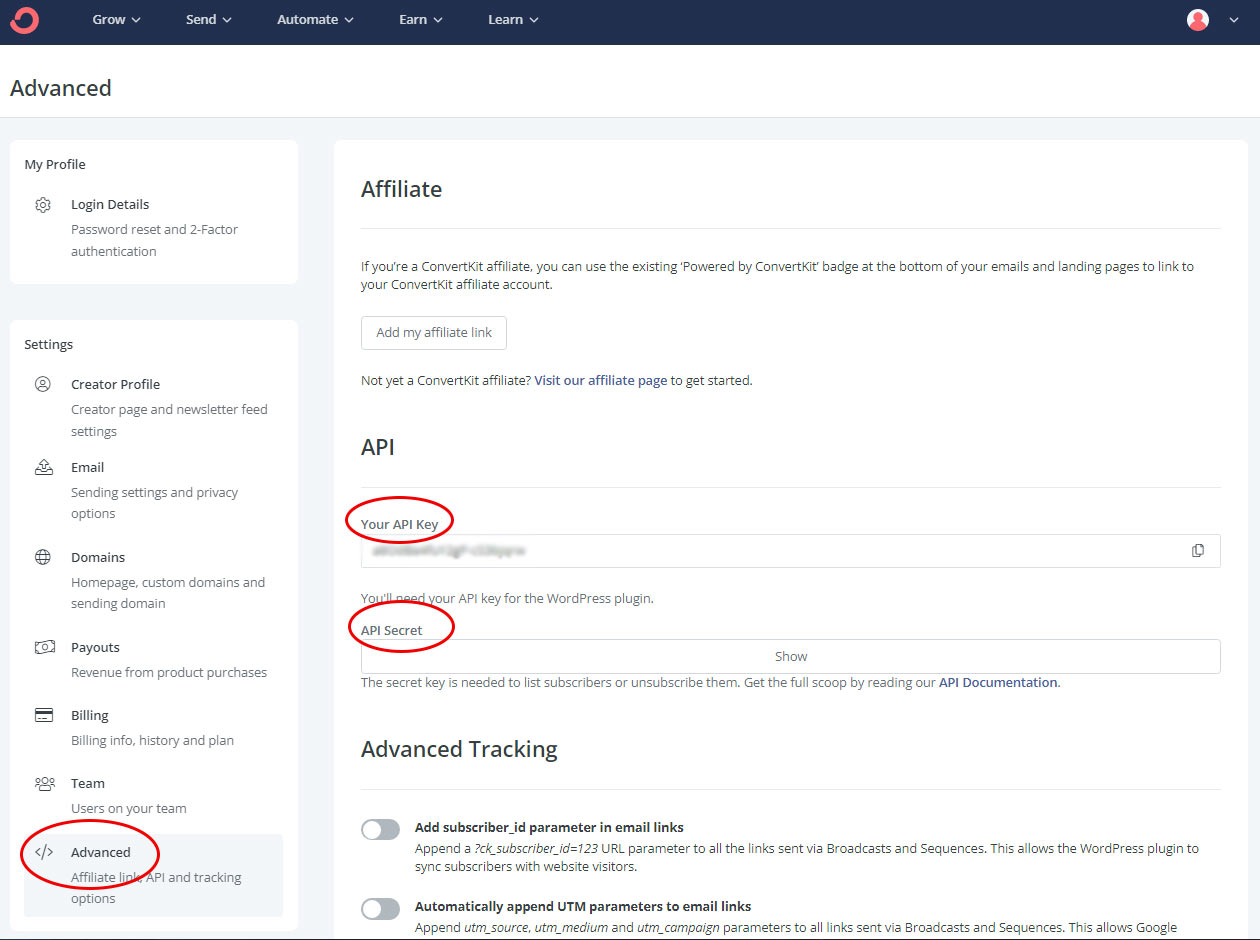
Open the Advanced Settings Panel
Log into your ConvertKit account. In the top-right corner click Settings › Advanced. You’ll see your API Key and API Secret displayed on this page. Copy both — you’ll paste them into EasyCart in the next step.
ConvertKit — Advanced Settings (API Key & Secret)
Step 3 — Connect EasyCart & Select a Form
Paste your credentials and pick the ConvertKit form your new subscribers will join.
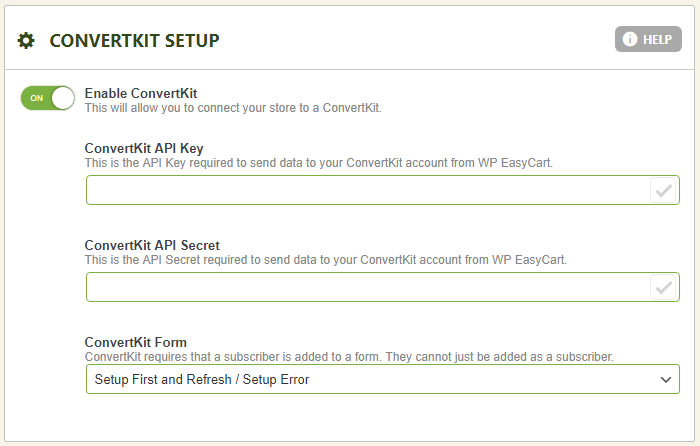
Paste Keys & Choose Your Form
In WordPress, navigate to EasyCart › Settings › Third Party › ConvertKit Setup. Paste in your API Key and API Secret, then save. Refresh the panel and your ConvertKit forms will appear in the dropdown — select the one you’d like new subscribers added to. EasyCart uses its own checkout opt-in, so the form choice is simply the bucket your subscribers land in on the ConvertKit side.
EasyCart — ConvertKit Integration Settings
Going Further
Build Automations Based on What Customers Buy
Once your subscribers are flowing into ConvertKit, you can layer in product-aware automations — trigger a welcome sequence when someone buys a specific product, send upgrade nudges for repeat buyers, or kick off post-purchase education sequences. The automation logic lives on the ConvertKit side, so you have the full power of their sequences and visual automations to work with.
💬 Note: Automations are built and managed inside ConvertKit, not EasyCart. For specifics on building sequences, tags, and visual automations, see the ConvertKit help center.
Start Growing Your Audience with ConvertKit
Combine WP EasyCart with ConvertKit to capture more subscribers at checkout, automate beautiful email sequences, and turn customers into a loyal audience.